A few days ago I installed a red mmWave dimmer in a small bathroom (250 cm width x 120 cm depth x 240 cm tall). The switch is within the room, immediately to the left of the door, and facing the wall opposite the entry, which is 120 cm away. My intent is that when someone walks into the room the lights turn on and off based upon presence so P110 is set to Auto On/Off When Occupied. I initially didn’t set the room size parameters for the mmWave module but noticed the slight door movement (when left open) caused by another door opening in the adjacent room was enough to trigger the switch to turn on, presumably from the reflected readings off the back wall. I therefore tuned the parameters to the size of the room which solved the false positives. However, I noticed the switch no longer reliably turned on when someone entered and seemed delayed in some fashion.
I played around with the room dimension settings, and zeroed in on P106 mmWave Depth Maximum (Far) as the culprit. Whenever this is set to something other than 600 cm a variable delay, most commonly ~2 seconds, uncommonly ~5 seconds, and up to ~30 seconds, is introduced. I’ve reset the mmWave module twice and performed a factory reset on the switch once and continue to get this behavior. My switch reports its firmware as 2.2.0, which I am assuming is actually 2.02. I eventually solved the problem by wiggling the door back and forth while generating the interference area, which doesn’t seem to carry the same performance penalty.
Is this a potential firmware bug? Anyone else notice this behavior?
Did not know about the magic 600 value but the variable delay (on firmware 2.4) is so annoying! Also seeing random motion triggering on some but not all switches. Overall experience with mmWave Reds has been a bit disappointing, so I sure hope you’ve discovered a bug.
The mmWave module has required more setup than I would have guessed. As others have mentioned, the signal passes through walls so movement can be triggered by something in a different room. For that reason you want to set the boundaries of your detection area appropriately for each room. Reflections are also a consideration and the tuning recommendations from Inovelli are described well in this article.
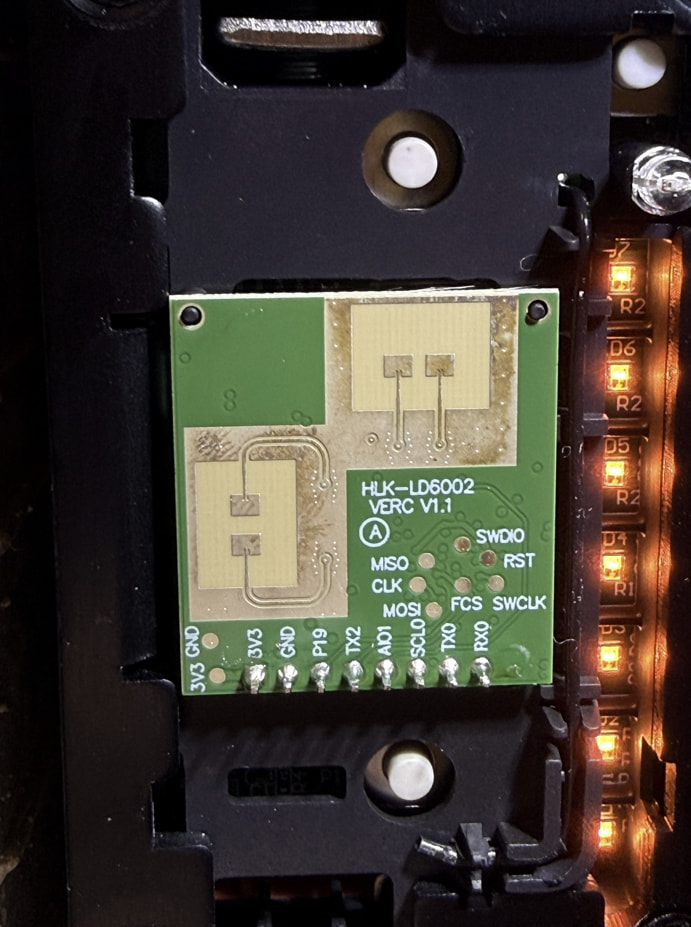
I’ve played around with the depth setting more and there continues to be a significant delay at a setting of 120 cm or lower. This manifests as me being able to enter the room and stand in front of the sensor without the lights turning on. Given enough time the lights will turn on, but sometime it seems as if I need to make a second large motion. I was getting a fantastically quick response with a setting of 130 cm though, almost like that setting held some special relationship with the way the radar functions. I took the cover off to check if there was any debris on the sensor and noticed it had fingerprints on it. This was not from me as the switch, while received second-hand, was new-in-box. Thus, I assume this was done at time of assembly. Picture below:
I took the module off and the corrosion partially cleaned up with isopropyl alcohol on a Q-tip but this hasn’t affected the delay at low distance settings. The blue mmWave sensor I have does not have this level of corrosion, and I don’t know if the presence this discoloration affects the functioning of the module.
Due to the complex nature of mmWave radar it’s not clear to me if this is expected behavior with mmWave sensors, indicates a faulty module, or suggests a communications delay in the firmware between the Z-wave chip and the module. While the model on the silkscreen is given as HLK-LD6002 the documentation on the Hi-Link site suggests this is the ‘B’ model and there is nothing in their documentation to suggest their technology is expected to have such behavior.
@EricM_Inovelli, has anyone else experienced behavior such as this? If not, I’m happy ordering a replacement module from Alibaba if the correct replacement is the HLK-LD6002B to test for a module issue.
Interesting, so the delay is different based on what the maximum depth is set to? I think I spoke to another user that mentioned something similar. Most of mine are sub 600 depth, but I don’t think anything is as low as 120.
I’ll open a request with the engineer team to see if they know what could be happening.
Correct. While there seems to be minor variation in detection based upon the lights turning on (I may be mistaken in this, if present the variation is small), I don’t notice a meaningful delay unless the maximum depth is set around 120 cm or lower. In some cases, I am able to jump into the room and stand squarely in front of the mmWave sensor without anything happening until I make additional movement.
It does seem like the mmWave sensing functionality has some level of quirks, as I have also been able to slowly sneak a yard stick in front of these until the switch is fully covered, then enter the room without any lights turning on. It’s not clear to me if this is something related to the mmWave module itself, the main switch processor’s processing of the communication from the module, or something else.
@EricM_Inovelli unfortunately the problem still persists with the new firmware. The problem is intermittent, as most of the time at the low depth setting the delay is ~500 ms but intermittently 4–5 seconds.
Ok, thanks for the info. I don’t believe this is an issue with a specific device, because another user we tested replacing the switch and it the results didn’t change. There is something specific about having x,y,z programmed to a smaller window that can cause a delayed response. When you come into the room are you on the left or the right of the switch? Could you do a simple sketch to show the room orientation and x,y,z settings?