This is a pre-sales question (and certainly a FAQ), I asked about Inovelli on Reddit and this forum was recommended. I’d planned to try the Inovelli White Fan Control on some vintage Casablanca Mission fans, but don’t think I can live with my 6 speeds going to 3 (or 5 going to 2 since we never use 6/High). I am now wanting to try one on a newer Casablanca Caneel Bay in the bedroom (which has a 4 speed AC motor), I’m hoping the White’s Low and Med fan speeds will work for us. The goal is for light and fan to be controlled by our existing Apple Home – and keep our quiet fan – but a bonus would be to get rid of the controller’s ‘feedback beeps’ (which I assume come from the existing canopy module). For reference there is 14/3 running from the wall switch to the fan, though at the moment it’s using 2 wire to always be hot. Also (besides HomeKit) I have HA and HK Bridge (mostly for zwave), but currently connect my Thread devices directly to Home.
My questions: It seems I could use just a White Smart Fan Switch connected with all three wires, and remove the existing canopy module. This would give us HomeKit control, and I’d keep wall control, but would I get full fan and light control in Home (I read the ‘Apple Limitations’ about the switch)? Or, I could use just the Canopy module, leaving the 2 wire / always on power, would that give me all the same functionality (sans wall control)? Of course the product quiz recommends both, which I don’t mind buying if I need them for full feature, but don’t understand what each piece brings to the table. Since all three options remove the existing canopy module, my hope is that the beep goes with it, but … does the White Canopy also bring a beep? What best meets my goal/need?
The Inovelli canopy module will give you the capability of control through HomeKit, and it needs constant power supplied to it.
If you want wall control as well, you need a smart switch that can talk to HomeKit. It doesn’t have to be an Inovelli switch, but the Inovelli switches have an extra button you can use in addition to the basic paddle, giving you a separate control method for the fan.
The switch you choose should be installed at that location without a load attached and connected to HomeKit. You would then use automations to then control the fan or light through HomeKit based on the inputs of the switch you decide on.
Doing this, though, the fan control is completely dependent on HomeKit, so if that were offline for whatever reason, you would have no control over the lights or fan.
If you were able to bind the switch and canopy module together, like through Home Assistant, it opens up some extra options. I think this would require having a separate thread border router connected to HA, but I am not 100% sure on that as I don’t mess with thread all that much, and also don’t use HomeKit.
For that setup, I would suggest the Inovelli switch as it is designed with the canopy module in mind. Binding the switch to the module allows the switch to talk directly to the canopy module without needing HA or HK as the middleman, and on top of that, you would have direct dimming control of the lights where you might not if needing to pass the controls through HomeKit.
EDIT: If you can install 2 switches at that location, one for the fan and one for the light, then you can get rid of the canopy module altogether, including the current one.
No, sorry, I did leave that part out. The ‘wall switch’ that came with this fan is actually an RF remote that talks to the canopy module (I didn’t realize this until I opened it and saw it has a battery). So it’s like a ‘remote only’ fan, but it’s dressed up in a nice looking and feeling wall switch.
Also, no, this device is not controlled by Home or Home Assistant, that’s why I want the Inovelli. However, I do have some Zooz dual switches (ZEN30) that control the light and fan in a single unit (though the fan is just on/off) — both HA and HomeKit see these as two separate devices. For this fan though, I want full control of light and fan.
Not familiar with the ZEN30… is the fan portion an actual toggle switch, or just a push button?
If just a button, you could use the input as a trigger to change fan speeds through the Inovelli canopy module.
You don’t want any load attached to the switch, as you will only be using it as scene controller.
EDIT: If you want the light portion of the switch to control the light so you can get smooth dimming, you can just use the fan portion of the Inovelli canopy module, especially as you have multiple wires going up to the fan.
Ok, good information, thank you. If I understand, the canopy module is controlling the fan/light, and being controlled by HomeKit; the wall switch is also connected to HomeKit, and controls the fan with automations and scenes (making it sound like a scene controller?)
The Inovelli wall switch can also be ‘bound’ to the canopy module allowing it, and HomeKit to control the canopy / fan & light. I could actually make room for two wall switches, and you’re saying that would allow wall switch only control (using the 3 wire connection I assume), like I described above, but two physical units. It sounds like the switch & canopy makes more sense than the double switches, since I’d have to take out the old canopy module anyway — unless the double wall switch gave me more fan speeds? Where does the 3 speed fan limit come from?
The fan speeds will be controlled by the specific switch or canopy module you use. The fan speeds are based on a combination of different capacitors, being used in parallel or in series, to control the motor. Each different switch will have its own capacitors that it will use.
So, if you fan currently has 6 speeds, that is because of that specific canopy module.
The Inovelli canopy module and Fan switches both only have the capacitors for 3 speeds.
With what you have, you can use the ZooZ either completely as a scene controller, or use it to power the lights directly, and using the fan button to cycle through the speeds via HomeKit. You can do similar with an Inovelli dimmer, powering the lights directly and using the favorites/config button to cycle the fan speeds. This gives the greatest light control without needing to bind the switch and canopy module, allowing you to control the lights directly from the switch no matter the state of the rest of your smart home setup… it will just work.
So, the only functional benefit to getting a single Inovelli switch would be the ability to bind it to the canopy module, but that might require a second thread border router connected to HA… as I don’t think you can bind Matter over Thread devices through HomeKit. Or you can get both a Fan switch and Dimmer and get rid of the canopy module altogether, no binding needed.
Wow, that’s a lot of info. So I’m not quite understanding the Zoos relay button as a speed controller, but let’s leave that out of this solution, it works fine with my less demanding fans. I think I need to decide how important, and how much control I need in a wall switch, it’s inconvenience led to looking for this ‘smart’ solution (though I would have gotten to it eventually), also whether I can give up a second gang location. I do think I understand why the bot quiz, recommends both the switch and canopy, as that’s what I’m leaning toward. Thanks again for your explanations.
Basically, you can set the fan output on the ZooZ to “smart bulb/remote” (or more accurately “smart fan”) mode and use the button as a “smart” button to control an automation to set the fan speed on the Inovelli canopy module. You can still hook up both switch legs to the switch as well, as connecting the canopy module to the fan load will allow you to more easily to power cycle the canopy module if needed by turning off the internal relay, while the output is always on due to the mode change.
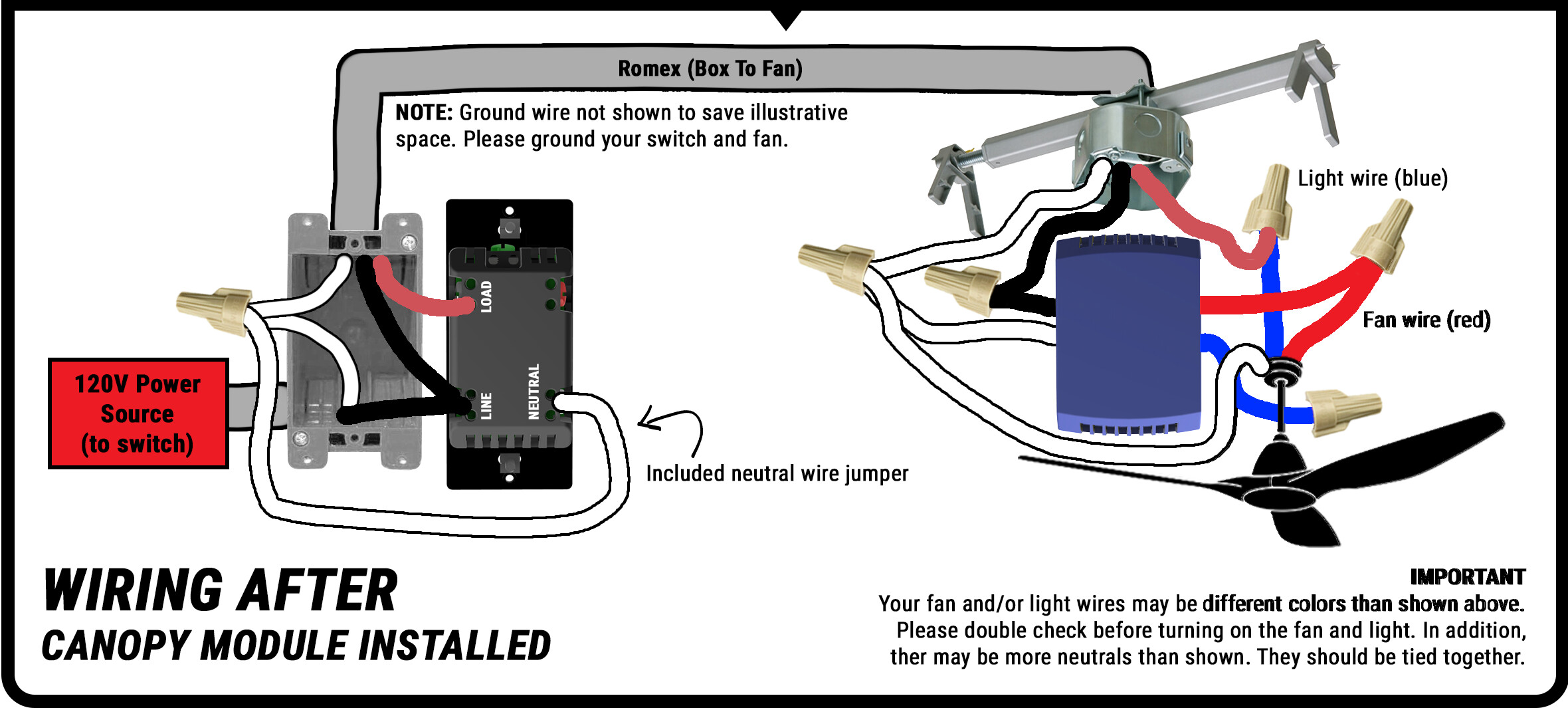
This is almost exactly what you’d have to do with an Inovelli dimmer, but the fan switch leg would connect directly to the line to supply constant power as there would only be one output on the switch, which you would use to control the light.
Modified diagram to show connection with separate switch legs for Inovelli Dimmer. ZooZ will have 2 separate Loads available.
If you use this method, the canopy will get wired to the fan switch leg and shared neutral, while the fan gets connected to the fan output on the canopy module and shared neutral. The light would bypass the canopy module and connect directly to the light switch leg and shared neutral. Doing it this way allows you to utilize the dimmer without issue if you can’t bind the switch and canopy module together, while still giving you full control of at least the light even if HA or HK is offline. Even if you CAN bind them together, you would only need to bind the fan portion and not the light/dimmer portion.
Two separate switches is the cleaner solution if you have or can make the room, with only a minor cost increase vs an Inovelli Canopy Module and Inovelli Dimmer. This also doesn’t require any additional automations controlled by HA or HK, while still allowing control through them. The ZooZ switch is “almost” this without the speed control.
In this instance, if only using a single switch and don’t NEED to utilize binding, and the switch doesn’t matter as much in regards to what functionality you will have, the deciding factor for me would be aesthetics. If the ZooZ matches what you’re already using, use that. If you like the look of the Inovelli switches more, and prefer that switch, get an Inovelli switch. But with both of these options, you need the Canopy Module to make the fan portion “smart”.
You have given me lots of great ideas and options! I do have a plan at this point, based on your Zen30 solution, but I should make sure you understand my architecture first as it may not be as trivial as you make it sound (at least for me). First, Apple Home is my front end and Thread controller (I haven’t yet spun up Thread on HA), in my case the Canopy module would be provisioned by Home, as would the White wall switch if I choose that. My Zwave environment is hosted under HA and the ZWA-2 controller, then exposed to Home via the HK Bridge. I currently do not have any Zwave devices triggering scenes created in Home, nor am I using any HA scenes, and though I’ve been trying to get the Zwave switch ‘double tap’ scene trigger exposed, I’ve so far been unsuccessful.
Given all you explained, I’ve decided to focus on getting the fan/light into Home using the Canopy module, and then work on a wall switch solution that meets our needs. Though the ZEN30 works fine on three of our other fans, and your idea of using the button to cycle through the speeds, is interesting, if I’m getting creative, why not use something like the ZEN32 switch w/ 4 scene controller, where presumably I could make the 4 buttons fan up/down, light up/down (Inovelli’s is similar). My point being, the Canopy module solves the primary problem, and both ZENs present a problem I’ve yet to solve (a single white wall switch would probably be the easiest).
So while I have a project to add Thread and devices to HA, and another to expose Zwave scene triggers to Home, I’m not there yet, and these projects compete with others. Maybe your ‘smart button’ idea wouldn’t become another problem to solve, but until I see it work, I expect it to be — I could actually test it with one of my installed Zen30s. So, I’ll be ordering a Canopy soon, and continue with control ideas in the mean time. Thanks again for your help and ideas.
As far as the ZEN32 goes, if you don’t need or want smooth dimming (holding a button to raise or lower brightness and it stopping when you release the button), then it will work just fine. For light up/down, you would most likely be going between preset levels… 0, 10%, 20%, etc., while if you use an actual dimmer switch, you can more precisely set it to the level you want at that time, and so long as the dimmer is smart and can be controlled by HK, then that can be used in place of that functionality in the canopy module.
If you’re having trouble exposing ZWave scene triggers, use HA to create virtual switches activated by those same ZWave scene triggers via automation. Example:
Single Press:
In HA - If ZEN30 single press, turn on Virtual Switch 1 for 2 second.
In HK - If Virtual Switch 1 turned on, set fan speed to 33%
Double Press:
In HA - If ZEN30 double press, turn on Virtual Switch 2 for 2 second.
In HK - If Virtual Switch 2 turned on, set fan speed to 66%
ETC:
If HKB doesn’t work that way allowing you to expose virtual “helper” switches to HK, I have had decent luck with Matter Hub (LINK)
This allows me to connect all my devices to HA only, and then share them with my Echo for voice control and allows Alexa act upon those virtual switches to trigger HA automations.
Helpers are the method I’ve been working with, but I only spent an evening or so, and don’t even remember if I triggered one yet. I also need to check my bridge entities to see what needs to be included, so while no success, I can’t call it a failure yet either. Busy summer, too many projects.