@Kaleb_Inovelli – can you please provide an update and a realistic ETA on the new firmware?
We were originally told it was a Q1 2025 thing. Then it became a Q2 thing, then “any day now” in summer. It’s now October. Can you get more information than “any day now?”
Frankly, I still need some serious QOL improvements that go beyond Matter 1.4 upgrades and am hoping that this long delay indicates more than just that in this firmware. If not, I am looking for the next release after this one that will solve some of my real issues.
I just triple-checked the wiring on my first switch and have verified that everything is snug and tested the live and load wires with a non-contact tester. It’s still intermittently resetting and flashing the colors when powering off. I also swapped out the ancient GE LED bulb in the fixture with an incandescent, and same result.
For the second switch, I removed it from Apple Home and Home Assistant, air gapped and did a factory reset and air gapped again. The paddles and LED freeze even when not added to any hub. Interesting to note, you can’t factory reset once it freezes up. You have to pull the airgap and push it back in, then you can factory reset.
An odd update: my second switch with the paddles not responding has… started responding on its own. Late last night my roommate returned home, went to the bathroom, turned on the light (which turned on the fan thanks to automation). When he exited, he turned off the light and the fan with the switch. The fan should have stayed on for 30 minutes. I checked again this morning, and the switch paddles are behaving normally. The LED bar is still stuck, though. The other switch that does the power reset is still misbehaving.
I just installed a dozen white series switches and dimmers. The installation went well and they worked as expected. However, when paired with Homekit, not so much. When I look at the tile for the switch in Home, there are two switches there. One for the regular switch and one that has a color wheel below it (presumably for a smart switch). When I turn the switch on and off it says “2 of 2 switches on (or off).” I used the Home settings to display them as separate tiles and set the colorwheel switch to not show in my Home page or Favorites. But it also showed tiles for all of the multiclick profiles. I had to go through and remove all of those from Home and Favorites. This worked, until I went to create automations when Home once again displayed two virtual switches for each physical switch. Is there a simple way to get rid of the virtual switch and multitap virtual switches if I’m not going to use them? I tried turning off Smart Bulb mode and I still see its virtual switches in Homekit. It would be nice if you turned off Smart Bulb and turned off Multitap before you pair with Homekit, that you only see the one tile for the one switch. I hope this makes sense.
@Kaleb_Inovelli@EricM_Inovelli – Haven’t gotten a response on this thread and the prior questions within for many weeks. Can you pull the curtain back a little bit for me on what’s going on? Thank you!
The only way that I know of is to pair the switches with Home Assistant (HA) (not direct with Homekit) and then push just the switch portion of the VTM31 into Homekit with the the HA “Homekit Bridge”. This also means for Dimmer Switches that I am using as “On/Off” switches I can display a switch in Homekit rather than a dimmer.
I’ve done that with all of my switches and it works just fine. There is a fairly steep leaning curve with HA but I really like it now I have learnt it. Cost of hardware < $200. Software cost $0!
Home Assistant 2025.11.0 was just released. It adds back entity naming for all of the White Switches. I would like to give a shout out to @jvm33 who wrote the new code for HA. He had to go through multiple cycles to get a solution that the “powers that be” over there would buy into but he stuck with it and everything now lines up extremely nicely. Thanks again!
Sure…. in previous HA releases the labeling for items like On Level (Load) was lost and multiple entities just showed as “Load” in HA. I believe this was due to how Matter describes these entities. @jvm33 could provide more info on this I’m sure.
In releases previous to HA 2025.11.0, you had to drill down into the entity description to find out what the entity actually did. This issue did not effect switch operation, it just made it harder to program in HA.
In this HA release the labeling for those entities is restored. Again, thanks to @jvm33 for putting the effort into this to make it work.
Overall I’m loving the switches. Just two things I’d like to see added:
Option to tell whether the aux or main switch was pressed. This would allow the aux switch to control a different light than the main switch (with matter bindings or HA automations). I have some poorly located 3-way switches that would really benefit from this.
Matter bindings should still work when “local protection” is enabled. Right now it’s impossible to make the paddle control a matter binding without also controlling the local load output. Smart bulb mode fixes this but prevents using the local load control via other automations or bindings.
Both of these are getting toward one goal really: I should be able to map any light in my house to any switch and finally escape the tyranny of poorly laid out switch placement
Local protection mode disables the switches ability to control the load using the paddles (all changes to the load must come from the controller). Matter binding only binds changes to the load that are initiated by the paddles. They work against each other by design.
Binding is syncing two endpoints together. What you’re looking for is customizable automation without a controller. It would be a wonderful feature, but there’s very little chance we’ll see this in matter. Instead you’ll need to utilize Home Assistant, homekit, etc. to automate.
Option to tell whether the aux or main switch was pressed. This would allow the aux switch to control a different light than the main switch (with matter bindings or HA automations). I have some poorly located 3-way switches that would really benefit from this.
Aux switches are meant to function exactly as traditional 3 ways-, by controlling the exact same load. No more, no less.
If you want something else & you’re using HA or something else that lets you, I’d recommend replacing the 3 ways (either physically or just mentally) with Lutron Picos.
That’s what I did. Dimming isn’t as smooth, but it still works, and I can make different switches do different things based on different conditions.
Yeah, uh, no. Aux switches have the capability to send their own unique scene commands, at least for the blue and red. So requesting the ability to determine the source is a logical request.
So a dimmer and an off switch can send separate scene commands, which seems to be what you’re explaining as your reason for using Pico’s.
I’m not on the latest Beta firmware(s), but from what I’ve seen in the thread, it looks like a few new functions were added for configuration through HA, but “Relay Click” was lost.
Is there any chance of getting Relay Click back, as well as some other new ones (such as min/max dim levels)?
Ideally, I’d love to do everything from HA that I can do at the Paddle, but min/max at the paddle is especially time consuming.
Aux switches have the capability to send their own unique scene commands.
Then it sounds like the request has been satisfied already.
I assumed, by virtue of someone asking for the ability to send separate scene commands from the auxiliary switches that they lacked that ability.
It’s not possible for them to both be capable of sending completely unique commands and be indistinguishable from other hardware.
which seems to be what you’re explaining as your reason for using Pico’s.
Well, no. That’s my reason for suggesting Picos in this context, because that’s the context of this conversation.
My reason for using Picos is that auxiliary switches are hardwired and only work with a smart switch in the lead.
If the smart switch ever physically failed, there’d be no way to control that circuit until it was fixed/replaced.
If the smart switch were ever replaced with a dumb switch or a smart switch that doesn’t play nice with those auxiliary switches, the changeover would mean replacing 2 switches instead of just the one.
So it made logical sense to me to maintain the existing dumb toggle 3+ way switches with covers on them and add wireless wall-mounted Picos for day-to-day control.
This also allows me to be able to put them everywhere I want them using only a couple of drywall screws without having to worry about where wires actually are and running new ones. In some cases, they’re positioned adjacent to the existing dumb toggles & in some cases, they’re nowhere close.
I agree, it would be really helpful if min/max brightness could be set from the controller. Currently, there isn’t a way to set min/max brightness on the VTM36 (fan/light module).
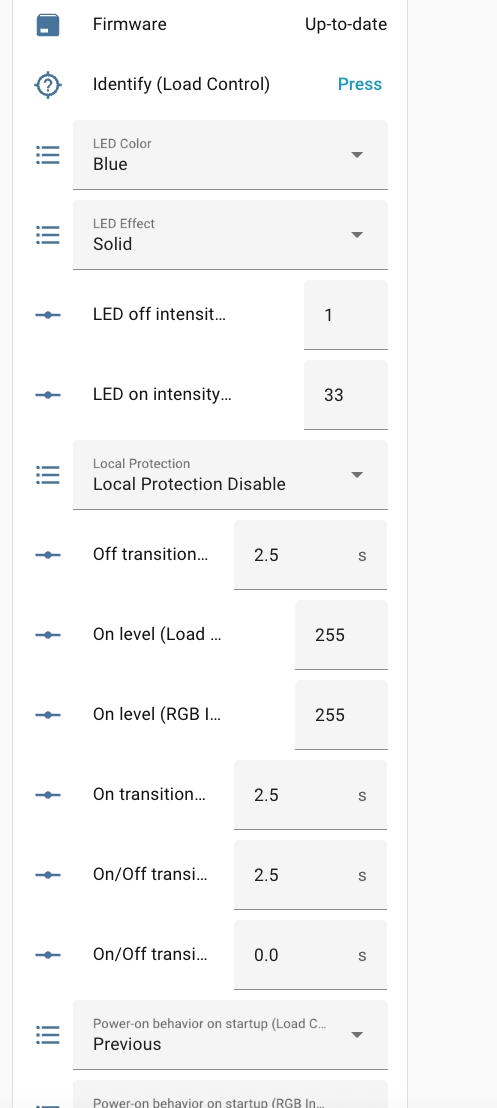
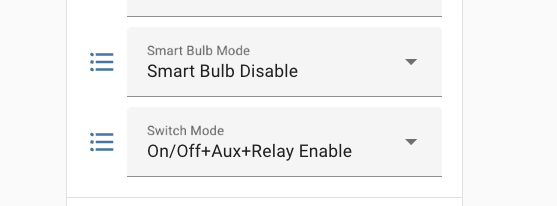
This appears to be a “bug” in 1.1.1. To get the click back, temporarily program the switch as “On/Off + Dumb” in HA. Switch it a few times and then program it back as you need it. The click will return and stay.
That option still exists, it’s just combined with other options now. “Relay Enable” signifies that the Relay will “click’ when the switch is toggled on On/Off mode.