Please reach out via PM if you are interested in testing
General Updates
Include EP20 in the Descriptor Parts List of EP1
V1.0.1r4 (beta) - Aug 14, 2026
Please reach out via PM if you are interested in testing
General Updates
Optimized the response speed of the smart switch buttons.
Added support for group binding.
Fixed an issue where the binding table could be accidentally lost.
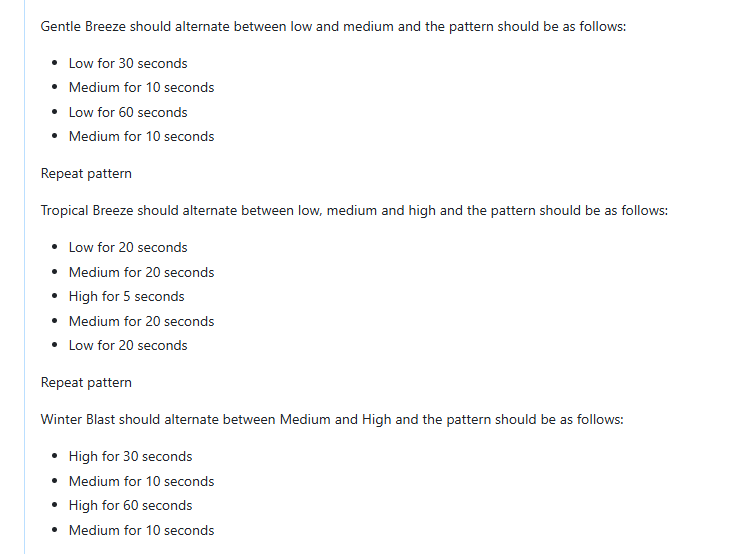
Updated the labels for Breeze Mode selections.
Updated Quick Start times from fractional seconds (e.g., 1/60s) to whole seconds (1s, 2s, etc.).
V1.0.1r3 (beta) - Jun 25, 2026
Please reach out via PM if you are interested in testing
General Updates
Added two new options, ‘2’ and ‘4’, to the Mode Select LED Intensity.
Stability and reliability improvements
Fixed color distortion for some colors at low brightness adding 2 and 4 to the intensity selections for on and off LED bar level
Disabled the long-press of Up/Down buttons to adjust fan speed in Exhaust mode
Fixed an issue where the LED bar did not restore to its previous state after a restart
Fixed a device crash caused during the binding process
V1.0.1r2 (beta) - Jun 8, 2026
General Updates
Add Thread Diagnostic Cluster on EP0.
Add TagList attribute to the Descriptor Cluster from EP3 to EP5.
Modify the IdentifyType attribute value of the Identify Cluster from EP2 to EP6 to 0.
Add endpoint 26 to the PartsList attribute of the Descriptor Cluster on EP1.
Fix an issue where Breeze Mode was not functioning properly.
V1.0.1r1 (beta) - Jun 3, 2026
General Updates
Added a combo button action to configure the power type:
Neutral Mode: Hold the Up button and tap the Config button 11 times → LED turns Yellow
Non-Neutral Mode: Hold the Down button and tap the Config button 11 times → LED turns Green
Removed the combo button configuration options for:
Aux switch mode (Hold Up + Config 5x)
Single-pole mode (Hold Up + Config 6x)
Endpoint & Cluster Changes
Removed the Mode Selection cluster from endpoints EP1–EP9.
Removed the private cluster from EP1.
Added endpoints EP20–EP29 with the device type set to Mode Select. These endpoints include:
Descriptor Cluster
Mode Select Cluster
Firmware Updates
Upgraded the protocol stack to Matter 1.5.0.
Automatic neutral detection is no longer supported. The default configuration is Neutral Mode.
To manually change the power type:
Hold Up + press Config 11 times → Set to Neutral Mode
Hold Down + press Config 11 times → Set to Non-Neutral Mode
High-speed mode is not supported in non-neutral installations. If the switch is configured for Neutral Mode with high-speed mode enabled in a non-neutral setup, the switch may repeatedly reset. If this occurs four consecutive times, the switch will automatically change its power type setting to Non-Neutral Mode.
Will this address the no response issues in Homekit? My dimmer switches have been rock solid after the latest update but the few fan switches I have need air gap resets every few weeks on a random basis.
Yes, it will likely improve network reliability. It is running off of Matter 1.5 (newest released version) which includes many, many, under-the-hood improvements.
I’m loathe to sound an alarm here but I’ve been getting repeat VTM35 lockups when trying to set them up as a binding sender. I’m using HA to do this. I have VTM31->VTM36 for lights, and VTM35->VTM36 for the fan control.
When the binding data is being sent to the VTM35, it fails to respond, times out, and drops off the thread network. Local paddle control stops working. I have to airgap reset the switch. When it comes back up, the binding attribute wasn’t saved.
I don’t know if I’m doing something wrong but I can bind/unbind the VTM31->VTM36 reliably, over and over. But VTM35->VTM36 hard locks each time. I am using beta VTM36 firmware.
(The VTM35 and VTM36 have been factory reset and re-paired several times. The VTM35 is running 1.0.1r2 from test-net)
I tried the same with VTM35 1.0.1r2 and VTM36 1.0.1r1. Same result. ACL is added to the VTM36 however the VTM35 crashes (paddle unresponsive) and no binding is added. Fortunately the new matter server allows you to remove “stray” ACLs.
We have a new beta firmware 1.0.1r3 that I posted the notes to up above. It should fix the binding bug and has some other improvements. I’ve put it up on our file server if anyone wants to manually install it. I’ll also put it in testnet sometime next week:
I tried binding the VTM35 (EP2) to the “fan side” (EP2) of a VTM36 and (in a very quick test) it worked just fine. In a real application you would still need an automation to handle control of the fan canopy from HA and sync it to the switch however the VTM35 button paddle action works just fine with the binding.
They will be renamed before going into production. For quick start:
To adjust the time between when you press the paddle and the fan receives full power. In other words, if you have the fan set to low, the switch output will not be 100%. Some fans require full output to get the motor started. We recommend not changing this unless you experience issues with your fan not turning on.
I’ll check with the engineer on this one to because the values are 1/60 2/60 etc. I think those are in seconds and shouldn’t have the /60 but I need to make sure.
I just put 1.0.1r5 in testnet which has just a small change regarding the Matter “parts list”. This is likely the version that we will push out to production in the next couple of weeks.