White Series On/Off Firmware Changelog | VTM30-SN

V1.0.4r3 (beta) - March 10, 2026

  • Fixed an issue where the device did not go to the specified color after reboot
  • Fixed a situation where LED intensity (On) could not be set to 0
  • Added “off” to the LED effect

V1.0.4r2 (beta) - February 13, 2026

  • Remove EP30
  • Rename the “Mode Select” option “Dimming Speed” to “Dimming Speed (Simulated)”
  • Modify the relevant content of PartsList

V1.0.4 (beta) - January 30, 2026

Note: The mode select clusters were moved to their own endpoints (20-27) to better conform to the standards. This (temporarily) creates duplicate select devices. Restart Home Assistant and the “old” copies will show up as Not Provided devices (greyed out, dead) entities. Go to entity tabs and filer on Domain = Select, Integration = Matter, Status = Not Provided and you should be able to bulk-select and delete those.

  • Removed EP1 Level Control Cluster attribute OnOffTransitionTime.
  • Set the following EP6 attributes to persistent storage:
    • On/Off Cluster: On/Off, StartUpOnOff
    • Level Control Cluster: CurrentLevel, OnLevel, StartUpCurrentLevel
    • Color Control Cluster: CurrentHue, CurrentSaturation, CurrentX, CurrentY, ColorTemperatureMireds, ColorMode, StartUpColorTemperatureMireds
  • Removed the Mode Select Cluster from EP1–EP6.
  • Fixed an issue where binding could cause the device to freeze (note: when using binding, do not allow the switch to join more than three hubs).

V1.0.3 (beta) - November 7, 2025

  • Further optimization for various loads.
  • Fixed Phantom Power Usage

V1.0.2 (beta) - October 31, 2025

  • Further optimization for various loads.

V1.0.1 (beta) - October 17, 2025

  • The timing of the relay activation has been optimized to reduce the interference caused when using Fan-type loads.

Is this firmware available for testing? I’d like to confirm if the fan fix helps my situation.

Yep, we are still working with our team to get it certified, but I will PM you with the instructions to get it before that.

1 Like

Initial tests seem positive. I’ll try a few more times over the next day or two to reproduce the issue, and check back in.

1 Like

on the 1.0.0 firmware the switch was going into a state where the physical switch no longer responded, but the software commands worked. I could readily reproduce it in its current location. on 1.0.3 that has not re-occurred at all.

3 Likes

That is great to hear. Thank you for letting us know.

I’m having quite a bit of flickering on my Inovelli switches (some of them keep rebooting every couple minutes). Wondering if I can give the newer firmware a try to see if this resolves the issue?

Sure, I’ll PM you.

Hm, the newer firmware now makes the one switch constantly in a reboot state, even after a factory reset, instead of just intermittently. Not sure if it’s related to the firmware or not though.

I believe another user reported something similar but the wall plate was pressing down on the config button or the air gap (or something like that). The timing was just coincidental. Can you remove the wall plate and make sure everything is good there? Also, might want to press on the airgap to make sure it isn’t loose or causing issues.

1 Like

I have two of these switches and both of them the physical buttons stop working after air gap and factory resets and without being connected via Thread/Home Assistant. I can power them on and turn my fan on and off then back on and it will lock the physical button from working again. Can I get access to the firmware to see if that fixes my problem?

I’ve been running 1.0.3 for almost 2 weeks on 11x ON/OFF switches, two of which are bathroom fans on timer mode, no crashes or healing issues or noticed disconnects

I’ve also just installed 1.1.2 on 15 dimmer switches, and after cleaning up stagnant Home Assistant parameters, I have to say the interface feels organized, less beta.

I’m tempted to run multi-admin on a few switches in Google Home, to test stability (previously not optimal) and to see if Google’s interface is improving. I may have to soon, as Home-Assistant-Matter-Hub discontinued support today.

2 Likes

FYI - The Google Interface is still a mess. A central problem with the Google Interface is that, if Google Home has not implemented a particular device / endpoint type, what happens is that (for no explainable reason whatsoever) Google Home will create a switch icon that does nothing and clutters up the interface. This latest Inovelli firmware corrects a previous Matter discrepancy by moving each of the “Mode Select” clusters (used for configuring the device) to a separate Mode Select device type endpoints (which is what the Matter standard says should be done). Organizing them in this “standards defined” way has benefits in platforms like Homey that correctly implement the Matter protocol, but causes Google to just create more dummy switch endpoint types. So, Inovelli had to make a tradeoff - do it right for platforms that implement Matter correctly, or keep a non-standard implementation to try and work around Google. Inovelli moved to a “correct” implementation. Hopefully, Google will too (though I have my doubts).

Note that, instead of Home Assistant Matter Hub, try GitHub - Luligu/matterbridge-home-assistant-addon: Official Matterbridge Home Assistant Add-on . Its basically a different take on the same idea.

1 Like

@jamesj2 I will PM you with the instructions.

Hey @EricM_Inovelli : Curious if 1.0.3 is still the most recent we can get for the White Series On/Off switches? You got me instructions to download that shortly after I installed the switches, but that was about 2 months ago. Was hoping to see if any of the delays I’ve had and posted about might get some love and attention to beat them down and make it more responsive in a newer firmware.

@EricM_Inovelli I’ve installed the beta firmware and it fixed my issue. Thanks!

1 Like

Heya @EricM_Inovelli : Just noticed at the top it listed that Firmware 1.0.4 was released. I updated the config file to point to the new version and got it to download. Just did one switch right now. Noticing a few issues you guys should look into, please:

  1. When it updated and rebooted, it totally lost the Smart Bulb Enable setting, going back to dumb-bulb mode.
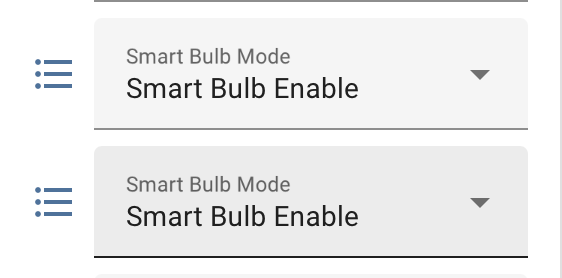
  2. In Home Assistant, it’s still showing a few parameters to set but are greyed out. For example, I got two of the “Smart Bulb” ones. Actually I really just had one (but it refused to allow me to change it) until I rebooted the HA Matter Server and re-interviewed the device. Now I have two listed, both non-grey, but only one allows me to change it.
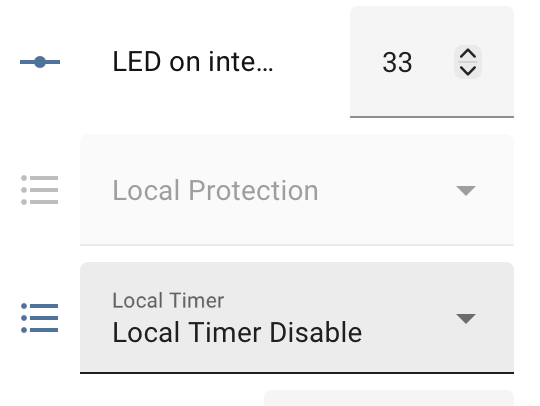
  3. The “Local Protection” is showing as grey and I can’t set it. Previously I had it set to ON such that the switch didn’t light up the LED Bar when I tapped Up. I preferred to keep them as the dimmer version, so Home Assistant could do something with it. This seems to be impossible now?
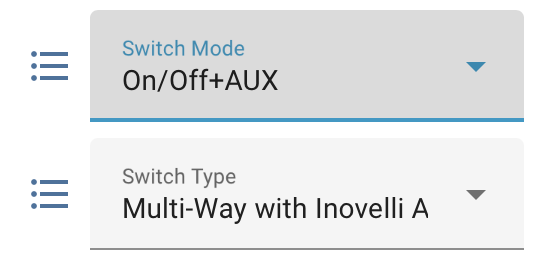
  4. The “Switch Mode” shows but won’t let me set it. Same basic error message as with the Smart Bulb that doesn’t work. There’s a new “Switch Type”.

I don’t know if some of this is Home Assistant junk but I’m not sure how to clean it up, as the Re-Interview didn’t solve it. Any idea? And any way to get the functionality of the Local Protection back in so far as having it NOT set the LED bar to bright blue when I turn the switch on?

To see if it cleaned up, in Home Assistant I deleted the Switch, then did a Factory Reset and re-add. Indeed that got rid of the dead Configuration entries (down to 35 Entities on the Device now, it was like 45 or something). But that’s a pretty nuisance experience, especially given I have 35 Inovelli switches!)

Pics below:

Smart Bulb showing doubles, with one throwing an error when I try to change it:

Local Protection Option Greyed:

Switch Mode showing the “Switch Mode” (throws error) and the new “Switch Type”):

Hi @mem10123, first, I recommend you glance over this document:

VTM31-SN - Firmware (1.1.0+) Update Advisory | Inovelli Help Center

It is for the VTM31-SN, but we will be making a very similar one for the VTM30-SN as we get close to releasing its next production version.

One of the Smart Bulb entities should work and the other is tied to the old mode select.

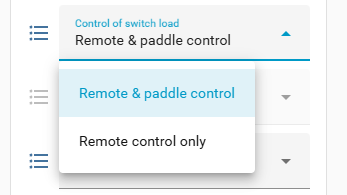
Local protection has been changed to something a little more user friendly:

It looks like Switch Mode and Switch Type need to be modified and we have informed the engineer of this.

For the extra entities, can you try the process mentioned in the document?

Restart Home Assistant and the “old” copies will show up as Not Provided devices (greyed out, dead) entities. Go to entity tabs and filer on Domain = Select, Integration = Matter, Status = Not Provided and you should be able to bulk-select and delete those.

1 Like

Hiya @EricM_Inovelli , a bit more info…. Spent all night and half of this morning struggling with this update. Out of my 35 switches, about 10-12 would not take the update on the first (or sometimes second, third, fourth) try.. Using Home Assistant Matter’s Server UI, I was seeing various switches going Offline. Still am, actually.

After a ton of frustration trying to delete and re-add a switch like 10 times, I hit the nuclear button and completely wiped/uninstalled the Thread/Matter/ZBT-2 adapter, Open Thread Border Router Add-On, etc from Home Assistant. Plan was to start all over from scratch because there was something just not working. Now, it seems like none of the Inovelli switches will add themselves even after multiple factory resets!!! Worst case scenario here is nothing is working anymore.

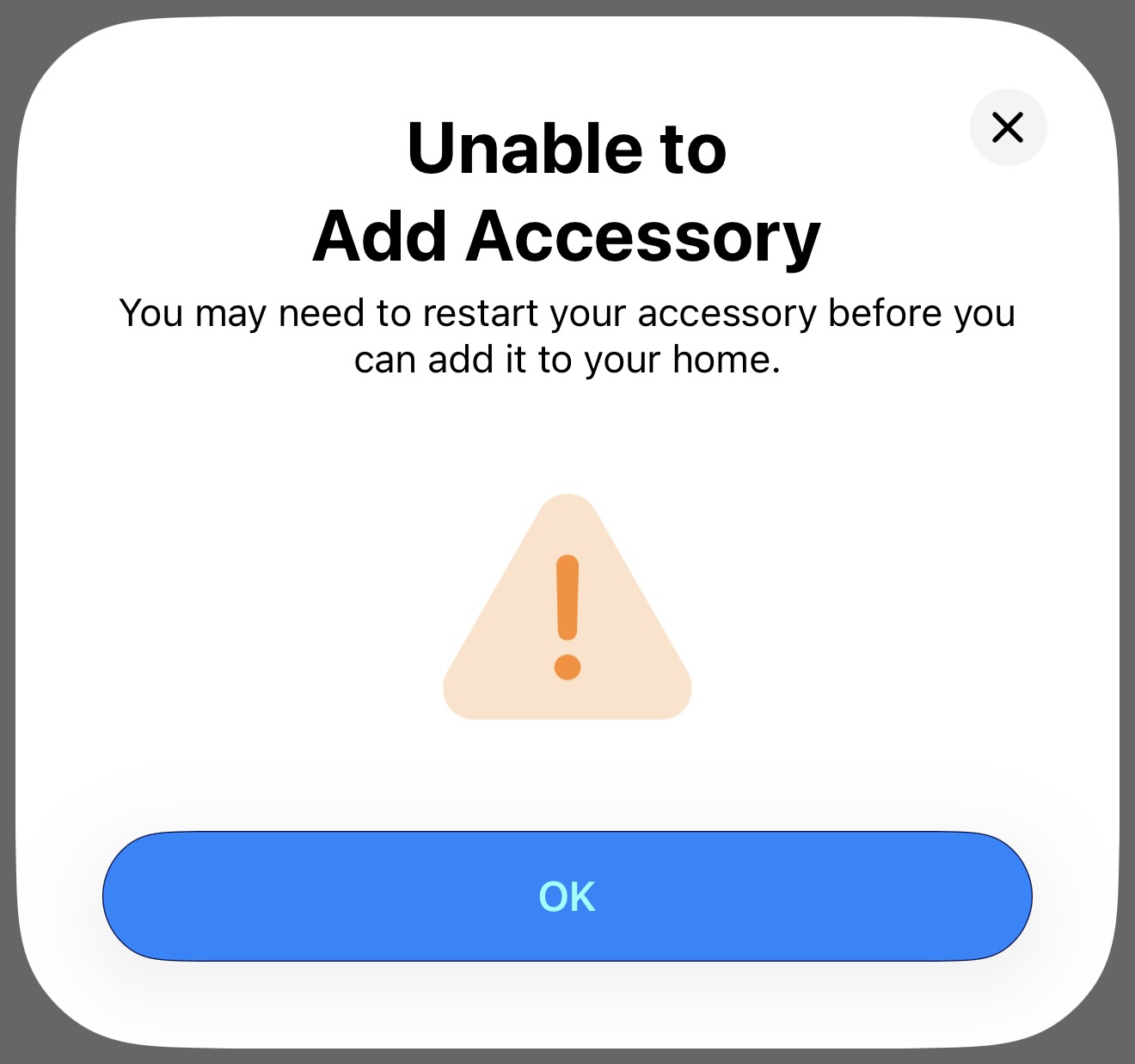
When adding the switches, they will often go through the normal flow (strobe blue, flash green, go back to blue, flash green). But then in the Home Assistant App on my phone, it hangs for a while and then finally gives up and says Accessory can not be added. Tried to go back through the Factory reset and start again process multiple times, with multiple different Inovelli switches. No luck at all!
I was thinking maybe it’s Home Assistant, but it happily re-added my Invis Outlet switches (I have 3 of these). So I know my phone has the proper HA router credentials etc. I’m utterly lost and now have 35 switches I can not get to work at all. Hoping you could please provide some thoughts or maybe some magic tap sequence on the switch. Picture below of what the iOS Home Assistant App comes back with. If I just try to Air Gap pull and then re-add, the switch just stays on solid blue (won’t even acknowledge the attempt). I have to factory reset again, but it’s just a loop of the same results.

From the OpenThread Border Router Add-On Logs, here is a transcript of events while trying to add a switch. None of this appears until after the 2nd green flash on the switch itself. I’m seeing “NoAck” which seemingly points over to the switches?

00:36:12.266 [N] MeshForwarder-: Failed to send IPv6 UDP msg, len:96, chksum:23e9, ecn:no, to:12050f47e0029003, sec:no, error:NoAck, prio:net, radio:15.4

00:36:12.266 [N] MeshForwarder-: src:[fe80:0:0:0:9cfe:63e3:8e07:516b]:19788

00:36:12.266 [N] MeshForwarder-: dst:[fe80:0:0:0:1005:f47:e002:9003]:19788

00:36:13.655 [N] MeshForwarder-: Failed to send IPv6 UDP msg, len:96, chksum:60c8, ecn:no, to:12050f47e0029003, sec:no, error:NoAck, prio:net, radio:15.4

00:36:13.655 [N] MeshForwarder-: src:[fe80:0:0:0:9cfe:63e3:8e07:516b]:19788

00:36:13.655 [N] MeshForwarder-: dst:[fe80:0:0:0:1005:f47:e002:9003]:19788

00:36:14.416 [N] MeshForwarder-: Failed to send IPv6 UDP msg, len:96, chksum:eef2, ecn:no, to:12050f47e0029003, sec:no, error:NoAck, prio:net, radio:15.4

00:36:14.416 [N] MeshForwarder-: src:[fe80:0:0:0:9cfe:63e3:8e07:516b]:19788

00:36:14.416 [N] MeshForwarder-: dst:[fe80:0:0:0:1005:f47:e002:9003]:19788

00:36:17.499 [N] RouterTable—: Allocate router id 9


And then from another wipe and retry, from the Home Assistant Matter Server logs:

2026-02-07 12:30:23.830 (MainThread) INFO [matter_server.server.device_controller] Starting Matter commissioning with code using Node ID 3.

2026-02-07 12:30:25.523 (Dummy-2) INFO [chip.ChipDeviceCtrl] Established secure session with Device

2026-02-07 12:30:29.153 (Dummy-2) INFO [chip.ChipDeviceCtrl] Commissioning complete

2026-02-07 12:30:29.154 (MainThread) INFO [matter_server.server.device_controller] Commissioned Node ID: 3 vs 3

2026-02-07 12:30:29.154 (MainThread) INFO [matter_server.server.device_controller] Matter commissioning of Node ID 3 successful.

2026-02-07 12:30:29.154 (MainThread) INFO [matter_server.server.device_controller] Interviewing node: 3

2026-02-07 12:31:06.567 (Dummy-2) CHIP_ERROR [chip.native.DMG] Time out! failed to receive report data from Exchange: 43036i with Node: <0000000000000003, 1>

2026-02-07 12:31:06.568 (MainThread) WARNING [matter_server.server.device_controller] Unable to interview Node 3: Failed to interview node 3

@EricM_Inovelli : Another data point. A very interesting/important one…

I have like 4 switches that I bought but have never used. So they are still on Firmware version 1.0.0. I just plugged one of them in and went to add it as a test. It added on the first shot, zero problems! So there is definitely something screwed up with Firmware 1.0.4 that is making it impossible for me to add to Home Assistant. But since I can add a 1.0.0 device, I’m thinking it’s the device, and not Home Assistant somehow. Log below.

I also tried to add the 1.0.4 switch to Apple HomeKit, and that actually worked. But when I tried to share from HomeKit to Home Assistant (getting the code to type in to commission), one of two things happened:

  1. Either the switch indicator LED panel flashed red and it quit
  2. It flashed green, then hung. And logs showed the same Interview timeouts.

I’m thinking I need to downgrade these switches to 1.0.3. But, since I can’t attach them back into Home Assistant.. How can I do that? Please tell me (and send directions) on using Apple to do it maybe? Because otherwise I have 35 bricks installed into the wall.

2026-02-07 13:27:53.268 (MainThread) INFO [matter_server.server.device_controller] Interviewing node: 2

2026-02-07 13:27:57.232 (MainThread) INFO [matter_server.server.device_controller] Node:2 Setting-up node…

2026-02-07 13:27:57.233 (MainThread) INFO [matter_server.server.device_controller] Node:2 Setting up attributes and events subscription.

2026-02-07 13:27:57.281 (MainThread) INFO [matter_server.server.device_controller] Node:2 Local updates found for this device

2026-02-07 13:27:57.281 (MainThread) INFO [matter_server.server.device_controller] Node:2 Software update found: 1.0.4 (104) from UpdateSource.LOCAL, current 1.0.0 (100)).

2026-02-07 13:28:00.830 (MainThread) INFO [matter_server.server.device_controller] Node:2 Subscription succeeded with report interval [1, 60]

2026-02-07 13:28:00.832 (MainThread) INFO [matter_server.server.device_controller] Commissioning of Node ID 2 completed.