First, sorry if the vtm131mr tag is not correct. I have no idea what that is (googling did not help me find out), and it’s the only tag available to me in the required first tag category. I have no idea why, I tried different categories and subcategories, and the options never change.
So I have 69 blue series switches around my house, and I’m running into some problems.
-We are using ZigbeeMQTT on home assistant.
-All switches are smart switches (no dumb or aux).
-There is a mixture of on/off, dimmer, presence dimmer.
-Firmware is latest stable (not beta)
And yet, some of the time I walk into the house, the slave switches aren’t working. I have to go around the house and toggle all of the switches on and off 4 or 5 times to get them to communicate with each other again.
To me it seemed that the first time we paired the switches to each other, this process was required to get them to communicate with each other. But now it’s required constantly. The only thing I can guess that is happening is that the power is going out. We have had a few quick power outages since the switches have been set up.
Now, these are light switches. They need to work like light switches. It cannot be required to go around and hit every switch 4 or 5 times on even an occasional basis. They have to “just work”, because not everyone who operates them will know they have to go around the entire house and toggle them 4 or 5 times to get them to all work again. And that’s the entire reason I went through the process of pairing them directly with each other rather than through my home assistant hub. Because they will continue to work even if the hub goes down.
How can I make it so that the switches automatically go through whatever this handshake process is after every power outage and after losing communication with each other?
To clarify a bit: The issue seems to be that despite creating Zigbee bindings as described in the linked documentation, and verifying that the bindings seem to work correctly even when the coordinator is offline, sometimes the bindings seem to stop working. The best guess for cause is that there have been a few power outages recently (often short ones, or just flickers, due to weather) and it seems like the problem happens after power loss. When the problem state occurs, the switches that are bound together do not behave as if they are bound until their states are toggled a few times after which they eventually seem to sync back up. The issue doesn’t appear to be time based, they don’t automatically “fix” themselves if you wait long enough, they remain broken until someone manually pushes the buttons a few times.
It’s unclear what the actual underlying issue is, or why toggling the switches a few times seems to “fix” it. There are half a dozen or more pairs of switches that are all having the same problem.
Please provide exact firmware versions you are running of each type of switch as well as the version of Zigbee2MQTT and Home Assistant that you are running. Saying that you are on the “latest stable” is unfortunately not very helpful.
Did you set up individual bindings or group bindings? The documentation you linked shows both.
When the switches stop communicating with each other, do they still communicate with the Zigbee hub itself? Are you able to remotely turn them on/off or make any changes to parameters.
I’m not 100% on the communication with the hub. I can try to force it to screw up tonight and check that. I’m 85% sure that yes I had controlled lights from my phone before I had gone around and toggled them all. But that’s expected because all that needs to happen is the master in each pair has to talk to home assistant
Okay - I just noticed there’s two of you in this thread with the same problem.
@zeel you answered my first question, can you go back and answer the other two?
@agordon117 can you share the version numbers (my first question as well).
And for both of you, a fourth question: What is your Zigbee coordinator?
I’ve seen this personally happen at my house with occasional switches dropping off the mesh (show up as Offline in Z2M) and no longer respecting bindings (because they fall off the mesh). Airgapping the offending switch has always fixed it. The problem appeared as my mesh grew past 35-40 devices and then went away when I upgraded coordinators to a more powerful one (MG24 based rather than the TI one I had before).
My understanding of Zigbee is that the coordinator shouldn’t be an issue if two devices are directly bound to each other, that the bindings should continue to function even if the coordinator is offline.
Ah I see. Thanks for adding that clarification. You both had managed to confuse me !
Firmware versions do look like the latest and I’m not aware of any issues in those firmware versions that would explain the behavior you are seeing.
The coordinator is using the same TI chip CC2652P that used to be very highly recommended and in the last 6 months has definitely been showing up in different places in the Zigbee2MQTT discord and on github with a lot of issues / crashing with large networks.
What’s the total number of devices that you have in the network?
My understanding is the same. But I’m guessing something is happening between the coordinator and the switch that makes the switch believe that it’s no longer connected at all to the Zigbee network so it doesn’t talk to bound devices at all until it’s rebooted.
Are you able to try the group bindings instead of the individual ones in the situations where you have more than 2 switches controlling the same lights? I’ve not personally used the individual ones but generally with multiple devices, having a group should lead to reduced traffic overall.
There are 70 Zigbee devices IIRC, 69 Inovelli Blue switches (mix of three types) and one Lutron dimmer. Would that be considered a “large network”?
I actually originally set them all up using groups, then we found that if the coordinator went offline everything broke completely and none of the bindings worked anymore. Then I changed everything to single one to one bindings and it worked even if we unplugged the coordinator.
There is only one instance where there are more than two devices in a pairing, most of the bindings are between one load control switch and one “smart bulb” mode switch. All of the lights are controlled by Inovelli switches, there are no smart bulbs. There is one instance of a non-Inovelli device (Lutron Aroura) that is bound to an Inovelli switch, but that switch isn’t bound to anything else. So there is really only one instance where a group would offer any theoretical benefit.
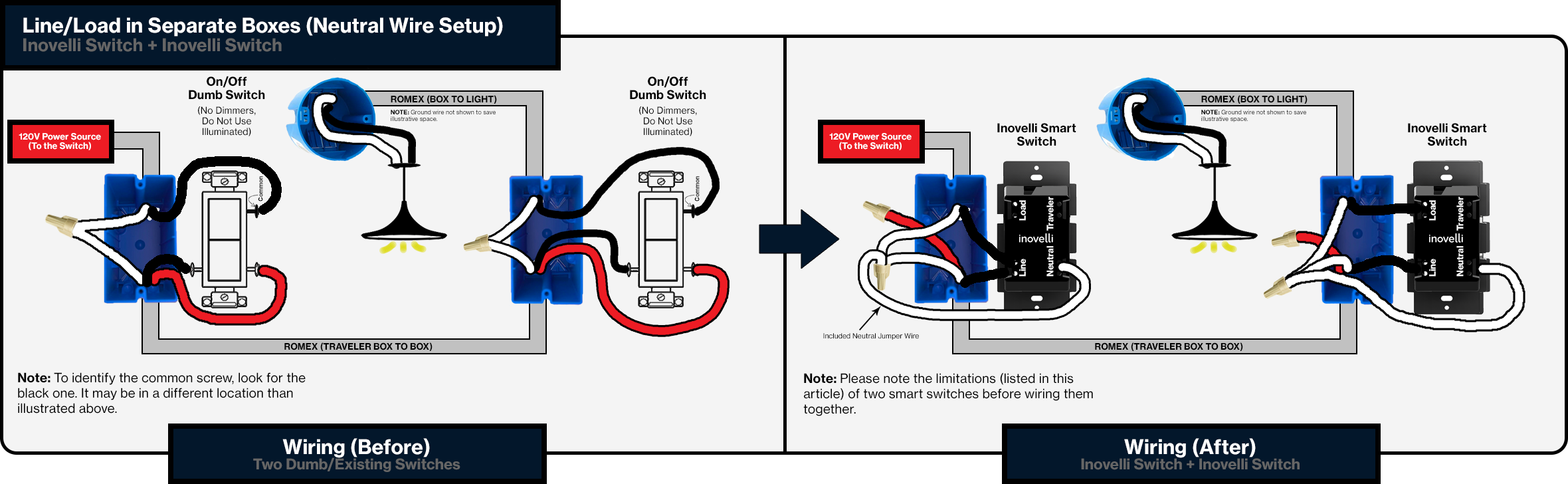
Basically, the most common situation is two Inovelli switches which were used to replace a traditional 3-way circuit. The new wiring follows the instructions from the Inovelli website, with one switch controlling the load and the other being bypassed by connecting both the line and load wires to the line screw terminal to provide power to the Inovelli switch but not allow it to control the load. These non-load switches are all set to “smart bulb” mode.
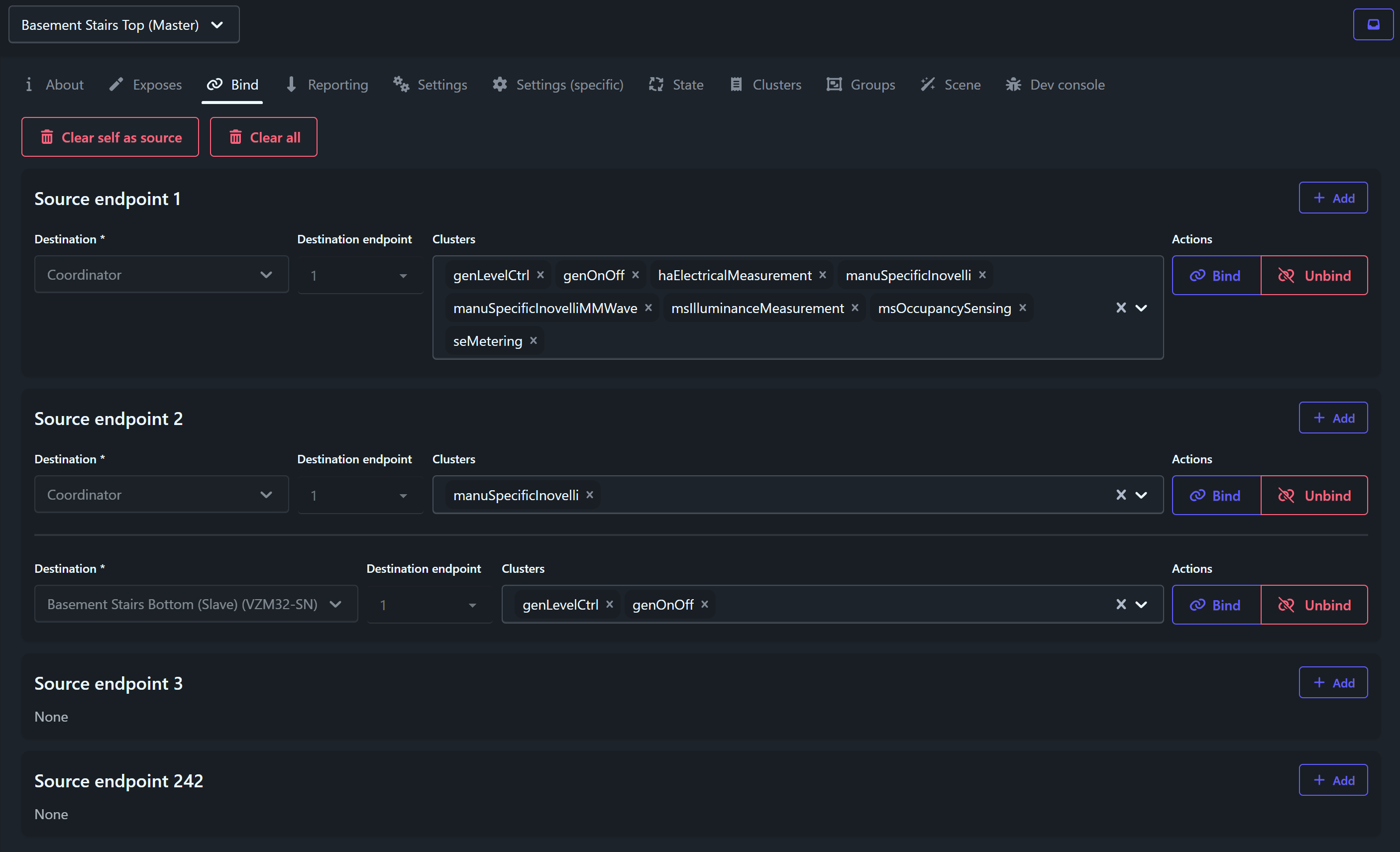
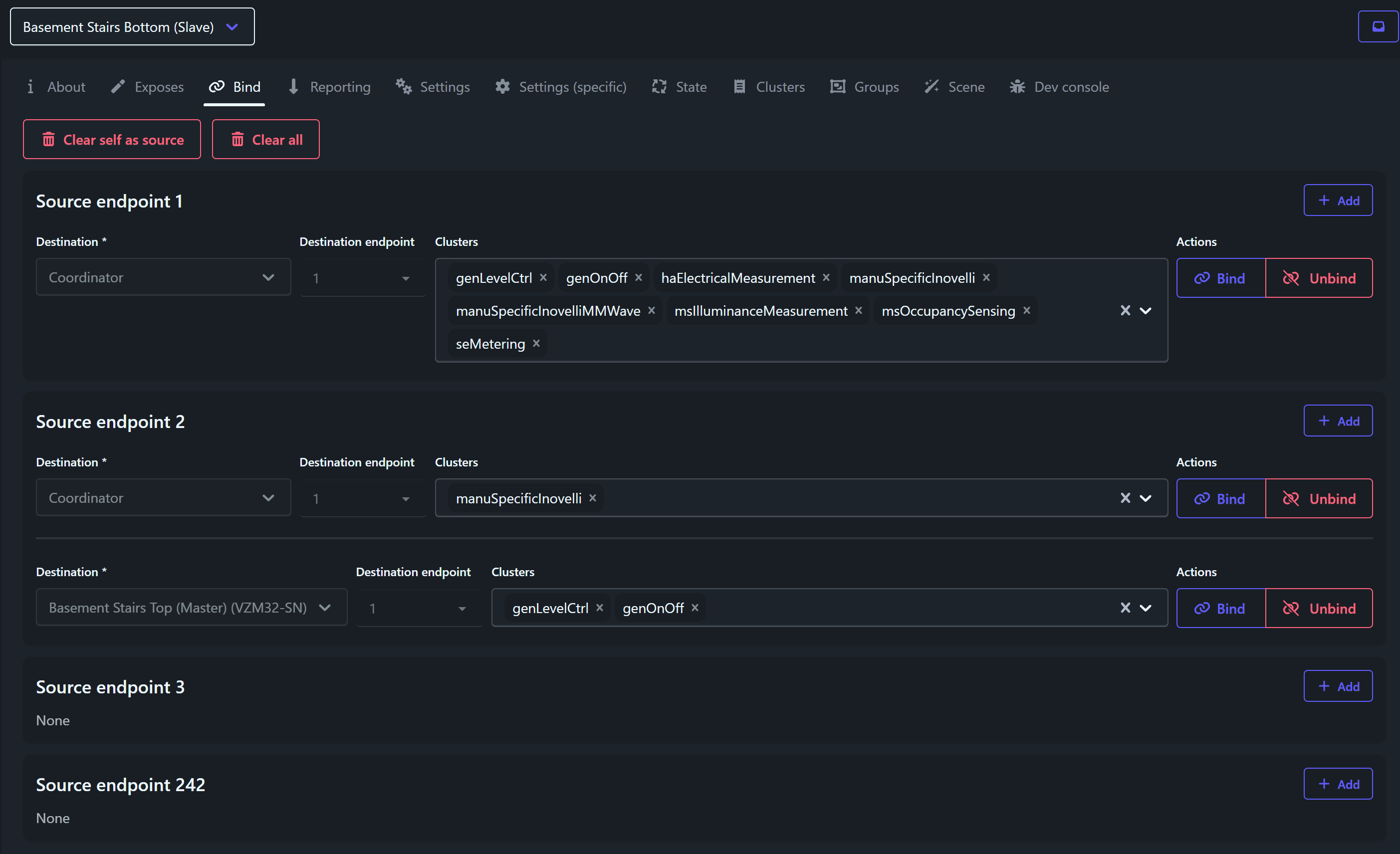
Each of these virtual 3-ways have bindings like the following:
As noted, this seems to work correctly most of the time and even works when the coordinator is unplugged as expected.
I take it that your theory is that in a total network reboot event (every device just lost power and all are trying to come back online at once) there is some error state caused by congestion? And this may somehow be because the coordinator is not up to the task of handling that many devices trying to reconnect at once? That feels like a pretty major flaw on the part of Zigbee given that power outages are a thing.
And you think something like one of these would resolve the issue?
Don’t want to hijack @rohan helping you, but I noticed something you said that does not sound right. The non-load-controlling switch should only have a hot and a neutral connected to it (and a ground). The load conductor is only connected to the load terminal of the switch controlling the load and not the other switch.
If power originates in the non-controlling light switch box, then you would have the incoming hot and a hot going to the other box both connected to the line terminal. That may be what you meant.
I can’t quite get my head around how you have described it. You might want to post the wiring diagram you used and confirm that you’ve actually wired to conform to that drawing.
I’m not sure what exactly to call each wire in the second diagram… as that page says “You will have to rewire your setup to a non-traditional way” , so please excuse my nomenclature. The important thing is that both switches have hot and neutral connections, and only one of them controls the load.
For the sake of information, you are taking the two existing travelers, and converting one to carry Line power, and capping/abandoning the other unused traveler.
Technically, you could repurpose the abandoned traveler to carry Load from the first box with the Load connected to that switch instead, but as these are both full featured switches, it isn’t necessary and adds unneeded complexity.
AUX switches instead of additional dimmers would likely make this setup more robust (no need to bind), but that is only if the wiring would support them. I have no idea how everything is wired in your situation. In the diagram you linked, that unused red traveler could be utilized as the Traveler between the Dimmer and AUX switch.
Right, but the AUX switch doesn’t have light bars and can’t be a presence detector. It would be really neat if these switches supported some kind of wired communication that could utilize the extra traveler. Idk how the AUX switch actually works, but it’s clearly communicating with the main switch rather than actually switching something. Is that a digital signal? Just a certain resistor value? I have no idea. But boy would it be cool if two smart switches could do the same thing!
I feel like we’re pretty far off topic here. The wiring is functioning correctly, the issue is regarding Zigbee.
I’m not fully convinced that the issue is the coordinator, I wouldn’t expect all devices to be effected would I? Surely some of them would properly reconnect while others, probably ones with worse signal, would have the issue.
Does anyone have a suggestion for how we could test this?
I’ve definitely seen larger. But probably around anything more than 50 is a decent sized one. I was running around the same number when I started having issues with my coordinator.
Interesting. I have everything configured with groups and have not had that problem myself. That said, most of my setups involve 4-5 switches, I only have 2 that are actually 3-way switches.
Was it instantly bad when you disconnected the coordinator? I’ve had 2 situations where I had no coordinator running (each about 1 week) and noticed that all of my group bindings were working throughout the whole time.
The bindings look configured correctly to me.
Yes, that’s my theory. Your network is dominated by Inovelli devices. And we’ve seen reports in Z2M discord (and other places) that the sheer number of entities that large volumes of Inovelli devices have and report on can overwhelm coordinators and the host running Z2M or MQTT itself.
I suppose that’s another angle we’ve not looked at. What are you running Z2M on hardware wise?
I’m grasping at straws since the magnitude of your problem seems considerably bigger than what I’ve seen myself. I can tell you that there are people on this forum who use an MG24 based coordinator and have 150+ Zigbee devices with binding and no issues.
I’d still like to find out if the coordinator is able to control the switches that are not behaving with the binding in that situation. There may be some more Zigbee network troubleshooting that could be done then.
I suppose that’s another angle we’ve not looked at. What are you running Z2M on hardware wise?
Z2M is running as an “app” under HAOS installed on an 8GB Raspberry Pi 5.
Was it instantly bad when you disconnected the coordinator? I’ve had 2 situations where I had no coordinator running (each about 1 week) and noticed that all of my group bindings were working throughout the whole time.
Yes, as soon as the coordinator was offline the group bindings stopped working properly. It seemed like sometimes the broken binding still worked but would take a very long time to actually go through, and sometimes nothing would happen at all. We did a bunch of testing of this, manually unplugging the coordinator then checking various switches. In every case as soon as the coordinator was down all the group bindings were unusable. Once it came back online, they worked again.
But with the individual bindings, this wasn’t a problem anymore. We could unplug the coordinator and everything still worked as expected. We also noticed that the latency between pressing on/off and the light actually changing was significantly improved by direct bindings.
Yes, that’s my theory. Your network is dominated by Inovelli devices. And we’ve seen reports in Z2M discord (and other places) that the sheer number of entities that large volumes of Inovelli devices have and report on can overwhelm coordinators and the host running Z2M or MQTT itself.
Any suggestions on profiling that? I can see that the load on the Pi right now is pretty minimal, but nobody is at the site so nothing is happening other than basic status reporting. The Z2M activity feed is moving a mile a minute, but the resource usage reported for it is less than 1%.
I’d still like to find out if the coordinator is able to control the switches that are not behaving with the binding in that situation. There may be some more Zigbee network troubleshooting that could be done then.
Depending on what other apps you have running on HAOS, it could get busy, but overall, I wouldn’t expect this to be an issue.
This is wild. I just took my coordinator down for about 10 minutes to check this one more time. And everything is still working with group bindings. I do not understand what is happening in this situation at all. I think this is one where we might need @EricM_Inovelli to see if he has any insights.
Interesting, I had chalked this up to me not understanding Zigbee well enough. I had assumed that group bindings were like normal ones, and would work without the coordinator. When this turned out to not be the case in practice, I tried to research the issue and couldn’t find definitive information that “yes the group bindings should still work without the coordinator” so I basically just assumed they don’t and that it’s just something nobody talks about. If that’s not the case, if my initial assumption was correct, I do wonder if that’s a related issue or not.
The Pi is actually connected to a UPS in a network rack, so an outage needs to exhaust the battery for the coordinator to actually go offline, while switches all go down immediately since they aren’t being backed up.
I think we want to perform the following tests:
Plug the Pi into the wall so it’s not backed up by the UPS.
Flip the main break off and back on to simulate a total power outage. This should result in the error state as described. At this point, we can test if HA can control lights in this state.
Flip off all but one lighting circuit, then repeat the main breaker to simulate an outage with fewer devices.
Unplug the coordinator, and redo test 2 to see what happens if there is no coordinator when the switches initialize.
Restore all the lighting circuits but don’t plug in the coordinator, toggle main breaker and see what happens when a large network comes online without a coordinator.
Repeat with the Pi connected to the UPS so HA/coordinator don’t ever actually lose power just all the switches.
Any other test cases? We don’t have another dongle so we can’t just test that and would preferably not want to spend more money unless we’re pretty sure it will actually fix it.
What doesn’t make a whole lot of sense to me here is that, at least as I understand it, Zigbee is a decentralized mesh network that should function just fine without a coordinator. Philips even sells pre-bound kits with a dimmer switch and a light bulb and no hub for instance. As such, I would expect coordinator problems to only impact controlling via HA and not impact bindings at all. And it wouldn’t explain why groups didn’t work with the coordinator offline since it would no longer be a variable.
 !
!
 , so please excuse my nomenclature. The important thing is that both switches have hot and neutral connections, and only one of them controls the load.