Hoping someone can help me out. I just installed many (50+) Inovelli Blue switches in my home to control Philips Hue (and standard) bulbs. I also purchased and set up a new Hubitat hub. I am not able to get one single switch working (so I can replicate the setting across the rest of the switches). I would like the switches to be in Smart Bulb Mode (which I have configured in the settings), but when I go through the step of setting Buttons Controls, the switch is not communicating to the bulb. I have tried connecting the bulbs through the Philips Home Hub and also tried connecting the bulb directly to the Hubitat. Nothing is working. Was hoping you could help me get one working and then I can replicate across other switches & bulbs.
Would take any tips or advice over this thread. Or if you know of anyone knowledge in Chicago, would be grateful for some support.
I would try to minimize variables. Try to get one smart switch (Blue) to control one dumb bulb. Make sure the switch is in fact paired with your Habitat hub and that you can turn a connected bulb on or off from the Habitat device page, thus confirming that the switch is indeed paired and controlling the light. If you can’t get that far, there are other problems.
I have Blue mmWave switches, Hue bulbs, and Hubitat, so I can offer some insight. I think Bry’s link above is a good first step to getting something working.
In Hubitat parlance, you need:
An App/Automation to control scenes.
In Bry’s guide they use Rule Machine, which is very powerful but can be confusing. Once you follow their example and get something working, if you want a simpler setup, try the apps Basic Rules for very simple rules (on/off) or Room Lighting which is as powerful as Rule Machine but does a lot of the heavy lifting for you.
Set up the automation to “listen for” / “Activate” / “trigger” on Button actions
Linked in Bry’s guide is a map of switch button presses to the button action reported at the hub. For example, you will tell the automation to listen for “Button 1 Pushed” for a single tap on the top paddle (traditionally “on”) or a “Button 1 Held” for a single tap on the bottom paddle (traditionally “off”)
Then you select devices to control and how to control them (turn on/of, set color, set brightness, etc).
[FYI In some apps/automations selecting devices comes before selecting activation method.]
For Hue bulbs in particular, I have all mine connected to a Philips Hue bridge and use the “Hue Bridge Integration” App/Integration to expose the rooms (groups) in Hubitat, and those groups are the “devices” I control in the automations.
Thank you for the support! I was able to figure out how to get the switches in SmartBulb mode and have them turn the lights on and off. A huge accomplishment!
However, the ON function is assigned to “Button 1 pushed” and the OFF function is assigned to “Button 1 held”. But I have summer switches! How do I add a command to have the lights dim up and down?
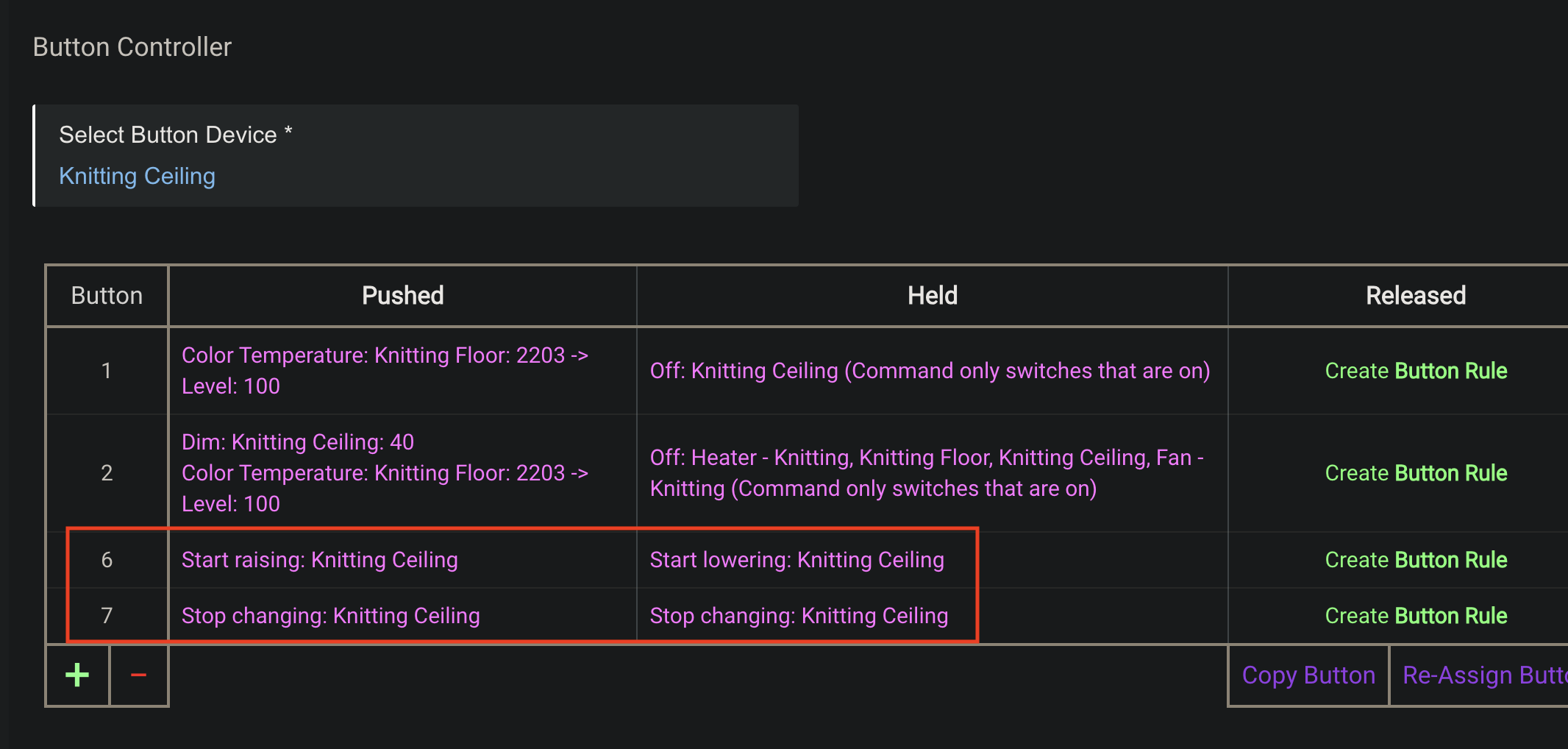
I’m guessing you are not binding your Blues to the Hues? If that’s true, then I’d recommend using Button Controller (BC) in Hubitat to set up the Blues…
BC has Rule Machine for its guts, but it’s all packaged up as a UI that’s easy to work with for button, switch, and dimmer devices in particular.
Here’s an example from one of my Blues where I needed to program its dimming capability. Note that you’ll need to follow Inovelli’s own button-mapping strategy (linked in a post above) when building actions in BC.
Yes, I have followed those instructions (how I got the lights to respond to turning on and off). My problem is that the switch only seems to respond to actions assigned to Button 1. But the switch (Inovelli Blue) is a Dimmer switch.
When I assign the swimming functions to button 2, nothing happens.
Is there a specific button number I should be using (other than 1)? Is there a way to make button 2 functional?