Hello there, I have White Dimmer switches, I’ve had them for about a year now and they’re in my mother’s home on the other side of the country, so I’m trying to troubleshoot this from afar.
Tonight a bulb blew in the ceiling. On the switch are 4 recessed ceiling lights, only one blew and the others remained turned on, however the White dimmer then was unresponsive. When the bulb was replaced with identical wattage ones it would not turn on again. When a smaller wattage bulb was placed in the socket the light turned on, but the White Dimmer was no longer controlling anything.
Now all the lights on that dimmer switch are stuck on and the White Dimmer does not have any control over them. The only way to turn them off is pulling the air gap. If the air gap is pushed back in then the lights turn on.
The bulb blowing seemed to be the catalyst that has started whatever is happening. This is a new issue and we’ve had these switches for over a year (and these bulbs are normal, incandescent bulbs that have been in the ceiling for over ten years, they are rarely used). It doesn’t control at the switch or through the app (Apple Home).
There was nothing unusual (weather or power surge) that precipitated the event.
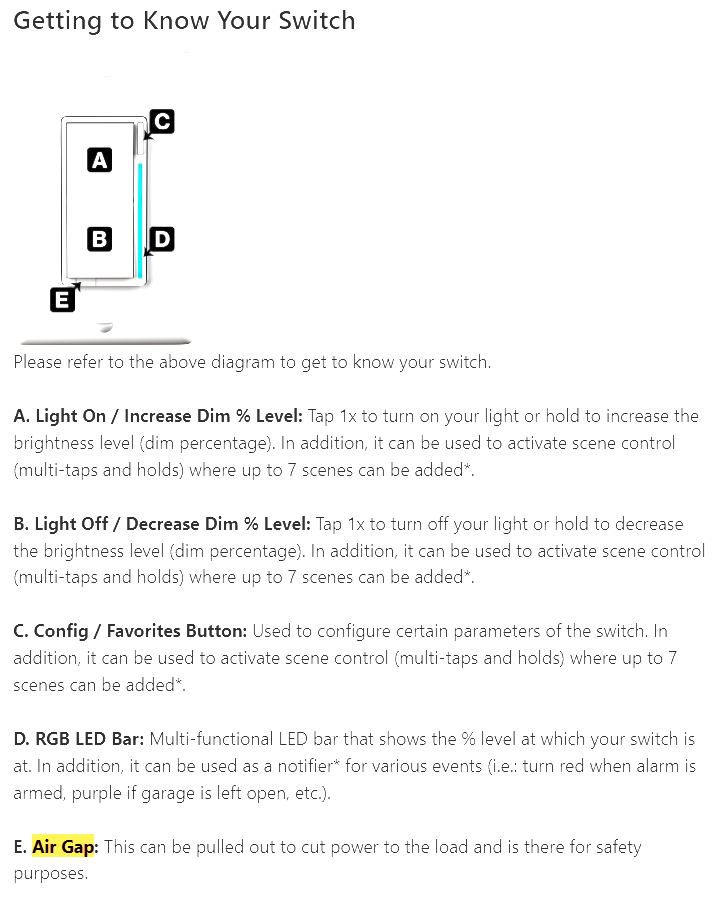
I don’t personally use the White switches, but the first troubleshooting step I would take is to pull the air gap on the bottom left of the paddle to kill power to the switch internals, and then push it back in to power the switch back on.
As for the why it is behaving this way, I don’t have any ideas.
Yeah, right now pulling the air gap is the only way I can turn the lights off. As soon as I push it in, the lights come on (but can’t be turned off via the switch, only by pulling the air gap again).
Is it in Smart Bulb mode by any chance?
To check (and disable Smart Bulb mode), hold the down paddle while tapping the small “config” button 4 times. LED bar should flash blue to confirm.
Unfortunately I don’t. I had quite a few leftover from the initial order but managed to auction them off. I guess I’ll have to buy one.
I just passed along the message to have them attempt to make sure it wasn’t in smart bulb mode. They did that, said it blinked as you said, but still doesn’t respond (in other words it still does the same thing where the lights power on with the air gap in, but won’t turn off unless the air gap is pulled out still). They said it briefly said “this is an unconfigured button” in HomeKit before reverting back to the standard “this switch was last seen online two days ago”.
I don’t think it’s the Smart Bulb Mode since you factory reset the device. I don’t have any Whites, but Inovelli’s default for Blues and Reds is that the switches do not come up in the SBM after a factory reset.
I’m surprised it could have gotten zapped or something, because it’s in a wall panel with 3 other switches (1 fan and 2 other dimmers) all of which are Inovelli Whites and they’re doing fine.
There is another user that had the same issue as you with the switch remaining on. Ultimately, he determined that the switch was defective. So that may be the case for you as well.
He swapped the switch to another location and it did the same thing. He replaced the troubled switch and that one worked, eliminating the fixture as the issue. Unfortunately, you’re not close to your troubled switch, but that is what he did to troubleshoot.
Thank you, I appreciate that context. I’ll have to order a replacement and then see if I can get it installed when I’m back for Christmas holidays. I thought I might upgrade to a presence sensor switch, but it looks like those aren’t available in the White models.