Non-Neutral on Line

Hello Inovelli Community,

I’ve recently started installing Inovelli White Series smart switches throughout my home and integrating them with Home Assistant. Overall things are going well, but I’ve run into some wiring challenges and could use some guidance.

I’m wondering whether adding Aux switches would help address these issues. I have a few circuits in particular that appear to have non-standard wiring:

  • Kitchen
  • Mud Room
  • Entrance
  • (Potentailly) Basement

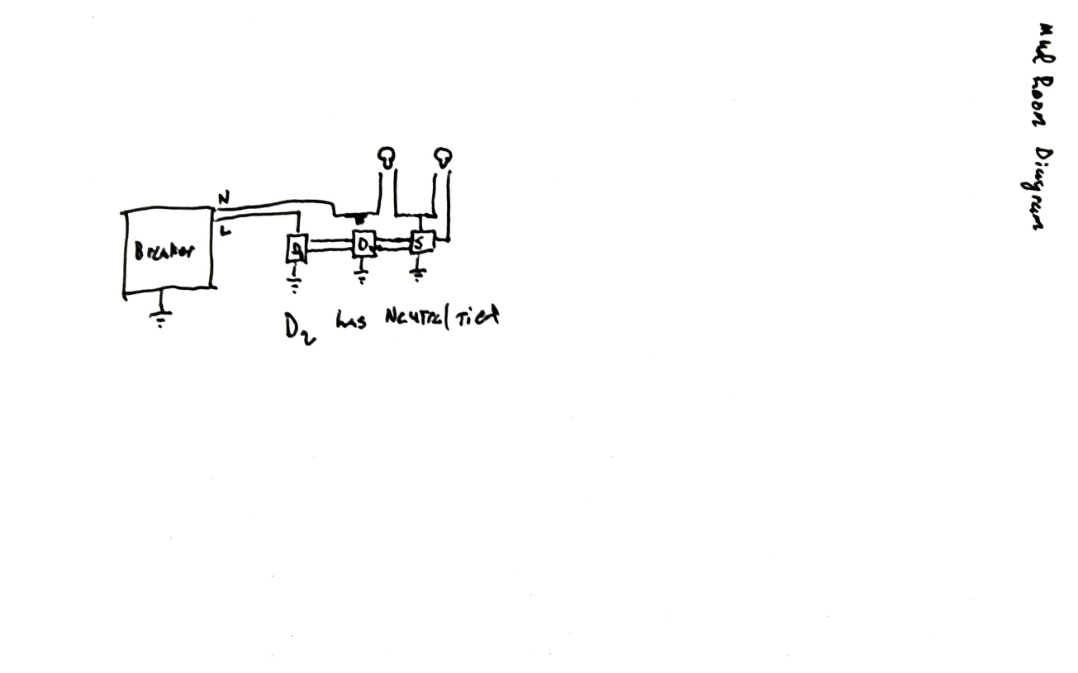
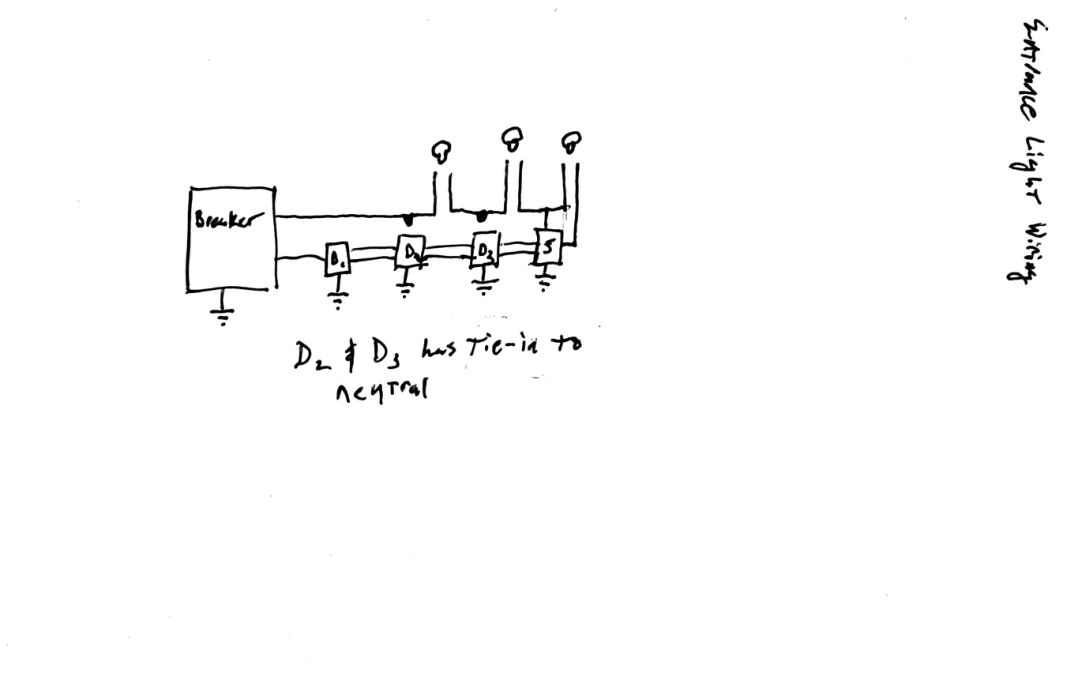
I’ve also attached a hand-drawn diagram of the wiring setup, based on my observations of the gang boxes.

The house was built in 2007, so it has relatively modern wiring.

Observed Issues

The primary issue I’m seeing is that when I turn off the lights using the existing “dummy” switches, the smart switch loses power and shuts off completely.

Additionally, when I turn the lights off via Home Assistant or directly from the smart switch, the smart switch appears to power-cycle.

Given the non-standard wiring and the fact that the smart switch is currently installed on the load side, this behavior is somewhat expectedbut I want to confirm the best way to resolve it.

Wiring Details

Kitchen

From my inspection, it looks like the line switch doesn’t have a neutral, but there is a neutral present on the load side. Additionally, the load side of my kitchen lights is in the same gang box as the line of dining room lights. (Note: the dining room lights omitted in the diagram.)
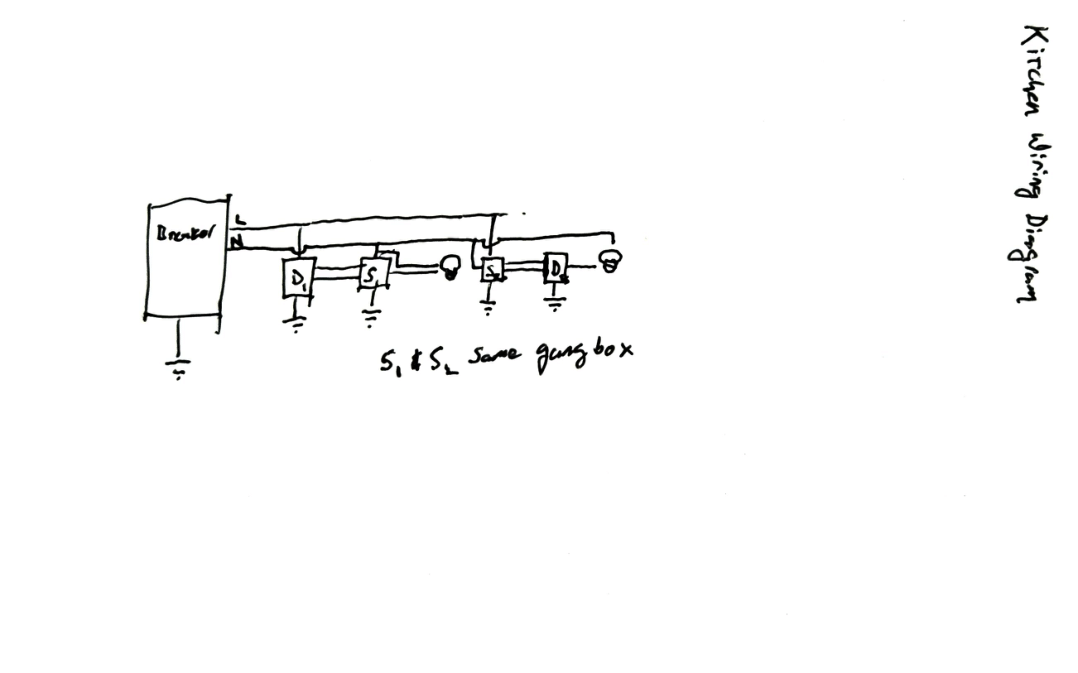
Mud Room

The mud room is wired in a 4-way configuration. Like the kitchen, there is no neutral on the line side, but there is a neutral on the intermediary switch and load side.
Entrance

The entrance is also a 4-way circuit with four control points:

  • Basement (near the stairs)
  • Front door
  • Bedroom hallway entrance
  • Mud room entrance

The line side is located in the basement near the stairs, and the load side is near the bedroom hallway entrance. Like the kitchen and mud room, there is no neutral at the line side, but neutrals are present at the intermediary switches and at the load side.

Additionally, the load side of the entrance circuit is in the same gang box as the line side of my TV lights. The line side of the TV lights is tied to the kitchen circuit breaker. This circuit is also omitted from the diagram.
Planned Installation

My current plan is to replace the existing dummy switches with Aux switches, and I’m hoping this will resolve the power-loss and power-cycling issues. I’d appreciate confirmation that this is the correct approach.

Your support is appreciated!
What type of wiring do you have? Romex / fabric covered wire or individual conductors like THHN?

Romex

Most often, when you have a dumb switch that is causing a loss of power to the smart switch, it’s because the line and load boxes have not been properly identified.

I took a look at your drawings, and TBH, they’re not going to be accurate if you have Romex. Also, with Romex, it’s pretty improbable that the load box would have a neutral in the line box would not.

If you want to post some pictures, we can take a look to see if we can figure out what you have going on. Start with one room, the mud room four way. The pictures need to be taken so that we can see all of the connections to the switches and also into the box. Pull the switches out as well as any bundles so everything is visible. Label the boxes left box, middle box, right box, etc. if you have pictures from before you wire the smart switch, those would be the best.

1 Like

Unfortunately I do not have any before pictures, but I do have current pictures. Hopefully these help. When I changed over from the old light switch to the new one I kept common to line.

Since my account is new I cannot upload more than two attachments so bear with me.

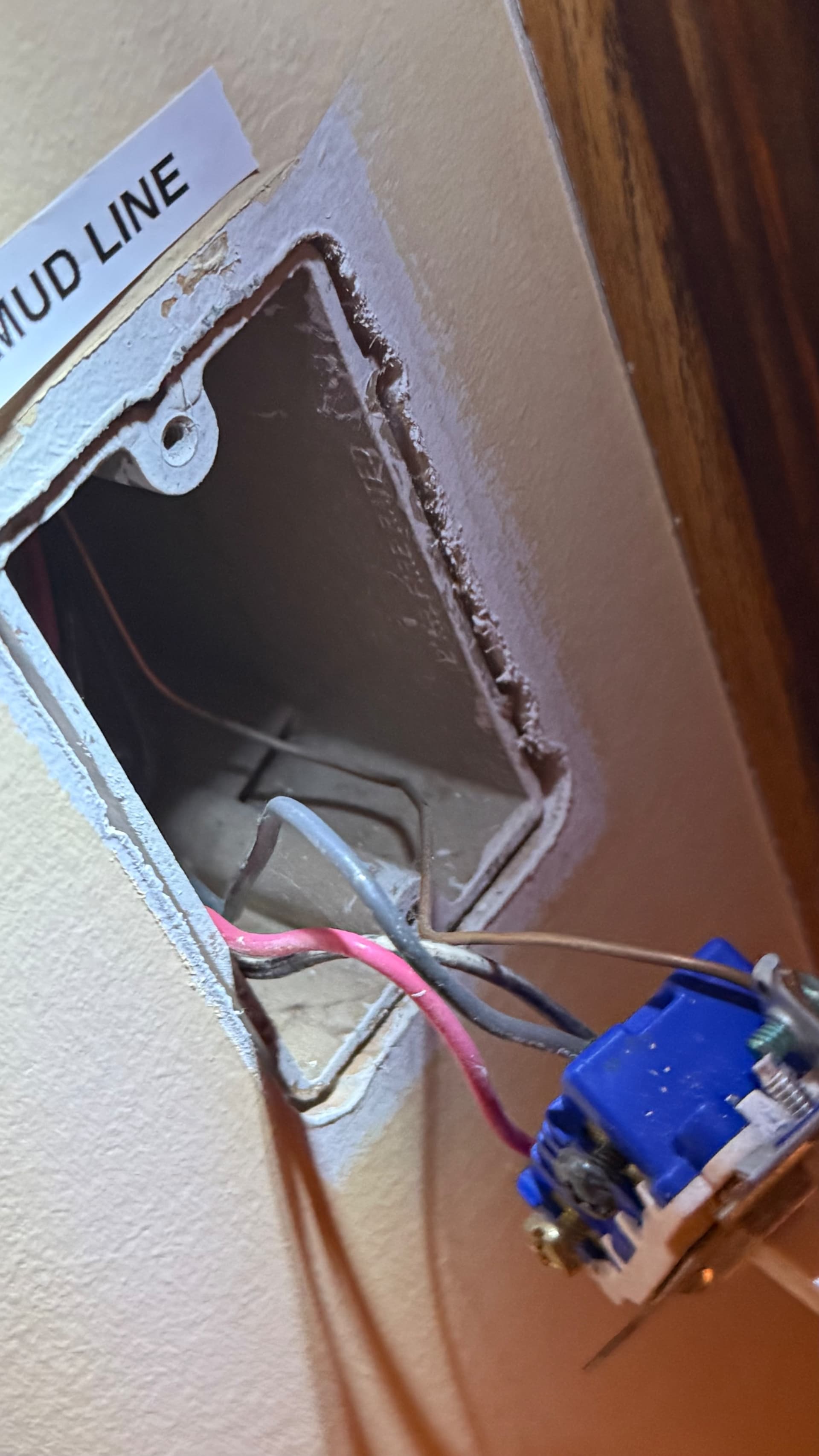
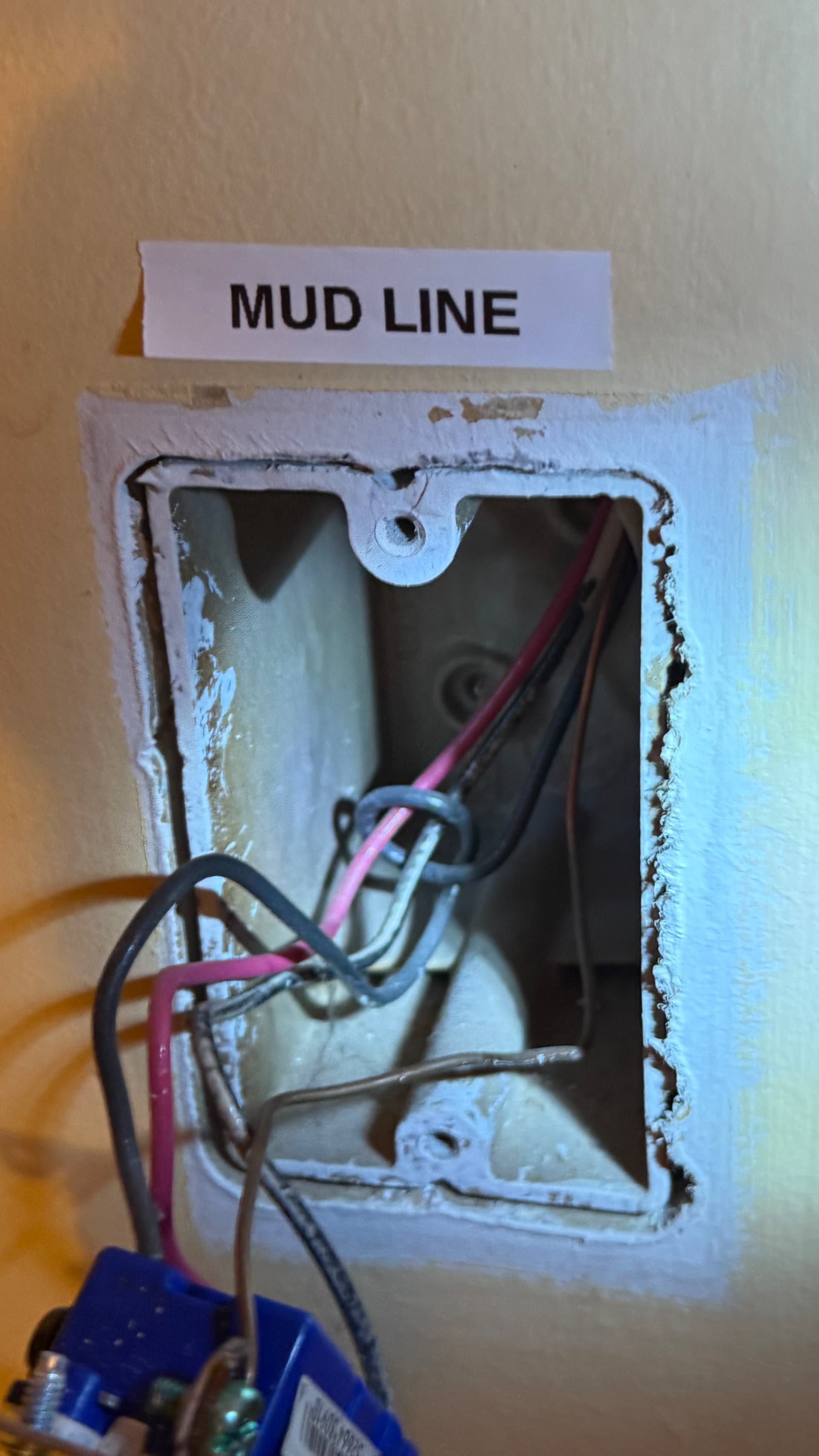
MUD Line

I am certain this is line the common wire is lit up even when I turn on and off the other switches.


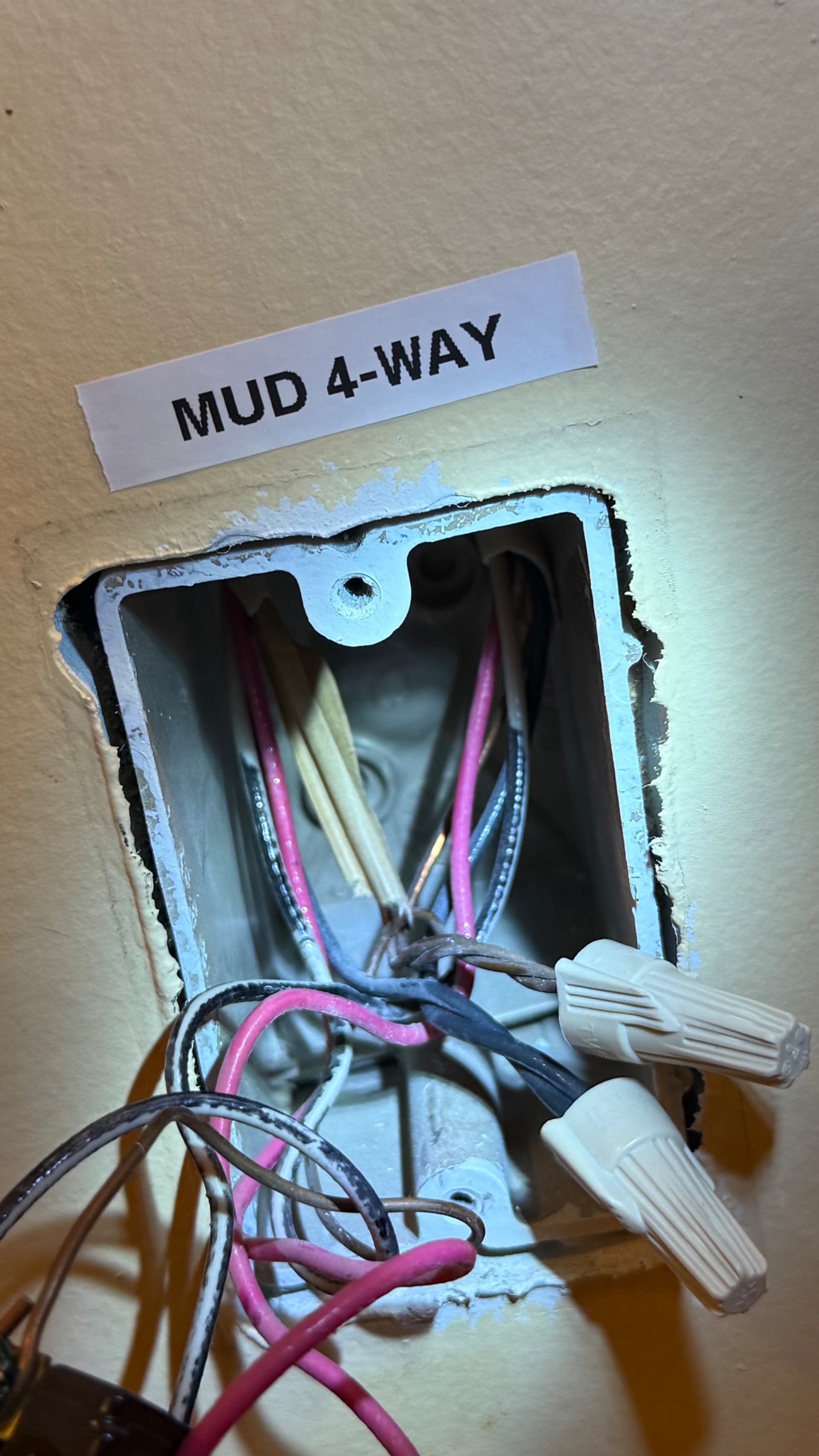
Mud 4-way

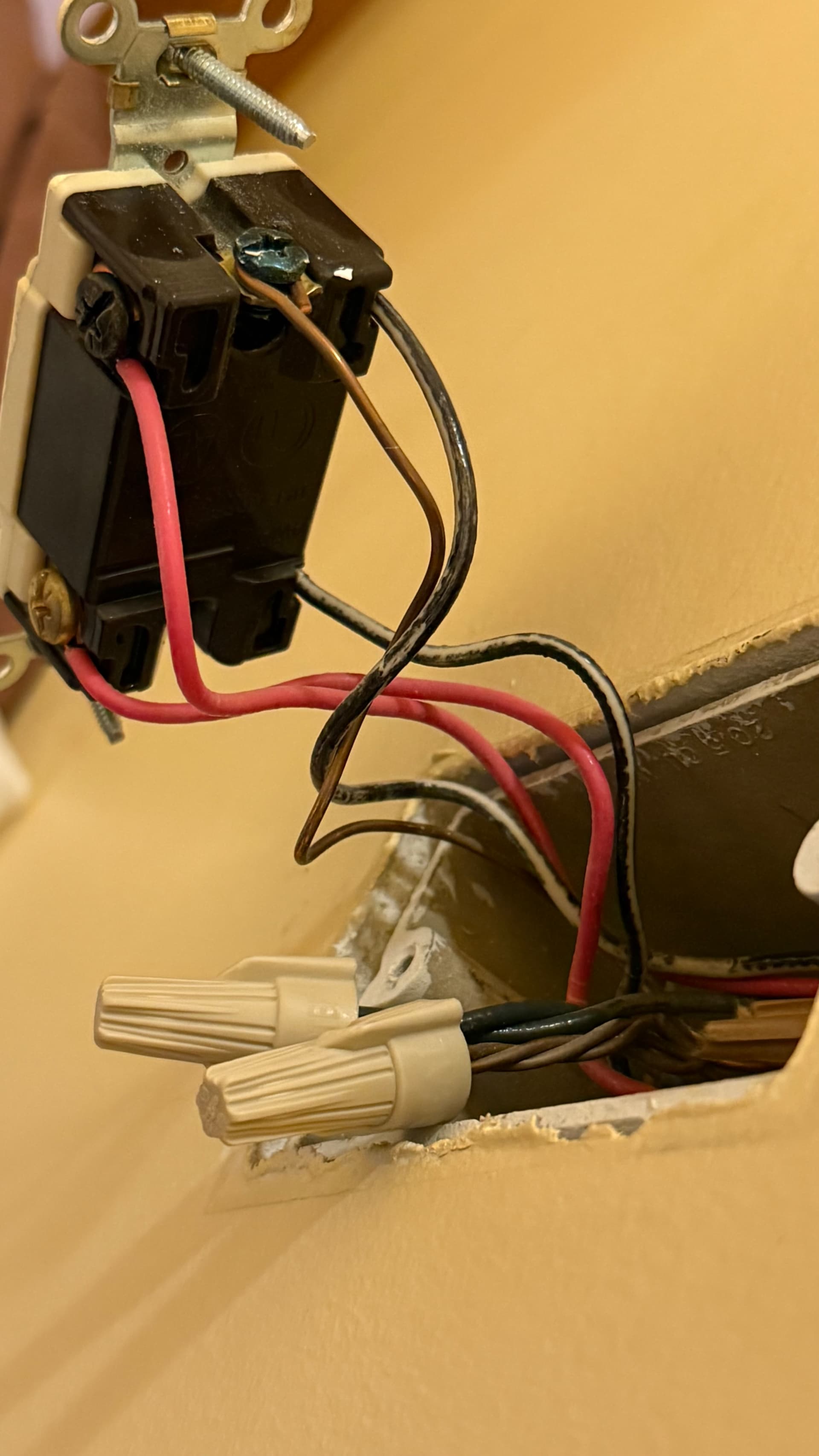
On the other side of the switch the top screw is black and the bottom is copper

Also after looking at my diagram i noticed that this is wrong and there is no neutral here. Just travelers and ground. My bad. This is what I get from doing it from memory at work.


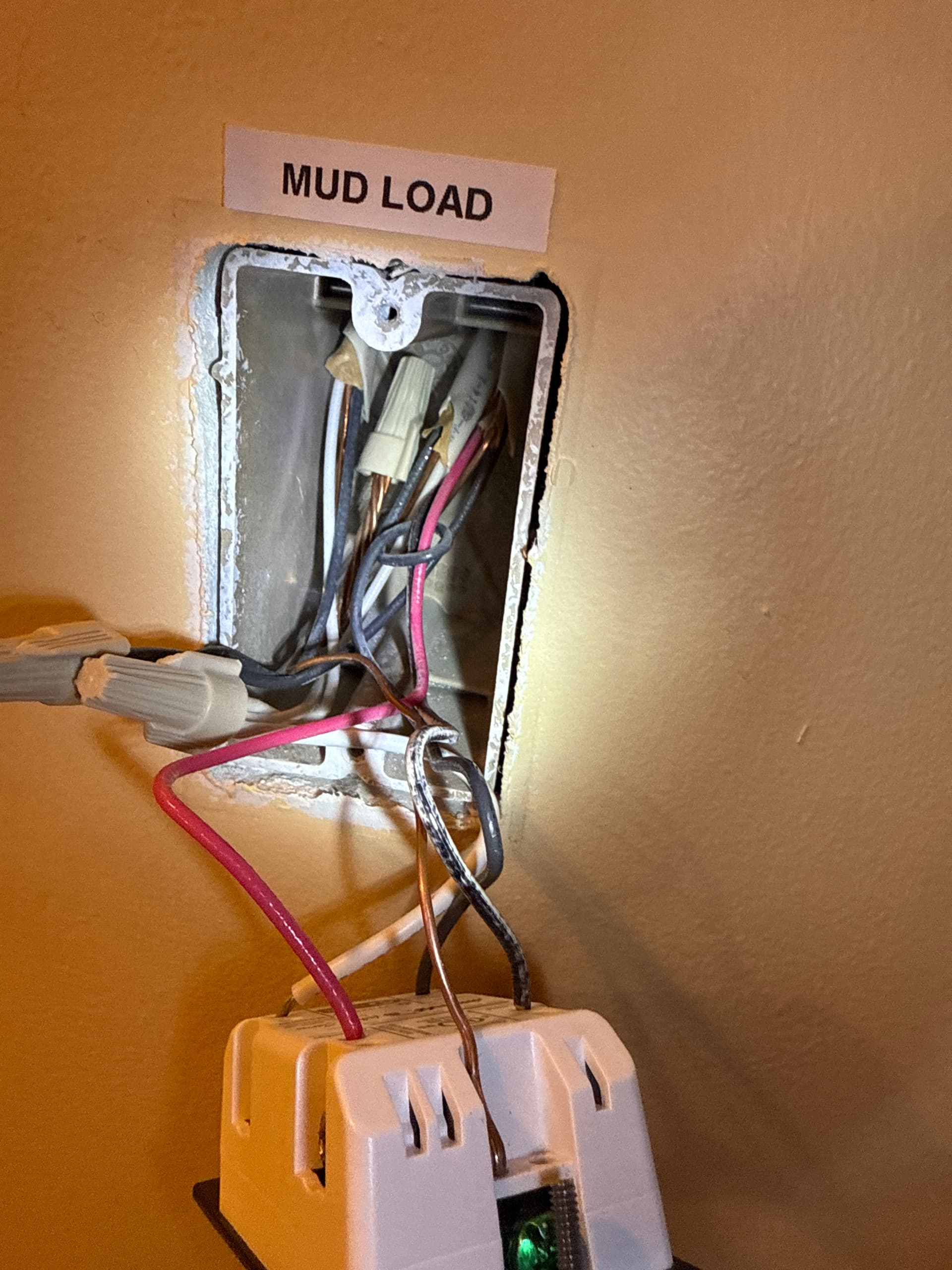
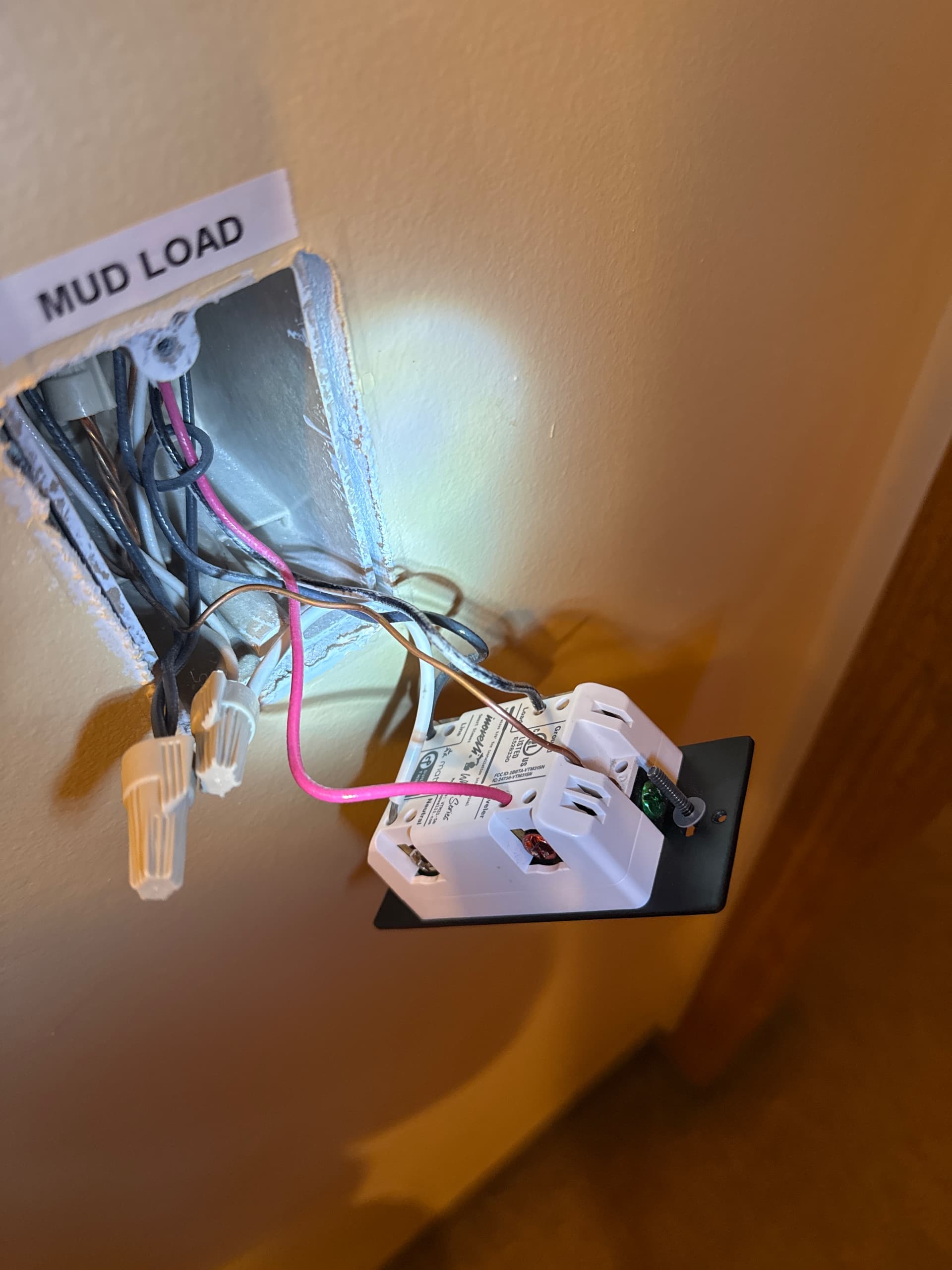
Mud Load


It’s a little tough to see into the box that you are calling the load box, but here is my initial impression. Please confirm if I am seeing what I think I’m seeing.

In the box you are calling load, you have two 2-wires and a 3-wire. In the box you are calling line, there is a single 3-wire. Confirm this please.

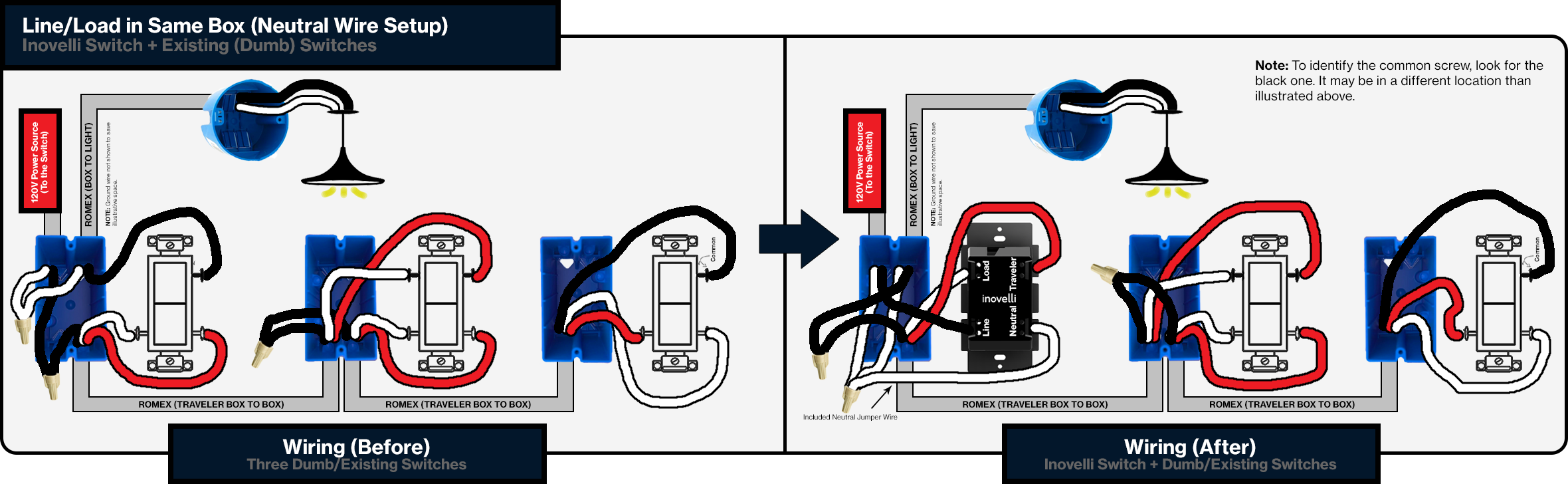
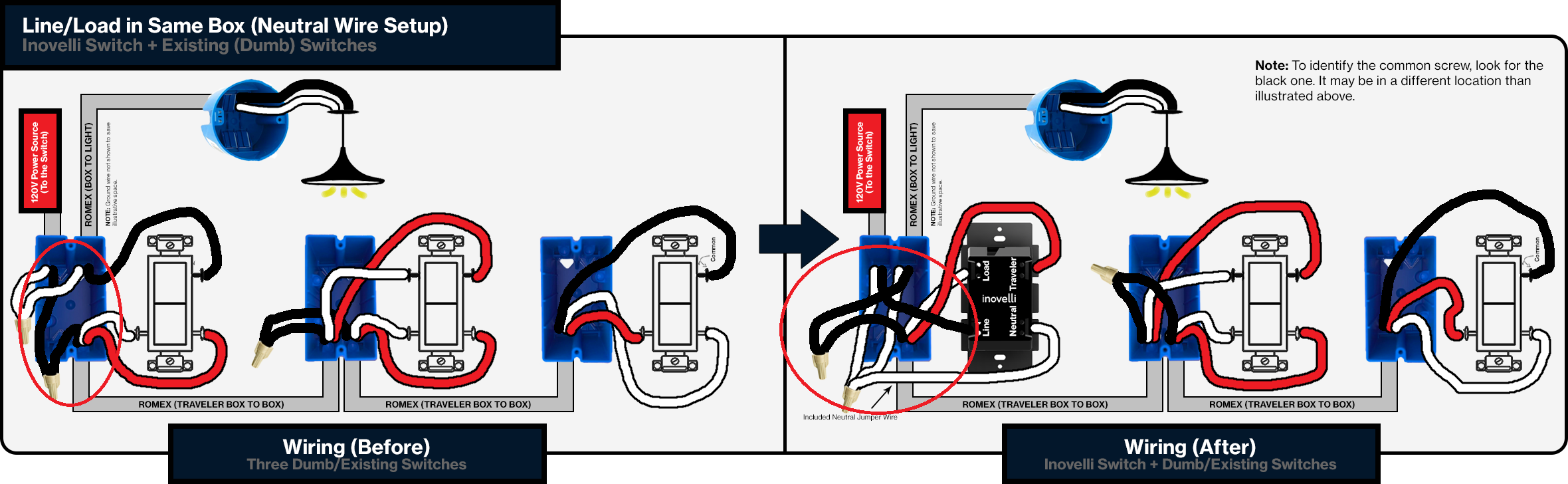
If that is the case, then you have a line and load in the same box, which in your case would be the box you were calling the load box. In this configuration, one of the 2-wires is the line and the other is the load. If this is correct, you are going to have to disconnect them and then test to see which is hot constantly, also testing with the other two switches thrown in different positions.

Once you have that identified, you can wire using the line and load same box wiring diagram.

It looks to me like they used 3-wires that have two blacks and a red. That’s not technically incorrect but that type of 3-wire is typically used for another application. Electrically it is the same as a black, red and white 3-wire, but it makes it more confusing to diagnose.

Post back with what you find let me know if I’m not seeing things correctly.

Here is the wiring diagram for line and load in the same box, but you need to confirm that’s what you have first.

1 Like

Thank you for the picture. I think this is the exact wiring I got. The black was repainted white.

I did a little testing on the wires on the smart switch end. This is what I got

3-way 4-way B BW R
Down Down Dead Live Live
Down Up Dead Live Live
Up Down Dead Live Live
Up Up Dead Live Live

Right now I have what the picture shows. Every time I switch any of the dummies it would kill the smart switch though. Then if I turn off the smart switch it would power cycle from cyan to green and back to the off position.

Sorry, but I have no idea what that chart is illustrating.

Did you unbundle the two blacks on the sets of 2-wires and test to determine which is constantly hot? It’s probably the black conductor that is entwined around the others.

Post a picture with the hot pair annotated. Also, pull everything out of the box as best you can so I can see better into it.

You’ll need to double-check your wiring. You have a wiring fault.

You were right. It ended up being a wiring issue. I didn’t unbundle the line and the black traveler. I assumed the wiring would be the same as a single-pole switch and just kept it the same as the original dummy switch. Definitely should’ve looked more closely at the documentation.

From my perspective the last box looked like it had the always live wire. So I though it was the line side of my box, but there wasn’t any neutral. That assumption was also wrong. I actually had the line/load in the same box.

I’ve fixed it now and everything is working as expected from all locations. at the documentation. I have corrected this and it’s working as expected in all locations.

This is probably why I am not an electrician :sweat_smile:

Thank you for your help and patience, much appreciated!

1 Like

Glad you got them going!

It’s easy to get confused. In a multi-way, there will be power on one of the travelers at least through part of the switch leg. But as you now know, that doesn’t make it the Line box!

This topic was automatically closed after 11 days. New replies are no longer allowed.