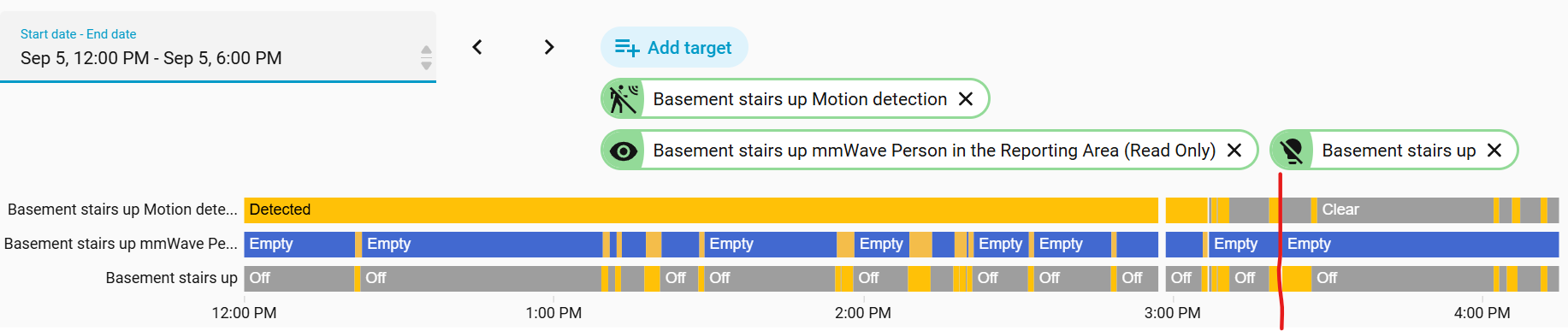
What does the motion_detection binary sensor indicate? Is it that motion is detected in the reporting area (defined by P101-106 and P117) or that motion is detected anywhere, irrespective of the reporting area?
Why does the motion detection sensor sometimes report “detected” even when there’s no motion? The motion detection sensor works as expected for ~5-10 days (i.e., it’s “detected” when someone walks by and “clear” otherwise). After 5-10 days, the motion detection sensor is always “detected” until I air gap the switch, then it works for another 5-10 days.
The mmwave_person_in_the_reporting_area_read_only sensor works as expected (top bar in the attached image).
Configuration: 2 VZW32-SN in a 3-way config (top and bottom of stairs). The switch in question is at the top of the stairs, connected to the load. Firmware 2.2.0 on both switches.
Love these switches when they work as expected, but I can’t air gap them every week.
Any idea why this is happening to me as well? Brand new switch. I don’t see other threads on this issue besides this one. The detection is wildly inconsistent and unreliable as it.
I can turn on debug in ZWJSUI and walk in front of the sensor when it gets in this state and no events are fired on the z-wave network. All other devices work fine.
There is a distinct difference between the raw motion entity and the target tracking presence entity exposed to smart home platforms like Home Assistant:
motion_detection
What it indicates: Raw, unfiltered motion detected anywhere within the radar’s maximum physical reach (~20+ feet).
Does it obey P101–P106 / P117? No. It triggers whenever movement is detected within the hardware’s full field of view, irrespective of your defined reporting boundaries.
mmwave_person_in_the_reporting_area
What it indicates: Target presence strictly within your configured 3D room boundary.
Does it obey P101–P106 / P117? Yes. It evaluates spatial X/Y/Z coordinates and will only trip when a detected target falls within those defined bounds.
Which one should you use?
For lighting & room automations: Use mmwave_person_in_the_reporting_area. This prevents false triggers from hallway traffic, movement past open doorways, or motion outside room boundaries.
For security or broad coverage: Use motion_detection if you want the switch to react to any movement within its hardware range, regardless of room bounds.
When the motion_detection entity becomes permanently latched on “Detected” after 5 to 10 days of normal operation (and only resets after a physical air-gap power cycle), you are dealing with a known firmware/hardware buffer issue on early builds of the Inovelli mmWave switches .
Primary Cause: Z-Wave Chip Buffer Overrun
The internal switch hardware uses a dedicated HLK mmWave radar module that communicates with an onboard Z-Wave or Zigbee transceiver chip.
In high-traffic areas or environments where micro-motions are constantly evaluated, the mmWave radar module sends a continuous stream of presence data. Over a span of several days (typically 5 to 10), the receiving buffer on the main processor experiences a memory stack overflow. Once this buffer fills up, the Z-Wave chip freezes its last known binary state which is usually “Detected” and stops processing new state updates.
Pulling the air-gap tab cuts power to the memory state, which clears the stuck buffer and restores normal functionality for another few days.
How to Fix It
1. Update the Switch Firmware
Inovelli engineering identified this buffer crash and pushed a firmware fix to increase buffer handling and rate-limit presence packet spamming.
For Red Series (Z-Wave / VZW32-SN): Update your switch firmware to v2.02 or higher via Z-Wave JS / Z-Wave JS UI.
If you cannot update the firmware immediately, you can slow down how quickly the buffer fills up by adjusting a few configuration parameters:
Increase Detection Timeout (Parameter 114): If set to a very low value (e.g., 5–10 seconds), the radar rapid-fires detected and cleared state changes every time someone shifts position, which accelerates the memory leak. Set this to 30–60 seconds.
Reduce Sensitivity (Parameter 112): Change from High (2) to Medium (1) or Low (0). This stops the sensor from constantly tracking minute environmental noise (like HVAC vents or pipe vibrations) when the room is empty.
Set an Interference Zone (Parameter 111): If the radar is tracking a static moving object (e.g., a ceiling fan or air purifier), set Parameter 111 to 1 while leaving the room empty so the radar learns to ignore background noise
The switches are on firmware 2.02 and yet they still get stuck in “detected.” Is there another firmware update that can fix this or should I submit a warranty claim for these? Sounds like you have it fixed in newer switches, which is encouraging because I need more mmwave switches!
Re: parameter tweaks, these two switches already meet the recommendations.
114: 60 seconds
112: Medium
111: Not applicable - no fans or other constantly moving objects within range of these switches, including on the other side of the walls that they face.
Is it a known issue thatmmwave_person_in_the_reporting_area is always “off” after upgrading to v2.04? If not, any logs I can provide that would help yall fix it? motion_detectionturns on as expected (i.e., walking in front of the sensor).
In the attached image, I upgraded the firmware to 2.04 at the red line (~3:15pm). You can see mmwave entity is always off/empty, even when motion detection is on. On 2.03 (left of the red line), the mmwave entity turned on as expected when someone walked in front of the sensor.
Can you reset the mmWave sensor and let me know if that clears this behavior. Make sure to copy the mmWave parameters so you can add them back after the reset. I did not see this after I updated my switch