The switch currently has no load on it and is only using the local motion to turn itself on an off. I was going to use it as a sensor for the room it is in but I sit just out of range, so it is constantly detecting then not detecting me. So there were no changes being made or commands sent to it when it locked up. That is why I think it may be a memory leak that is probably related to motion detection.
I have not made any changes to the switch after air gaping it and can leave it untouched for a few weeks to see if it happens again.
I configured some automation based on double/triple up and down. It is becoming very obvious that the switch is getting more and more delayed every day. When I double tap on the mmwave switch, it can take at least 5-10 seconds for the automation to start. Something that is instantly on my other switches and seems to be isolated to the mmwave switches only.
Let me know if you need me to pull any specific information.
Switch locked up last night. I have the detection timeout set to 0 in a room where it is constantly flapping and it still took a week, so if it is a memory leak related to that most people would not have an issue for several months. Logs show it turning on then off 5 times in under 3 minutes.
I’m going to remove it from hubitat, factory reset the switch and reboot the hub, then add it back fresh and only change the detection timeout.
All my red mmWave switches lock up regularly. They are all still running the original firmware (2.0). (Though I have enough of them installed that a once a month type bug would cause a singular switch out of the bunch to lock up every couple days).
It is hard to say exactly how often any individual switch runs before lock up. But it feels like it happens often. The single blue mmWave switch I have installed has been rock solid and does not exhibit the same behavior.
Similarly the blue switch I was able to configure so that it basically never has false positives triggers, but the reds have been super finicky. Though this maybe more a function of the blue is in an easier room.
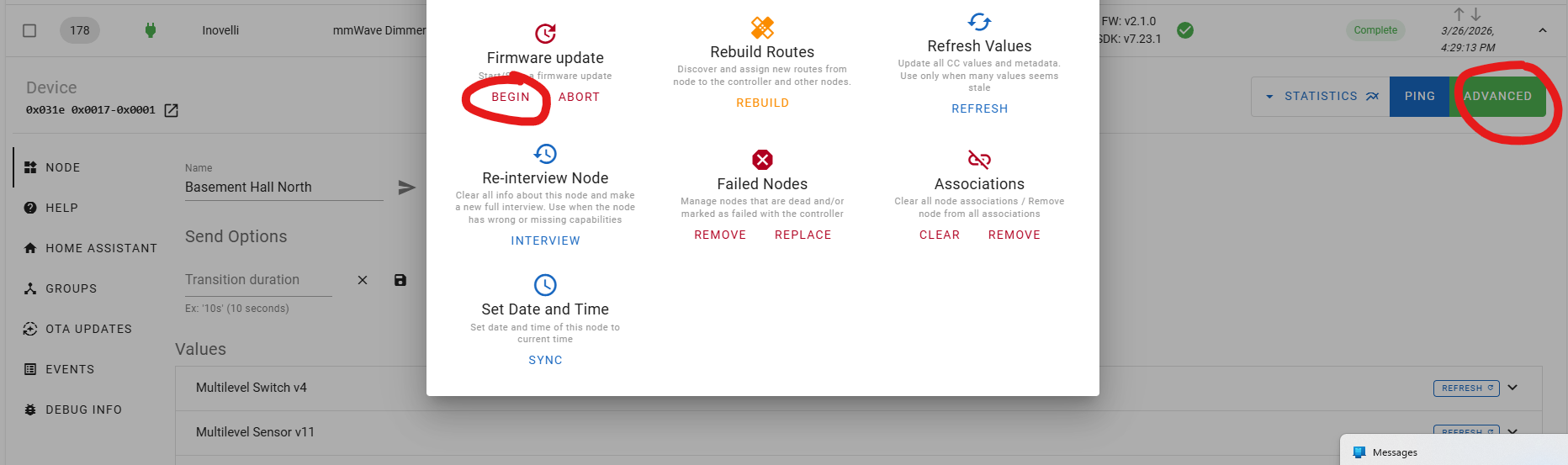
In the Z-wave JS GUI you click on advanced for the device and then begin firmware update. It will ask you which file and you use the one you can download in the top post:
Hm, I’ve never used the JS GUI, I just installed it and it looks like I need to enter some security keys before it will show any devices. Not quite clear where how to find those or where to enter them.
Honestly, I am not sure. I assumed since you had Home Assistant setup that Zwave JS was already running in the background (and you just needed to open the webui). Can you explain more about your configuration? If you want to PM me with screenshots you are welcome to do that as well.
I have 3 red mmwave switches and have witnessed this behavior on 2 of them.
Running 2.01 firmware on all 3, pulling the air gap brings them back to working order but it has happened 2 times on one of them and once on the other.
Our engineer is working on creating a test setup that can accelerate the testing of this issue. It is difficult to replicate over a shorter time period.
Just in case this information could be useful - I installed all 3 switches within a 5 day period, late February.
The two switches that I have witnessed the problem on have a few things in common:
Both are installed on the same set of stairs, one at the bottom and one at the top.
Both have customized mmWave detection boxes to prevent cats/dog from triggering lights. The cats run up and down the stairs constantly.
These 2 replaced a 3-way switch.
mmWave senstivity: 1
Has a single hue light bulb attached as a load.
Common aspects of all 3:
Powered via neutral
Switch Mode: On/Off
Aux Switch Type: Single Pole
Smart Bulb Mode: On
Light on presence behavior: Disabled
The switch itself is being used exclusively as a convenient way to install a motion sensor without needing to worry about batteries or running a usb cable up a wall. It is not being used to turn on/off a load.
The switch that hasn’t exhibited the issue so far:
Installed in a room that is used as a work office
NOT part of a 3-way switch.
Does NOT have any loads attached to it, it is the switch that would normally be used to turn off an outlet.
Has a customized mmwave detection box, but not as “small” as the stairs.
Significantly less cat/dog traffic in this area.
I realize this is a small sample size, but maybe it will help out some.
I’ll pass this on to the engineer. From what we gathered it seems like some kind of memory leak based on how many presence / no-presence events occur. So in high traffic areas or if you set the hold time really low it accelerates the issue.
I have 5 switches and the ones in high traffic areas do lock up more frequently. Also probably not related but I get phantom motion event triggers. I even tried setting very low detection zone like 50 in all directions and it still randomly triggers.
The engineer was able to replicate the issue and believes that it “is due to the mmwave module sending more data than the receiving buffer on the z-wave chip”. It takes a while to trigger the error so it is taking a while to test fixes for it.