We are currently beta testing a fix for the possible memory leak. @skynet @Collision @EMC75 @cfoos1 @bureau.radii (and others), please PM me if you are interested in trying it on a switch or two. I’ve put the changelog in the original post.
2 Likes
So far the new beta version is working great, will update if the issue occurs. I’ve had it running 3 days so far.
1 Like
I’ve had better experience with the switch not freezing up, but I still get fantom motion detections when no one is in the room, I’ve shrank the areas, tweaked them a bit, reset to defaults, but sometimes I will see the light in the office come on, the door is closed, there was no other side of the wall motion and the light stays on for like 15 minutes.
So something is “keeping it hot”, throughout the day when I am actively in and out of the office, the Stay life seems to be working properly and never more than what is configured (350 which should be like 17 seconds or so) and 45 seconds for detection time out. So really never more than a minute with no activity but yet at night it seems to stay on for 10-15 mins then go off.
Is there a way to see what the sensor is seeing when this happens? (like HLK Radar tool access?)
It’s been a little over a week now and 2.02 has been a huge improvement. It responds immediately and the delays I was experiencing have not returned. I am using the presence detection of this dimmer to turn on/off another dimmer and it never worked well. Even after a reset there would be a small delay. Very happy with this update and it’s been solid so far.
I bought 10 and installed only three so far, but now I feel comfortable with installing the other mmwave dimmers. Now for mmwave metrics and it will be awesome 
If anything changes I will provide an update.
1 Like
@momo Are you able to swap the switch with another one to rule out if there is a defect in that particular unit?
@EMC75 Sounds good, thanks for the support!
2 Likes
Can the beta version be made available?
Do you have any roadmap or working list of features/bugs/issues that are being worked on before a production release?
1 Like
Had my first reoccurrence of the issue today, with the switch that is in the busiest location. It’s located at the bottom of our primary staircase, and I have noticed over the last 2 days that if I approached it from behind to go upstairs, it wouldn’t detect motion.
In case it’s not clear, here’s a crappy mspaint diagram of what I’m describing. If I take the path in red, it wouldn’t detect me, but it would detect motion from any other direction until it finally stopped working today. The min distance is set to 0.
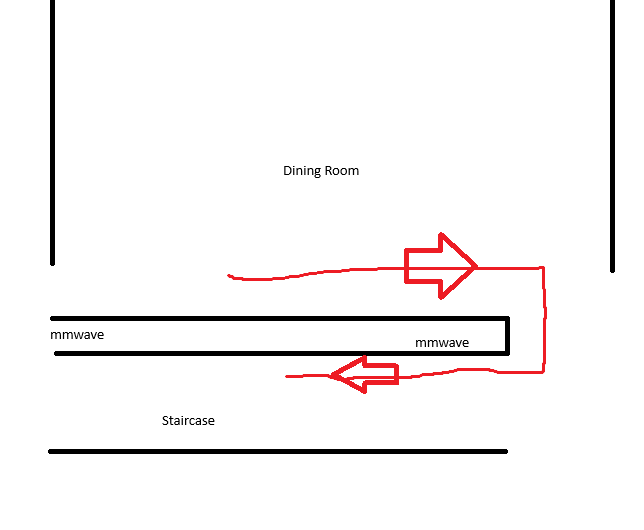
Now the switch doesn’t detect motion and doesn’t respond to digital or physical button presses.
In case there’s some hidden debugging feature that I’m not aware of that could be useful for your team, I haven’t pulled the airgap to reset this switch yet.
Try to pull the airgap and reset the switch. I was having similar issues with very unreliable detection. The latest beta did resolve this issue and so far it has been rock solid and it has not locked up at all. I do still have some phantom triggers and trying to figure those out. Hope to get x,y,z coordinates so we can map/log and really tune things.
Yeah, but the airgap fix shouldn’t be needed with the latest beta (2.02) firmware. I did go ahead and pull the airgap to get it working again.
The VZW32-SN on the upper part of the same stairway is starting to react slowly to movement, so I have a feeling it will also soft-lock in the next few days.
I recommend doing a full reboot of the Z-Wave MCU and the mmWave chip via an air gap after the firmware update to make sure the modification and communication with the mmWave chip are re-initialized. You may want to pre-emptively do this on the other switch as well.
I’m on the beta and had it lock up like usual after the update without air gap. Did an air gap to restart it and the switch has gone longer than before without lockups, so a restart may be needed to clear out everything from the old firmware.
I didn’t do this after updating the firmware before, went ahead and air gapped them all. I’ll post back in a few weeks if the issue reoccurs. Thanks!
1 Like
Unfortunately the same lockup occurred again, I don’t know if this lockup is from the same issue that is fixed with the new beta firmware – This one occured after 24~ hours of uptime on the switch because I had a brief power outage yesterday.
I pulled the air gap on it a few minutes ago, and if I have the time this weekend I’ll swap this particular switch out with a 4th one that I have sitting in a box to rule out a hardware defect.
I have 10 of these switches sitting in boxes ready to be deployed but it isn’t obvious if I should default to the 2.0 firmware they ship with or immediately upgrade to one of these betas?
I appreciate any advice. I’m also comfortable just leaving them in their boxes for the foreseeable future if I absolutely have to for additional firmware development time.
I would update them to 2.02. It is a significant improvement over the “shipped with” firmware.
1 Like
I decided not to replace the switch. The other 2 switches have been rock solid since I pulled the air gaps on them after the update, and the third one only had that one hiccup. 2.02 is definitely an improvement.
1 Like
Any update as to having a verified bugfix for these? Would love to buy more…
Red mmWave dimmers (VZW32-SN) running 2.2.0, hub is Home
Assistant with Z-Wave JS. Air gapped them after the 2.02 update like Eric
said to.
The one in our hallway keeps reporting motion in the middle of the night
when nobody’s up. Only noticed because the hall light kept blipping on
around 2-3am. Went back through the history and the motion sensor on the
dimmer goes active for a second or two then clears, no one near it. Handful
of times just this week, all between midnight and 4am (6/7 at 12:23 and
12:28am, 6/8 at 2:35 and 2:44am).
Reason I’m sure nobody’s there, my wife and I both have bed sensors (Sleep
Number) and they show both of us in bed the whole time, and the bathroom
light is on a motion switch and it never tripped. So the hallway is seeing
motion with two people asleep and nobody in the hall. When one of us
actually does get up for the bathroom it looks totally different, motion
fires, bathroom light comes on a few seconds later, bed shows someone got
out, and the light stays on ~30 sec. The phantom ones have none of that and
only last a few seconds.
Not a huge deal since I’ve got an automation that flips the light back off,
but it’s clearly the sensor firing on its own.
Other thing that might be related, that same hallway unit is getting noisy
on the zwave side. Over about 4 days the supervision reports off it went
from ~18/day up to 170+, and by 6/7 I’m getting S2 nonce errors and a couple
SPAN decode failures in the zwave js log. The other two dimmers are quiet.
Saw momo’s thread on phantom motion so figured I’m not the only one. Same
issue, and is there anything in a newer beta for it? Or a sensitivity/
blocking param worth tweaking to cut the false detections down in the
meantime? Can pull whatever logs help.
I would try changing the trigger speed from 2 to 1. I think that is how long it needs to detect presence before triggering.
Is 2.02 still an invite only beta? I guessed that this would be the link and it downloaded something, but I’m not sure if it’s correct.
https://files.inovelli.com/firmware/VZW32-SN/Beta/2.02/VZW32-SN_2.02.gbl
Also is there an ETA on an official release of a new firmware?
1 Like