was looking to see if you guys can help on2 issues I’m having.
in ZHA in home assistant all the parameters do not show up in the main configuration page. it’s only a small smattering of parameters that show up. I’ve looked at all the available threads and they say they show up after some time but they still haven’t after about a week. also tried removing and re-adding them.
I can’t seem to figure out how to turn off the presence sensor for when folks go to sleep. looked all over but nothing clear on how I can make the automation ignore the presence sensor during sleep time. Any help here would be appreciated had to take my son into another room to sleep last night :).
I’m guessing you don’t want to turn off the presence sensor per se, but want to keep the switch from turning the light on when presence is sensed? If so, that’s P110. You’ll probably have to change it with an automation:
Parameter 110 - Light On Presence Behavior
To define how the switch should behave in response to presence on the Blue Series mmWave Presence Dimmer switch, find parameter 110 in your hub’s UI and change accordingly. Suggestion: Start with 1 for typical occupancy-based lighting. Try other modes to suit your environment.
Range, Default, Size & Firmware Version Implemented
Range: 0-6

    0 = Disabled - Presence does not control the load

    1 = Auto On/Off when Occupied (default)

    2 = Auto Off when Vacant

    3 = Auto On when Occupied

    4 = Auto On/Off when Vacant

    5 = Auto On when Vacant

    6 = Auto Off when Occupied

Default: 1

Size (Bytes):
Ah thank you this is helpful. So does that mean, if I set that parameter to ‘0’, I’ll be able to still use the presence sensor itself in an automation? because you’re right I do not want to disable the sensor itself just not have it control the light it’s attached to all the time because no amount of automation will stop that from happening it seems.
also… I can’t see that parameter in the UI as stated in my other problem statement, do I just send the configuration via the configure tab after putting the switch into configuration mode?
Correct - that’s how I use mine. In my automation, I have a PIR sensor trigger the lights as soon as you cross the bathroom’s doorway plane, and then the Blue’s mmW takes over to keep the light on, and then turns them off when it determines room is clear.
If hub is down for some reason (rare), then we just use the paddles for on/off like cavemen
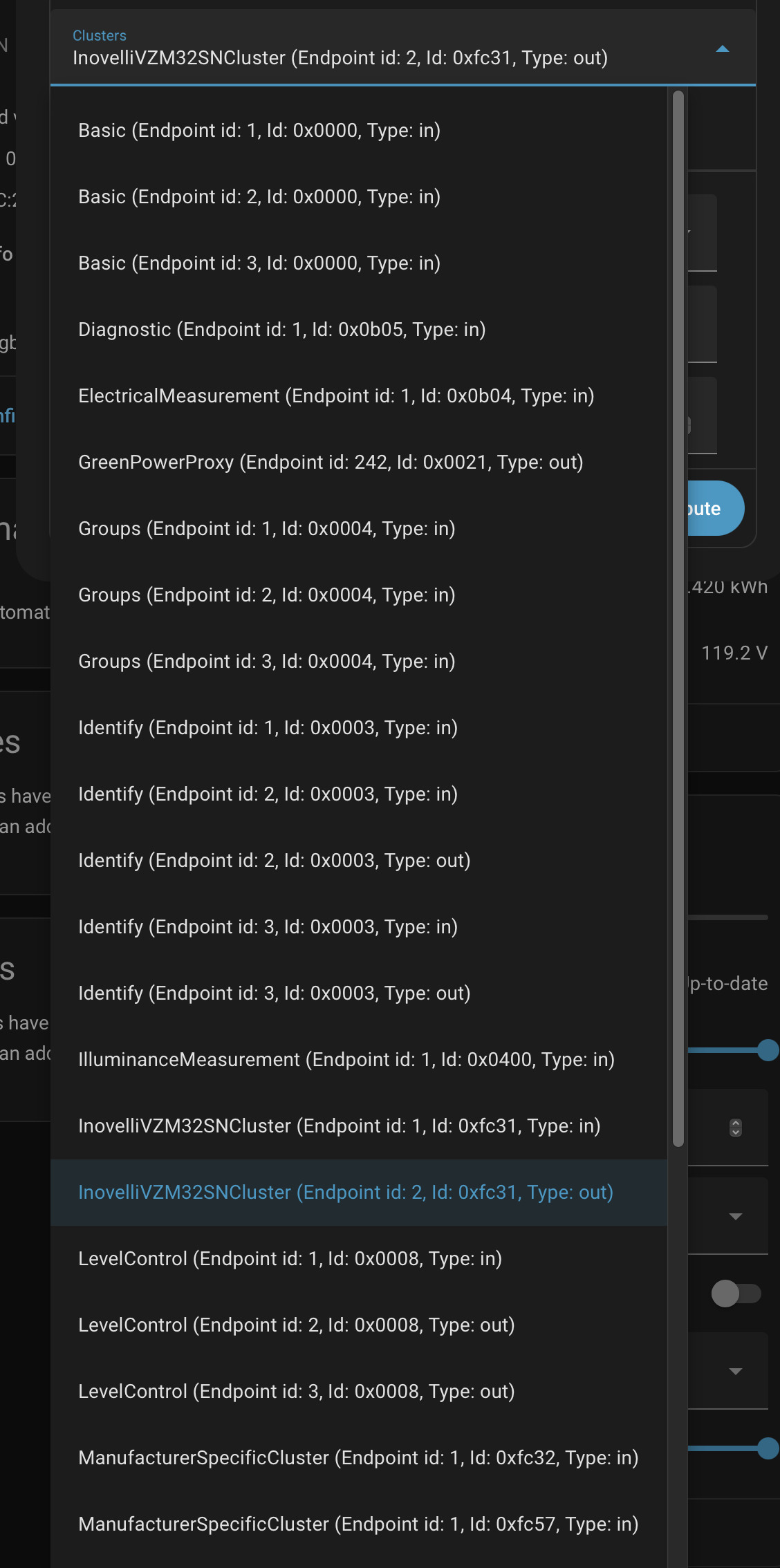
sorry for all the noob questions.. but where do I set the configuration parameter above? I have home assistant and don’t have a smart home hub. I’m looking at the ZHA interface for managing the parameters and which endpoint do I use to send that value? (screenshot below)
I don’t see parameter 110 in any of these endpoints. And do I have to put the switch into configuration mode before sending values from this interface?
I’m the last guy you want to get HA guidance from, but I think that at the present, you may need a custom quirk to expose all of the mmWave parameters in ZHA.
The parameter you’re looking for is in the InovelliVZM32SNCluster (Endpoint id: 1). It’s called light_on_presence_behavior. I do exactly what @hydro311 described. I have the parameter set to 0 and then use an automation in Home Assistant to turn on the switch when the mmWave sensor entity detects occupancy.
Alternatively, you could change light_on_presence_behavior to 0 at night and 1 during the day, but I like having more control over the light logic in my automations. To update light_on_presence_behavior in an automation you’ll need it to be exposed directly in Home Assistant, which isn’t available yet. This will be fixed once ZHA deploys the update (timeline TBD, but hopefully not too far out). In the meantime you can use the custom quirk to expose all of the switch’s entities in HA, as well as enable the mmWave cluster so you can customize the room size, sensitivity, and other mmWave parameters.
Note: Over the weekend I noticed that one of the mmWave entities (stay life) still isn’t exposed. I have a PR out to fix it but it hasn’t been merged yet. Hopefully it will be soon.
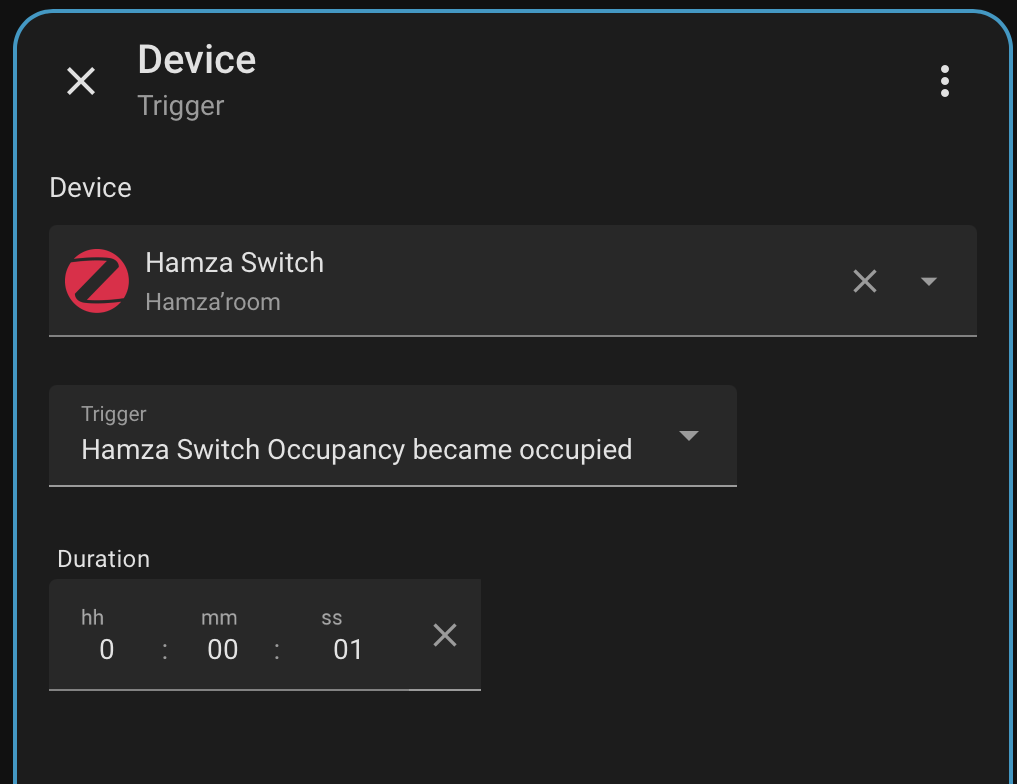
If I could bother you for one more question if that is ok now that I’ve been able to modify the above parameter. I’m having a little difficulty on one of the automation steps. If I use the inbuilt blue print for presence sensor for turning on light, everything works peachy. but I can’t edit it for scheduling.
If I create a new automation from scratch, I can put in scheduling time and all, however the following triggers don;t seem to activate the light the way it would with the blueprint →
The timing parameters shouldn’t impact your automation. I typically use a state trigger followed by light.turn_on, but the way you have it should work too. I’d look at your occupancy entity and ensure it’s showing detected/clear properly. If so, then the issue may be with the scene.
Here’s a simpler version of what I do. I have far more complex logic in my automation to account for more than just time, but it’s the same basic concept:
 had to take my son into another room to sleep last night :).