Inovelli: White Series (Thread/Matter) Smart Dimmer; no neutral wire connection
Fixture: “Dumb” Light (non-smart bulb)
Platform: Apple Home
I would to make a change to my setup. I want to enable Smart Bulb Mode (scene control only). This will leave the dumb bulb on since the switch provides constant power to the load in this mode.
I would like to set the paddles as follows:
UP paddle: run an automation that turns on a Homebridge dummy switch AND
enable the dimmer’s internal relay so that power is cut to the dumb bulb.
DOWN paddle: run an automation that does the opposite; turns off the Homebridge dummy switch AND disables the internal relay so that power to the load resumes.
I guess the overall question is: can Apple Home disable/enable the dimmer’s relay via automations, or can this only be done directly on the switch itself (manually)?
Please feel free to correct me if I am misunderstanding/misstating anything; I welcome and appreciate feedback and solutions!
btw, after the last few updates, the dimmer is working flawlessly.Thank you Inovelli team!
I think what you’re looking to do is disable local control so the switch won’t activate the relay, and then use the button press to control via automations.
EDIT: It’s called Local Protection (Parameter 256) that you would want to enable. You can do this from the switch itself by holding up on the paddle and pressing the configuration button 10 times. To reverse it, hold down on the paddle and press the config button 10 times.
Yes, that part I got. The challenge is that the light fixture is not “smart” so it cannot be controlled by automations, even if button presses run them. Hence, I want to be able to enable/disable the internal relay itself with automations. (This in turn will turn the light on/off.)
I think you’re not quite understanding what I am saying…
You don’t need to control the light fixture, just the switch, which is why you don’t want to use “smart bulb” mode.
If you enable Local Protection, the switch will no longer allow you to control the relay in the switch by pressing the buttons.
Instead, you use the paddle or favorites button presses from the switch through Apple HomeKit to turn the relay in the switch on or off through automations.
I was commingling the switch’s SBM state with local protection {Local Protection (Parameter 256)}.
Anywho, bottom-line: the solution you offered gave me exactly what I needed; (Thank you, koadic!)
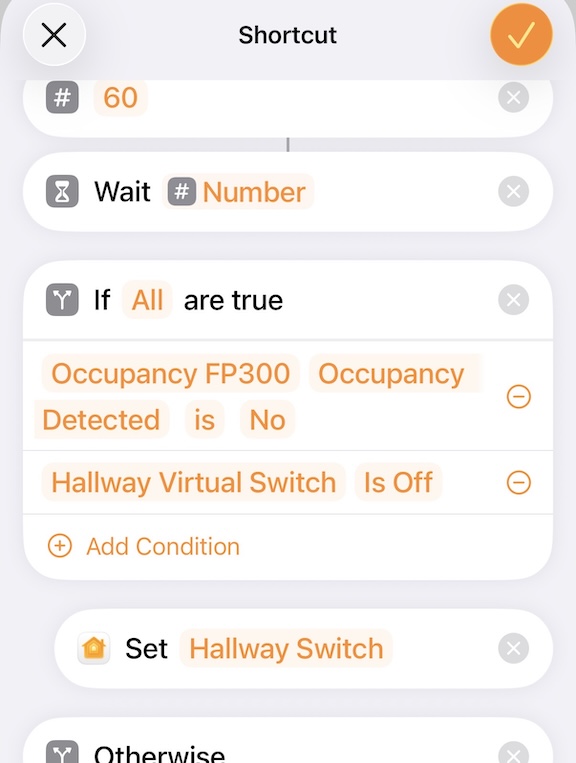
FYI for anyone running into this thread: hallway lights turn on when (Aqara FP300) presence is detected, then turn off 60 seconds when sensor detects no motion. Perfect; nope.
A household member (vague, huh? would like to press the switch (UP, Button 1) to keep the lights on until they manually turn them off (DOWN, Button 2).
This solution gives me exactly that without getting too complicated. (I think, LOL)
 would like to press the switch (UP, Button 1) to keep the lights on until they manually turn them off (DOWN, Button 2).