I am constantly seeing detection in my laundry room when there is no one near the room. What settings should I start changing to try and eliminate these false detection? Also is there a cross from the parameter table to where they are in Home Assistant ZHA?
I have just reset the switch and it is showing detected in Home Assistant. No one is near the room. Could wind from the outside effect the switch? It is very windy tonight and the switch is mounted on the outside wall.
If you haven’t yet, it’s worth setting the depth and left/right distances so they are just inside your actual walls. That helped me with a couple rooms where I was having detection challenges. If your washer/dryer are running, that could be it as well. In my laundry room I set the room dimensions so that the washer/dryer aren’t in the detection zone. Before that, when they were running that was enough motion to cause detection.
Thanks. I had did that as well. Yesterday afternoon, no one was in the room and nothing was in either machine. It was showing detected. I reset the device, I added a timer and I rebooted Home Assistant. It has been clear since. Not sure if any of these did anything or it was a coincidence. This has happed a couple of times where it seems the switch is “stuck”.
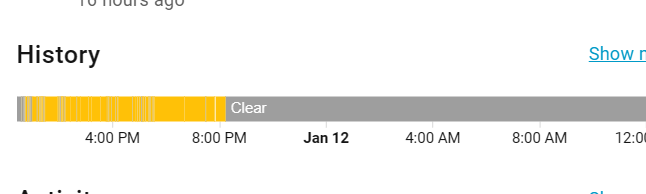
Here is the history. The Kitchen Island (mmwave sensor) is associated and controls the Kitchen sink (inovelli dimmer). After constantly turning on/off, the association bugs out and stops turning on/off the kitchen sink seemingly following the motion detection. However the island light keeps turning on and off probably due to the mmwave sensor still working.
I’m seeing the same issue when I put the switch in my kitchen. It kept turning on and off every minute and then eventually gets “stuck” causing any z-wave associations to also not get triggered. I changed my room to “Large” and set the sensitivity to “Medium” and it didn’t seem to work. After trying to figure out what’s going on, I suspect that the air purifier is causing the sensor to turn on. So maybe check if your switch is pointed at a wall vent.
“Have you tried restarting your switches using the air gap, then setting your interference zone with parameter 111 while your air purifier was running?”
I read you could reset the device by holding the two buttons for 20 seconds. Is is incorrect? It has been working today correctly since I have done this. This is the third time I have had to do this. Does not seem very reliable. Is there logs that can be looked at to troubleshoot this device?
I just looked in Home Assistant and it shows the device showing clear from last night until now but the light is going on and off when I enter and leave the room. Not sure what is going on as it should show detected and then turn on the light?
I restarted my switch by using the air gap. Then associations started working again. I then used parameter 111 (mmWave Module Commands) to send 1(The interference area is automatically generated) to have it update the interference area with the air purifier running. Seems to be working much better now. No false positives, yet.
I was trying to find documentation for the FoV in relation to the “Areas” listed in the config. Because Area 4 is the only area that ever says “Occupied”. It would help pinpoint the location where the sensor is seeing the movement or activity.
I just walked into the room with Home Assistant open. It shows Clear, the light goes on as it should Home Assistant never goes to detected. It has been this way since the reset yesterday. Light has been on several time, it never shows as detected. Never did this before. How do I fix this?
Try pulling out the airgap then pushing it back in to power cycle the switch. In one of my previous pictures, you can see that the Kitchen Island motion detection stays clear, however the Kitchen Island light kept turning on and off. Power cycle seems to have resolved that sync issue.
I’ll try this next time. I would like someone to confirm what the difference is. The online docs say that you can press the paddle up and hold the button for 20 seconds and it resets the device. If this is not correct the document should be changed. When I do this I need to repair it with Zigbee.
To factory reset an Inovelli VZM32-SN (Blue Series 2-1 Switch), hold the top of the paddle (On button) and the Config/Favorites button simultaneously for about 20 seconds, until the LED bar turns red and then pulses blue, indicating a successful reset; alternatively, cycling the breaker and then performing a quick paddle press sequence (top 3x, bottom 3x) might also work if the primary method fails, but the 20-second hold is the standard method for this model, according to Inovelli, this YouTube video, and Inovelli Community, this Inovelli forum post, this Inovelli forum post.
Resetting it with the paddle up/config button for 20 seconds is factory resetting the switch (setting all parameters back to defaults and requires pairing to the hub).
Airgapping the switch or flipping the breaker is just power cycling the switch which can fix a lot of transient issues without factory resetting.
Oh, that’s news to me. Most inovelli devices have the tap config 3x and hold up for 20seconds to factory reset.
For z-wave, factory reset can also happen if you exclude(remove) the switch from the mesh network. Maybe that’s what they’re referring to for zigbee, just an exclusion/removal from mesh to trigger reset of configuration?
When I pull the airgap, it’s just power cycling the switch while retaining my own configuration. I’m not factory resetting the configuration.
You can just use a flathead screwdriver or your nail to pry out the airgap. You don’t need to take off the plate. But yes, they should accomplish the same thing.
In any case, I have reset it many times and it has a mind of it’s own. Says occupied when not and clear when occupied. I believe I am going to replace it with my old motion sensor switch. Very disappointed with this switch.
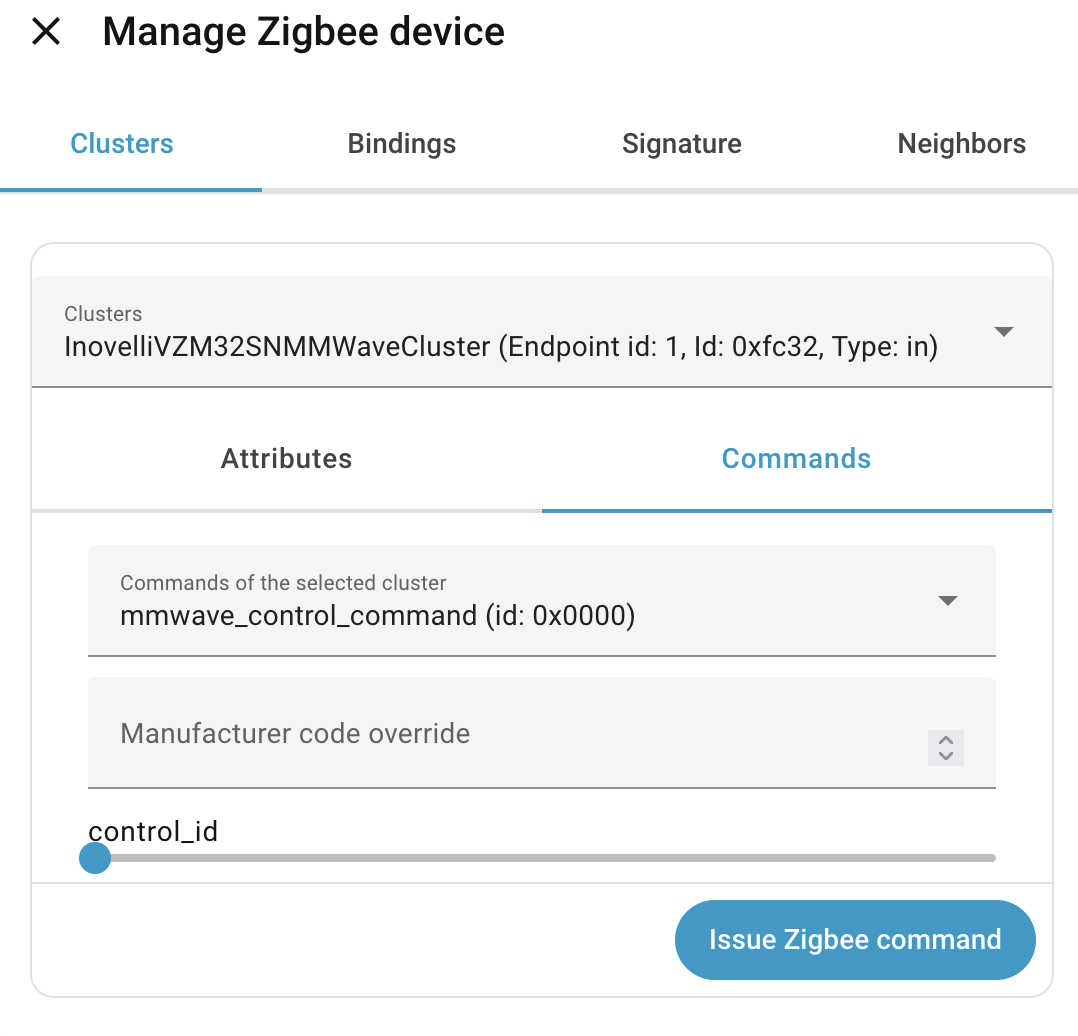
Does anyone have instructions for how to issue the set interference area command with ZHA? If I go to the zigbee device, this is the screen I’m looking at – I’ve tried issuing a manufacturer override of 111 and a control ID of 1; I’ve also tried leaving manufacturer override blank and just doing control ID 1. Both of these seem to do something (switch blinks), but they don’t show LEDs glowing amber and don’t seem to fix my washing machine triggering the switch.
Did you find an answer to this, t_3? I am in the same boat and I only got THERE after installing the custom ZHA quirk from Inovelli. Previously I had some generic cluster for 0xfc32.