Is it possible to actually set the LED to completely “off” when the switch is Off? I’ve tried using the configuration info for the On / Off White series switch but cannot get it to actually save the settings after setting the LED to 0 when the switch is off.
“LED OFF Intensity” and “LED ON Intensity” serve this purpose perfectly for my own White Series On/Off. I just set them to zero in HA and there’s no more LED.
I got it fixed. I had to factory reset and then I was able to set the LED to off and it saved the setting. I don’t use HA as I am trying to avoid any third party stuff. I spent too many years fighting with Conbee and HomeSeer and Z2M. I want my system to be as simple as possible so when I’m not here anymore my wife doesn’t have to deal with that mess.
Hah! I have a tech-savvy sister-in-law that is tasked with “de-teching” our house if/when something happens to me!
I changed mine to 0, now decided that I actually want it set to 1 for off. The variable is now listed as non-writable, so I guess I’m going to be factory resetting and again setting up 20+ switches.
Note sure if which switch version (Dimmer, On/Off etc) you are talking about and what software version you have. However if you have the dropdown mode-select below you need to use it rather than the box that you can type a number into (with the same label two items below the dropdown). The second box will go away when HA processes the code change that handles custom clusters on the White Switches. I just tried it and setting the LED Intensity (Off) to zero on the dropdown turns off the LED bar when the switch (load) is off, setting it to one or above and the LED bar is lit when the switch (load) is off.
Use this if you have it:
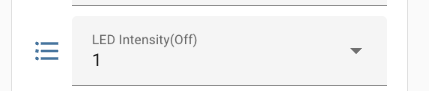
Not this:

Related to this, is there any concern of the LED ever “burning out” if left on for years? I have no idea what the life of the little bulbs are, but it’s something that’s been on my mind since the LEDs on mine are on all the time.
I’ve had older red switches in service in 2020 with the LEDs at 20% brightness when the lights are off and at 60% brightness when the lights are on and not a single LED has burned out in that time period.
I had a Leviton/HAI Zigbee Interface Module (ZIM) with backlight LEDs that changed color over time. The red, green, and blue LED brightnesses diminished differently, affecting the color. I worry that this may happen with these switches as well. Time will tell I guess.
Good tip on the Dropdown versus the Text box. You mentioned something about it going away when Home Assistant processes a code change.. Is that within the Home Assistant Core, or you’re saying when you delete unused entities from the switches after a firmware update? Because I did the latter after updating to 1.0.4. It’s not reporting “Unavailable”, so the switch has both I’d think?
You are correct. The upcoming change is in HA core. The history is that prior to Inovelli’s support for “mode-select” clusters this was a heavily requested feature so it was implemented using a custom cluster in HA by @harryh. Now that feature is supported by mode-select (which creates the dropdowns automatically) the old implementation needs to be removed from HA. @harryh has already done the PR to remove it. It just has to work through the queue to get released by HA.