Just starting to get my feet into the Smart Home ecosystem and learning the ropes.
Doing a little bit of research on smart switches, I decided to go with the Inovelli switches for the flexibility and open development platform currently shown here.
I recently purchased a single VTM30-SN switch as a test run before I convert the rest of my house, and I’ve got it working almost the way I want.
My current set up is having a White Series On/Off switch set up in Smart Bulb Mode that is passing constant power to 4 LIFX fixtures that are all talking to Home Assistant via Matter over Thread.
I realize this basically makes the switch more of a Scene Controller, which was my goal in the first place.
That last thing that I’m having trouble with is this: I would like the LED dimmer bar on the switch to reflect or show the brightness level of a Home Assistant Light Group and am not sure how to go about doing this.
I’m not sure if it’s an issue with Home Assistant configuration or something I need to set up on the switch, but I can’t find any way to control that LED bar on the switch reliably.
Am I going down the wrong path in thinking this is an option or is there actually a way to do this with the products I am using?
As of now, this is not possible with the On/Off switch. I’ve seen a few people ask about it, so it’s possible they add this feature later, but I wouldn’t count on it.
However, this is possible with the Dimmer (VTM31), so you could just swap it out when you kit out the rest of your house. If you do, make sure to connect your load wire (the one that goes to the LIFX fixtures, assuming that’s how they’re wired) to the line terminal on the switch. That way, your smart fixtures always receive full power without going through the switch’s dimmer circuitry.
That’s really unfortunate to hear that they didn’t allow the ability to manipulate the LED bar like they could in the Dimmer switch.
While I could get a Dimmer Switch and bypass the switch entirely to power the lights, the main reason I got the On/Off Switch was to still have the ability to relay the lights on/off if I needed to factory reset them. If I was doing a wiring bypass, it would mean having to completely take apart the switch to achieve the same thing.
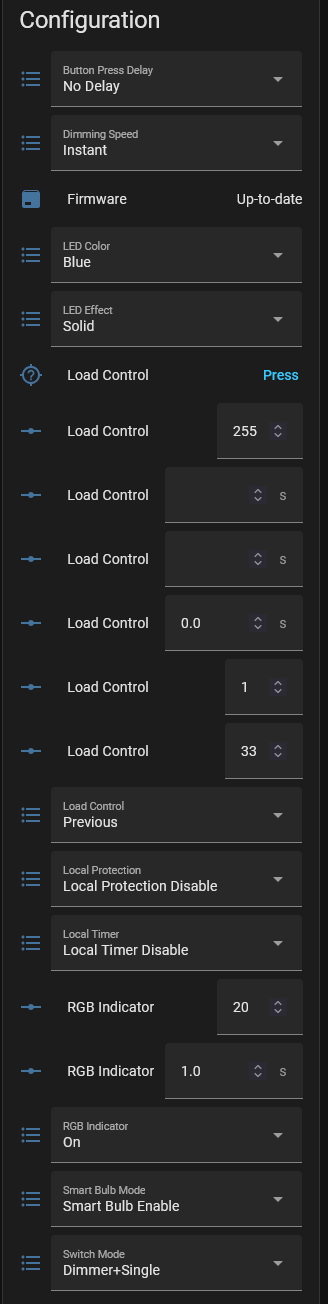
@Bry, I have the Switch currently configured like this:
I don’t have a white on off, so I don’t know if that dimmer plus single is the same as the dimmer mode described in the quick tap settings. To put it into that mode using quick tap:
Enable Dimmer Mode
Hold Down + Tap Config 3x
If the switch has successfully been switched over to a dimmer switch, the LED Bar will flash Orange
It just seems strange that that setting is there. The blue on off has the same setting and the LED bar works as a dimmer when bound to a bulb.
Curious that Matter would limit the parameters that could be edited on the switch, or perhaps it’s just not programmed in yet? Is there somewhere to put in a feature request?
@Bry To clarify, I’m doing all of the dimming on the Home Assistant side, the Switch itself has no knowledge of any of the lights and is just sending commands to HA. What I’m looking to do is just have the LED bar act as a “display” for the brightness value in Home Assistant.
I see. I had it in my mind that the bulbs were bound to the switch. That’s not the case with you, but you just want the LED bar display the level change. It seems to me that some here have done that in the past without binding (on the Blues), but it’s been a while since I’ve seen such a post. HA isn’t my primary hub, so I’m not sure of the solution, but hopefully someone else who has done it can comment here.
I’m one of the beta testers for the White series switches. My understanding is this capability is currently a limitation for the VTM30 due to Matter issues. @jvm33 should be able to provide more details.
The VTM30-SN is my first Inovelli device, and I played around with it for a few days before finally installing it into my production system. The one part I couldn’t figure out was the “dimmer” aspects. So may I ask, what does “Dimmer mode” mean for this switch device?
That’s used for when you have the switch bound to a bulb(s). Even though it’s an on/off switch, it can act as a dimmer when bound. (The Blue on/off does the same thing.)
I don’t have any whites, so I can’t comment based on testing. However, Inovelli believes that the dimming is working. Hopefully Inovelli will be able to address it here.
If you don’t mind if I ask, using HA Matter Server UI for the VTM30-SN, I only can find one binding cluster, and its the one for endpoint 2 (Dimmer Switch). I don’t actually see one for endpoint1 (On/Off). Do you know which one endpoint you did the binding to?
I appreciate all the feedback and answers, everyone!
So just to recap: it appears for the White Series switches, at this time, it is not possible to control the RGB indicator on the switch due to a limitation with Matter.
I assume this is hopefully something that eventually will be fixed with an update, to either both the Matter protocol and the switch firmware in the future?