Just received the module and got it installed - was replacing an Insteon FanLinc.
I use Zigbee2Mqtt, and OpenHab - for the purposes of this question, Openhab is not relevant.
I’ve bound the VZM31-SN wall switch and on/off/dim of the light works exactly as expected.
I’m having trouble with the fan speed. I’m only able to get the fan to spin at one speed - slow.
I’ve double checked some of the settings via Zigbee2Mqtt, specially set the min fan speed to 1 and max fan speed to 255 (though they are already defaults).
When I try and change the speed within the Zigbee2Mqtt UI - no change. I’ve also tried sending the commands directly via MQTT explorer just to rule out if the UI was doing something odd.
Any suggestions on how to proceed?
The fan is an AC motor (as that was also required by the FanLinc)
Please direct me elsewhere if this thread isn’t the right place.
Thanks very much.
ps - wire length is great - much easier to manage versus the Insteon device.
Hi @mike.kolcun, can you please try the edge version of z2m? There is a bug in the current production release that won’t go live until 4/1 in the prod version of z2m.
The yellow block in the help article should help with getting edge:
I just installed the Blue Fan Canopy module. I installed the three drivers listed in Hubitat It paired with Hubitat, I selected the type Inovelli VZM36 Zigbee Canopy Fan, the page updated as expected. I called the device “Table”. When I click Initalize the child devices never get created. I cranked up the log level:
java.lang.NullPointerException: Cannot invoke method getDataValue() on null object on line 548 (method initialize)
Table initialize()
java.lang.NullPointerException: Cannot get property ‘deviceNetworkId’ on null object on line 1748 (method updated)
Table Set Private Cluster attribute 22 dataType 0x20 value 0
Table calculateSize(8)
Table setParameter(22, 0)
Table updated()
It seems that the initialize routine is getting a NPE on
I logged parent and it is null. Since no code ever initializes this I am assuming it is some kind of global that is not getting initialized for some reason
After switching to the dev branch, it’s working great now.
Just to confirm, it’s not currently possible to use zibgee bindings to bind both the light and the fan from the canopy module to the wall switch. In order to do this, it would require firmware version 2.17+ for the VZM31-SN, which is not yet public.
That is correct. The 2-1 switch will require firmware 2.17+ which is not released yet and changes in Z2M that should be merged into the dev branch of Z2M soon.
I have an older home and two of the fans I’d like to install this on have single pole switched neutrals. where the fan is always hot and the neutral is interrupted by the switch. I cannot easily change this setup without cutting into drywall. Can I still install this?
Sure can. Since your power originates at the fan, you connect the hot an neutral there to the fan module to power it. You’ll also connect that hot and neutral to the black and white going to the switch box (after removing the dumb switch). This will provide you a hot and neutral at the switch box as well.
You can then add a Blue 2-1 switch and use either multi-taps for automations or binding to communicate with the module.
Oh I thought I read above that if you update through Hubitat it would load 2.17.
The paddle part binded to the light just fine but the config button won’t bind to the canopy.
I’m running on Hubitat, with 2 canopy modules on two fans on the same circuit.
I’m using the blue 2in1 switch, configured as a scene switch with no load.
The Group Bind 1 is set to 2.11, and the Group bind 2 is set to 3.22 on the 2 in 1 switch.
In each canopy module, I have EP1 as group 11 and EP2 as group 22.
Each Fan child has 22 in its bind #1, and the light child has 11 in its bind #1.
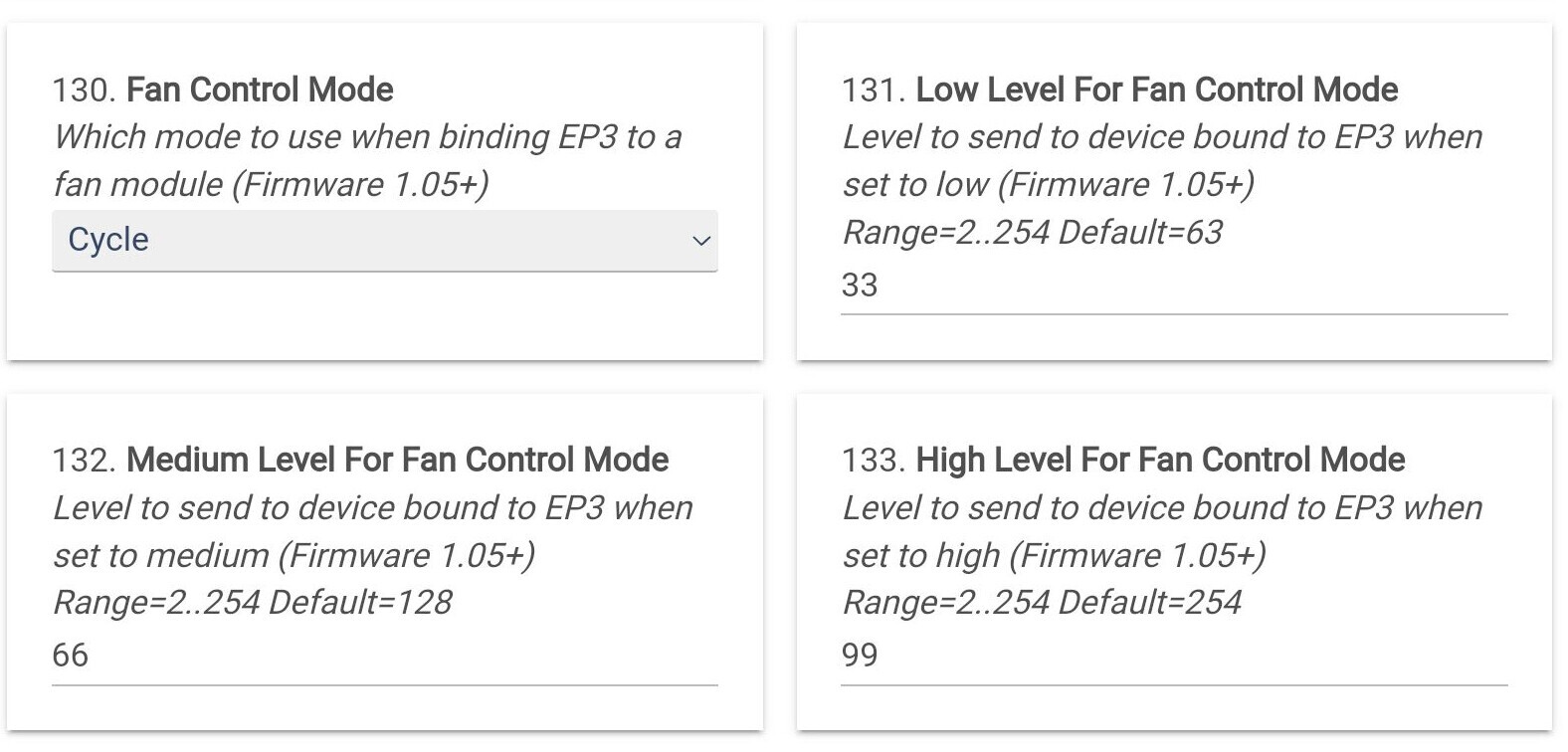
As noted elsewhere, cycle doesnt work yet, but the fan will come on and go off with successive pushes of the config button, and the light comes on and off with the paddle as well.
S
Update: Bindings working to control 2 canopies on one circuit. Lights by paddle, cycling of fan speeds by the config button on the 2in1 switches. Very Cool. Thanks @EricM_Inovelli !!!
I set the paddle up binded to the light so that works fine.
I used rule machine and the button mappings for the speed control and off using the config button. 1 press on low, 2 presses on medium, 3 presses on high and 4 presses off.
Works well and I can go right to the speed I want with config button presses.
I’ve tried to follow the writeup on zigbee bindings instructions for Hubitat, but it’s not very clear to me, and this particular scenario also seems a bit different, is there a write up specific to the combo of the 2-1 switch and new fan canopy that was provided? I’ve installed the canopy and switch but had no success with executing the bindings yet.
Hi all - so far, between the 2.17 driver and the edge Z2M version both the switch and the canopy are working exceptionally well.
Few follow-up questions for both team Inovelli as well as anyone else familiar:
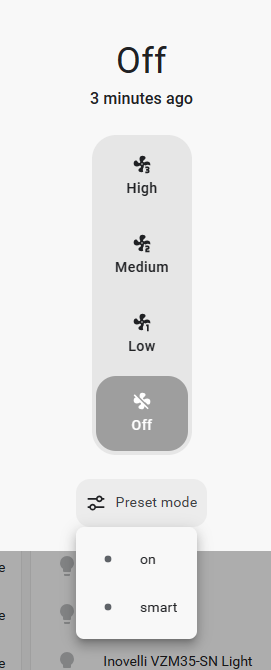
In adding the canopy fan entity via HA Homekit integration, I get two extra buttons (reported by HA as “preset_modes” if triggered. Can i exclude them? Can’t quite seem to find the entity exposed that does this.
turned on triggered by HomeKit send command set_preset_mode for Fan-Light Canopy (
)
10:03:02 PM - 2 minutes ago
turned off triggered by HomeKit send command turn_off for Fan-Light Canopy (
)
10:02:57 PM - 2 minutes ago
does the 2-1 switch expose a fan mode toggle? Or should the fan be controlled via canopy? If so, does that de-sync the button toggling from the switch in case one is operated remotely, and later locally?
can a user double press fan button for full off if it’s in cycle mode? Or just have to run through cycle till i hit off?
(nice to have, not even sure how necessary) for the 2-1 switch, cycling through fan modes provides three different intensitities of the same color - can three different colors based on fan speed be set?
Each Fan child has 22 in its bind #1, and the light child has 11 in its bind #1.
when you say bind#1, are you referring to the “Group Bind #1” under the preferences section, or the “Bind” segment for the commands section. Or am I still completely confused…lol
I think I understood the high level description of the rest of your post though I’m not combining two different canopy modules to one switch, my situation is a switch and module combo at each fan. I’m still not completely sure what else would need to be done outside of the devices section to be honest (assuming that something else needs to be done)
does anyone have a link for this exact combination of the blue 2-1 and blue canopy for the full process of setting up the zigbee binding from scratch to work as it was promoted to work for hubitat? I have a few places I need to install this combination of switch and canopy module but I definitely don’t know how to execute this from A-Z. pairing the devices to the hub was easy, this feels complicated though so far.
Hey all – just wanted to say I created some binding instructions for SmartThings and Hubitat here that should help anyone that stumbles across this and needs help with binding a light switch to the canopy module. I think Eric M is working on Home Assistant instructions.
I used a variation of this in Hubitat.
For actions I chose “Adjust Shades/Blinds or Fans” Then the buttons 8,9,10 or 11.
It works great and a few less steps to go through.
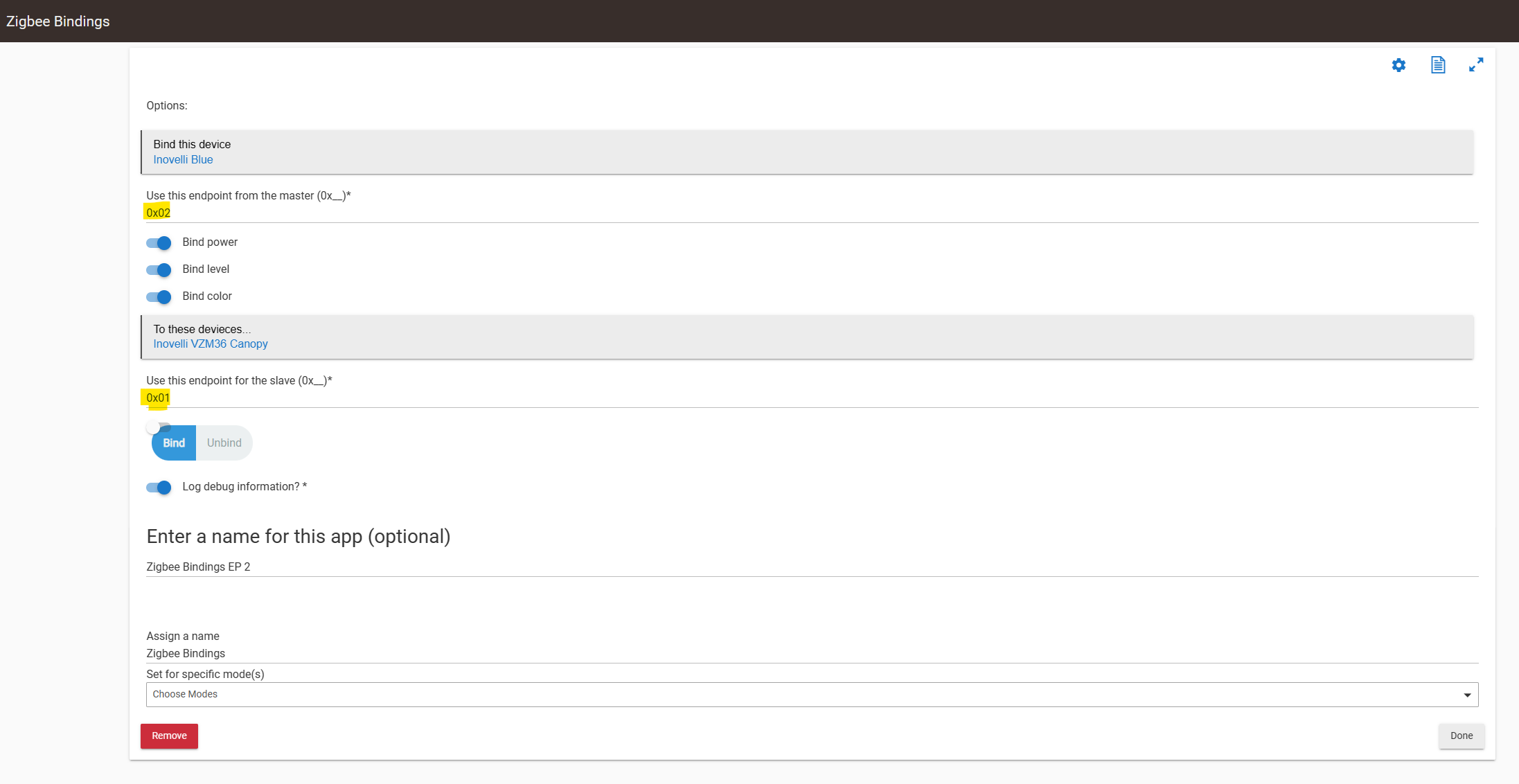
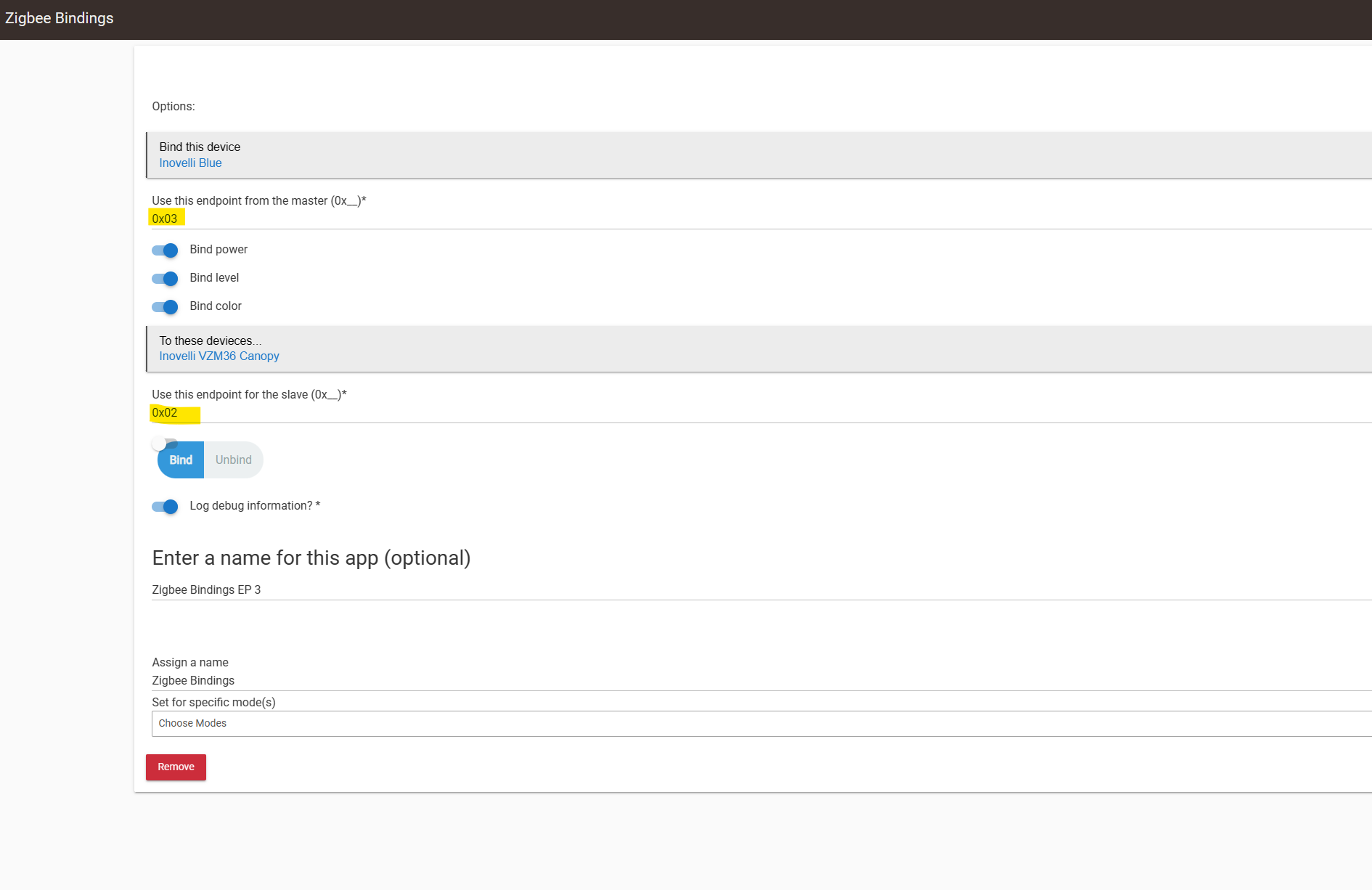
The document provided by @Eric_Inovelli goes over this in much more detail but the quick and dirty is to use the Zigbee Binding App and bind Endpoint 2 of the switch to Endpoint 1 of the module and endpoint 3 of the switch to endpoint 2 of the module.
Not familiar with those, but maybe they are these?:
Can you disable them in Homekit?
It does not. You will have to control the module from HA and they will get out of sync. Since there is an LED display of the level when you hit the config button (that only appears when you hit the button) I think that it is only a minor inconvenience. The multi-tap method might be useful in this scenario so you always know the exact speed it is going to go to.
I have not tested this but it seems like it would work. You could create a double press scene in HA to turn it off?
Parameter 134 lets you choose the color. The default color is white, but it might not be showing for you because the firmware update may have shifted some configuration update around. If you manually change P134 to a different color or factory reset it (factory reset will change it to white).