Those might be the “Reporting config response” messages from the device. The driver isn’t written to parse those but just to give a warning.
Yes, I got it working.
Made a small code change at 2228, i dont understand why this worked, but it does
@Field static final Map<String, Map> SupportedSwitchTypes = [
‘Inovelli Blue 2-in-1’: [
title : ‘Inovelli Dimmer 2-in-1 Blue Series VZM31-SN’,
type : ‘capability.switch’,
To thiis
@Field static final Map<String, Map> SupportedSwitchTypes = [
‘Inovelli Blue 2-in-1’: [
title : ‘Inovelli Blue Series (VZM31-SN Dimmer & VZM30-SN Switch)’,
type : ‘capability.switch’,
In case anyone else is seeing inaccurate power usage metrics with these new switches in Home Assistant, there’s a thread here.
Do you have an estimate of when you’ll have all of the preorders shipped out?
Hi there,
Due to the large number of backorders we are still working through, our best estimate at this time is 2-3 weeks to get through everyone’s pre-orders while still getting new orders out timely.
1 Like
I’m a bit annoyed that new orders are being sent out before all of the preorders are processed…
Shipping new orders in the mix does seem like an odd choice. If I’d of known new orders could jump the line, I probably would have just waited until they were in stock to put my pre-order in, since I’m pretty sure I was late to the pre-order party and further back in that line.
I think he means new orders of other products. They have a single shipping department, and they are likely intermixing backorder processing and processing new orders for items that were not backordered. The alternatives would be they stop shipping any other products for weeks while they process the on/off backorders, and since those other products have been shipping for a while there are people that depend on getting them in a reliable timeframe.
2 Likes
Oooh, that does make some sense as a potential read. This is one of those moments where the decisions on where to put certain words (or not) really matters.
I’m still figuring out my problem with the switches powering off that I reported elsewhere, but is there a trick to getting the reporting to happen more frequently on zigbee2mqtt? I tried setting the minimum report interval to 1 and the min reportable change to 1, and it still only reports every 60 seconds exactly:
2025-08-11 13:38:01z2m: Configured reporting for 'MBR Bathroom - Switch - 4 - Fan', 'msRelativeHumidity.measuredValue'
info 2025-08-11 13:38:01z2m:mqtt: MQTT publish: topic 'zigbee2mqtt/bridge/response/device/configure_reporting', payload '{"data":{"attribute":"measuredValue","cluster":"msRelativeHumidity","endpoint":"4","id":"MBR Bathroom - Switch - 4 - Fan","maximum_report_interval":3600,"minimum_report_interval":1,"reportable_change":1},"status":"ok","transaction":"9rh66-1"}'
I’m using Hubitat and noticed that these switches are creating a lot of activity in the system log.
I’m not very interested in the temperature and humidity reporting.
I set all 6 of these settings to 0, but I’m still getting some reports.
Has anyone else run into this? Did I miss a setting?
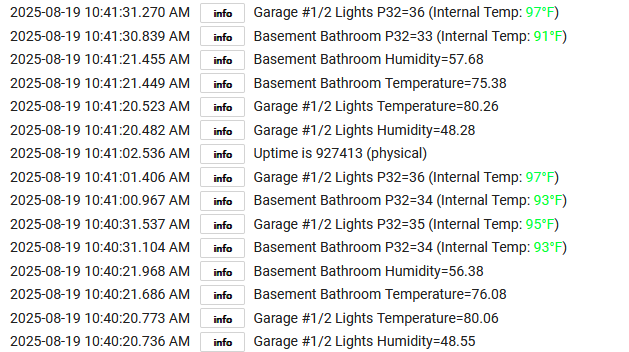
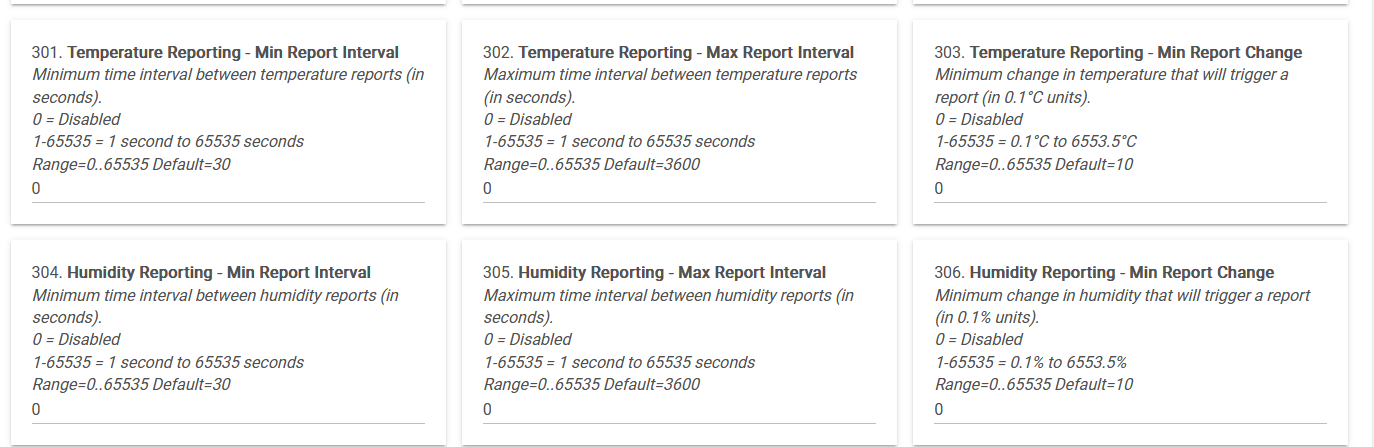
I put in a bug report related to this.
I have a VZM30-SN switch that does not update its on/off status on my Hubitat hub.
Distance from the hub is not an issue.
I have a couple of other VZM30-SN switches the same distance away (10 ft) that work fine, so it seems to be only this one.
I’m also using the latest driver.
Any ideas?
Run a “Configure” command on the device from its device detail page to see if that helps.
If it doesn’t, reset the switch (see: Blue Series On/Off Switch • Factory Resetting Your Switch | Inovelli Help Center) and re-pair it to the hub. Do not delete it from the hub first; it will slide right back into place after you do this, though if you’re using it in any Zigbee groups, you’ll need to open the corresponding app (a Group from Groups and Scenes or a Room Lighting instance would be two common ways you could have done this) and hit “Done” to re-save that information on the device. Re-save device preferences if you changed any too, though the UI should remember their values and just a save should do it. Other than that, it’s a pretty painless process that could take care of configuration issues that I’ve seen cause this issue, especially if you tried another driver at some point.
Thanks for the reply.
I followed your instructions but haven’t made any progress on any of my switches.
The drivers were already installed before pairing, but I repeated the process as suggested:
- Reset the switch
- Repaired it to the hub
- Confirmed the correct driver was applied after pairing
- Ran Configure
The switch responds to ON/OFF commands from the hub, but when I operate it locally, the hub doesn’t register the status change.
If anyone else has ideas, I’d be glad to hear them.
Thanks
When I have issues like that I hit initialize and refresh as well if drivers have those options. Might even help to switch to a generic driver, run configure, then go back to the Inovelli driver and run configure again.
Are the button presses being logged?
Good question.
“Last Button” updates correctly.
“Pushed” updates correctly.
Switch - does not
Energy - does not
Power - does not
edit -
Hit Configure and Refresh (again) and now everything seems to be working.
I thought you could only 3/4/5way using a Aux Switch.
Am I looking at the wrong page?
You can also wire multi-ways with multiple Inovelli switches and binding
Edited for correctness.
The documentation for the On/Off says " unlike our Dimmer Switch, it does not work in a multi-way setup with a “dumb” switch (an Aux Switch is required for multi-way settings)." If it’s wrong, it should be updated, but I don’t think it’s wrong. For multiway that has an On/Off switch you have to use other smart switches or an Aux switch.
1 Like