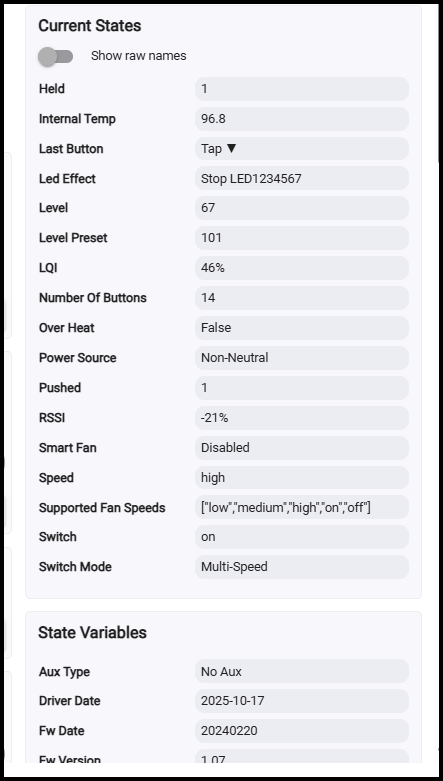
A few days ago I noticed that one of our fans wouldn’t switch into high speed. Remembering there is some issue with non-neutral installations and max speed, I checked the power source attribute and it’s reporting non-neutral.
Now I find that every Blue fan switch in my house whose switch mode is set to Ceiling Fan is reporting non-neutral. This isn’t an old house; every switch box has a neutral and this isn’t an isolated case of the neutral wire being loose or disconnected. Strangely, the switches set to Exhaust Fan mode are fine.
Air gapping the switches returns it to correctly reporting neutral and allowing the fans to go into high speed mode.
WTH is going on here? I’m on the latest firmware and drivers (Hubitat).
I have also been experiencing this issue for a few months. The switches were previously working as expected with a neutral wire and then started behaving as if there were not a neutral wire. I just came across this post and pulling the air gap and it also returned the switches to accurately reporting neutral. Thank you for that!
I also finally got around to validating with a multi-meter that the neutral wiring is correct, which it is. I expected it to be as it was working previously and nothing has changed, but I wanted to rule that out.
I am also on the latest firmware.
Have your switches continued to work or have you had to air gap them again to get them to work again?
It happened more than once prior to when I made that post in Feb. It hasn’t happened between Feb and May, but we’re away for the summer so I don’t know if it’s happened since then.
The only way I knew it even happened is because one day I noticed that the fans on our patio weren’t going very fast. In non-neutral mode, you lose the high speed setting for some reason and I remember reading that somewhere (maybe in the manual).
Pretty disappointed that nobody from Inovelli has even acknowledged this issue. These aren’t cheap switches, and I have a hefty investment in them. I’ve replaced every last switch in my house (45 or so) with blue series switches.
I am also getting the same plus a high pitch buzz sound from the fan switch. It has been working well for 1 year + and just started reporting non-neutral. I’m going to kill the power and validate but there shouldn’t be any issues from how it was wired when I put 14/3 in the wall for the fan.
Flagging this for @EricM_Inovelli. If the wires are all correctly in place and tight behind their plates and rebooting the switches is fixing it, this sounds like it may be a firmware issue.
I’ll note that I haven’t seen it myself (though I only have 1 fan switch).
I am also wondering, though I’d have to check the firmware but I normally let MQTT handle that for my switches. I did confirm, “Air gapping” the device, it now reports back as Neutral and the buzz is gone again. I only noticed it on this switch but its been up and running without any issues for almost 2 years.
It’s only happened to me a couple of times. Probably some obscure firmware bug that most people either don’t run into, or don’t notice. Only reason I noticed it is because our patio fans seemed to be running slower and I recalled something in the docs about high speed not working if there’s no neutral. At first I thought the neutral wire was loose, but then discovered that every fan switch in my house (5 or 6) was also reporting non-neutral. So something common triggered the bug, but I have no idea what.
I have a Antero 44 in. Hunter Express Indoor Matte Silver Ceiling Fan with Light Kit Included. I did validate it’s a AC, with three speed and otherwise works well. Only within the last weeks have a noticed the squelch noise from the switch. I’ve also noticed the temperature is a bit hotter than normal. The light is also running on a blue but with a separate switch. They do all have a common neutral.
Is there something I can run from MQTT to provide feedback?
Nope, nothing at all. We have six fans on five switches. Four different models (and probably manufacturers) of fans. All are your typical 3 speed AC fans you’d find in Home Depot or Lowes.
Thanks for the info, I’m working with the engineer on this. He is looking into what might be causing it. The switch is supposed to only check for neutral vs non-neutral during boot up. I’m not sure if the switch rebooted and mis-detected or if somehow it just got changed. We might implement a workaround that makes that setting stick until after a factory reset (the factory reset would trigger the switch to check again but otherwise it would always stay the same).
Any update on this? It’s happened again, sometime in the past 4 months (we’ve been away for the summer). Only 2 out of 6 though are reporting non-neutral; the other 4 are correct. After air-gapping the 2 and doing a refresh, they’re back to 'neutral’ again.
Is there anyone here that would like to beta test this new firmware that lets you manually set the neutral vs non-neutral. First it would be ZHA or Z2M users.
I would, please. I had this (and the buzzing) problem and replaced the switch, thinking maybe it was just bad. The new switch doesn’t buzz, but I still have it reporting non-neutral. My problem MIGHT be different from others in this thread because the air gap trick doesn’t seem to do anything.
This DID, at one point, allow high fan speeds for me, though.
I just installed fan switches in my living room and bedroom this evening and they’re likewise reporting no neutral and I’ve physically validated the neutral is tightly connected. They both have a neighbor blue series dimmer switch that connects to the same bundle of neutral wires and those correctly report with a neutral, so I suspect I’m hitting this bug as well. The fans are both Maxim Lighting brand.
We sent out an email about this, but there is a firmware update that allows for manual configuration of neutral vs non-neutral. The default is neutral which is what most have, so you shouldn’t need to take action after the update but it might be worth checking. Here are the details: