Blue series 3 way pairings stop working occasionally (possibly after power outage)

Well we are a bit beyond the first couple of times after power outage at this point. Using group bindings we always lose commands if they are sent “too fast”. Such as more than once per second. Some fail every time even if they are the only command sent that second (usually it’s the same switch group or two). Dimming basically doesn’t work correctly because it’s sending a constant string of commands until you let go of the switch. This always causes switches in a group to be out of sync with each other (in terms of how bright they think the light is).

I agree I need @EricM_Inovelli or a firmware engineer to help review this and possibly suggest further troubleshooting tasks. But I have been unsuccessful at trying to get further acknowledgement of any kind. I tried pinging him in this thread a few times back in may, no reply. I tried the DM when I sent you one on May 27th, no reply. So I’ve been bumping this thread hoping that eventually I get some kind of response.

I understand that everyone has a lot going on, but it isn’t like I’m sitting here snapping my fingers for a fix in half an hour with no input from me. It has been 5 months since I started this thread and 4 months since I have gotten any acknowledgement from someone at Inovelli. I guarantee I am not the first or only person with this issue. I am just the only one taking the time to come here and try to figure it out. Anything that anyone at inovelli wants me to test, I would do for them in a heartbeat to try to solve this and make sure that nobody else has the same problem that I do. Maybe we will find some incompatibility with other hardware (although we’ve already tried switching coordinators). Maybe we will find some issue with a specific configuration of switches that causes problems. It could be anything, and solving it would help other customers not have this issue. Most customers who will have this issue will have absolutely no idea where to even begin to troubleshoot it. They will just think their switches don’t work right and that’s how they are. So far I have demonstrated that I can do complicated troubleshooting. I am willing to take any steps possible to solve this issue. Even if I have to buy things to test with (within reason). But I can’t do it on my own, I need help from someone at Inovelli who has any idea how this stuff works.

Linus has been talking about installing his soon (he mentioned for 2 or 3 consecutive weeks now on the WAN show), and I bet his setup will have more switches than mine does. What if he runs into this problem? He’s going to be led right to this thread where there’s no resolution.

I also would like to briefly point out, normal people simply cannot understand these switches the way they are now. Every person who comes in the house has to get a 5 minute rundown on the switches or else they end up having problems. If they weren’t having this issue, it would be no problem.

@agordon117 I can jump back into this issue to see if we can shed any more light on what is going on. It is difficult to resolve since it seems more like an underlying Zigbee SDK issue that will require coordination with Silicon Labs to investigate. I’ve got your packet capture and the key so hopefully that will give us some good info. I want to just confirm we are up to speed. I think we determined that devices do not automatically re-establish their device-to-device routes after a power outage and we’re investigating a manual ping from the switch side (if possible) . . . I don’t think I heard back from the engineer on this possibility, so I’ll have to check again. The multicast issue you are seeing is also perplexing as I have a large network and haven’t noticed any missed commands. Although I do remember one situation where my z2m install was down and I think some of my switches did not turn on the group when presence was detected but I didn’t investigate much after bringing z2m back online. Is there anything else I am missing?

I think you’re up to speed on it. Everything on my network has been converted to groups since they don’t have that initial issue of needing half a dozen presses to talk to each other. But like you said the group commands just are not making it through. Also just to note, I either reduced to minimum or eliminated the status updates that the switches send to the coordinator just to help eliminate an overloaded network as an issue. I detailed it above somewhere.

The capture I sent is only the group command issue, I didn’t really think about that but if you would like I can convert a group back to individual bindings and get a capture of that after an outage.

I haven’t even really started any of the more advanced things like you mentioned with presence. The most complicated thing I set up was a built in timer. I suspect that would work just fine. Everything seems to work reasonably well from home assistant control. I can’t assert this as 100% fact, but it seems to only be packets that originated from one switch and need to go to another that have issues. Commands that originate at the coordinator have much less issues, if any.

Anything you need at all, just let me know.

Also, if you have a minute can you pop into my other thread and give that a look? I suspect that one has a much easier solution than this (such as an optional delay on detecting neutral, or a way to send a reset command that will make the switch go through the startup process again remotely). I’ll ping you in it again for visibility.

Also, thank you for taking the time to look at this

@EricM_Inovelli this may or may not be meaningful to your engineers as they browse this thread for clues. I had an issue with home assistant over the weekend. I updated both Core and OS. MQTT then refused to start. After hours of debugging with unhelpful errors in the logs, I finally found in mosquitto broker that it was receiving an oversized data packet, and shutting down.

This was after I rolled back both OS and Core. To get it working again, I had to add a customization to mosquitto that allowed it to handle 10MB packets. 1MB was not sufficient, it still crashed when I increased it to that. Once it started to work again, I went ahead and switched back to the newer versions of OS and Core, and everything works fine now. All I can guess is that this would have happened at any point that MQTT restarted since I began running the available OTA updates on the blue switches (about half of them had updates for quite a few weeks now and I finally started updating them a week ago). And the first time that MQTT did restart was when I updated home assistant.

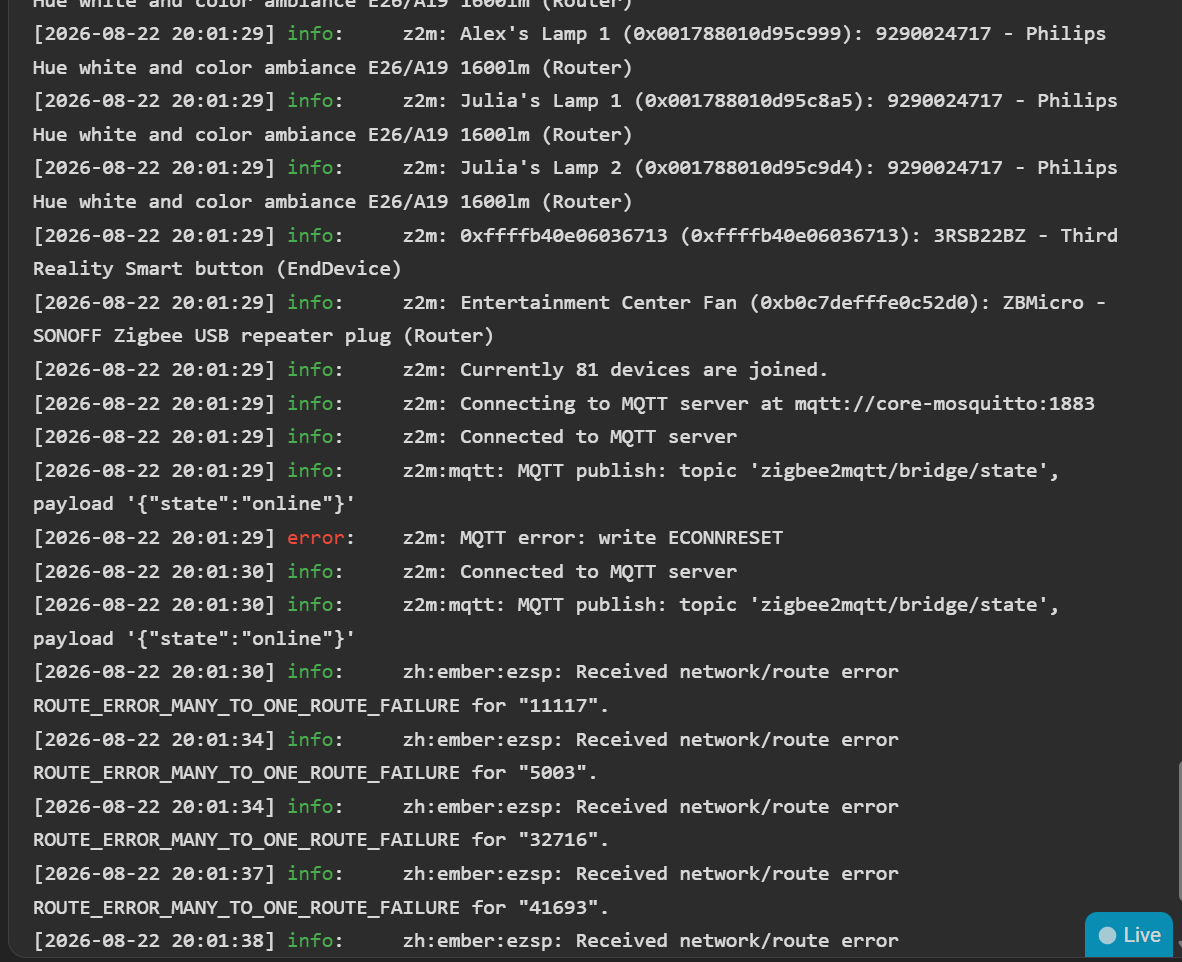
Pretty much everywhere in the MQTT logs while it was trying to start, I was seeing the same “MANY TO ONE ROUTE ERROR”, as well as “ROUTE SOURCE FAILURE” that I have pointed out earlier in this thread. I am never seeing these errors on any of my 8 hue bulbs, so it seems they aren’t building a network that requires every device send packets through a very small number of other devices to reach the coordinator (or each other directly). Or their packets are so small that they just don’t have an issue. No idea which.

All I have on MQTT is:

-a single battery powered switch (philips rotary dimmer)

-a switchable usb plug for a fan in my entertainment center, a single flood sensor

-a single battery operated smart button

- the 8 hue bulbs

-69 blue series switches.

Nothing else runs through MQTT, and these problems predated all of the other devices. But it was interesting for me to see over the weekend that on MQTT startup where every device is being pinged and sending packets in a short timeframe, only the blue series switches had any of these errors.

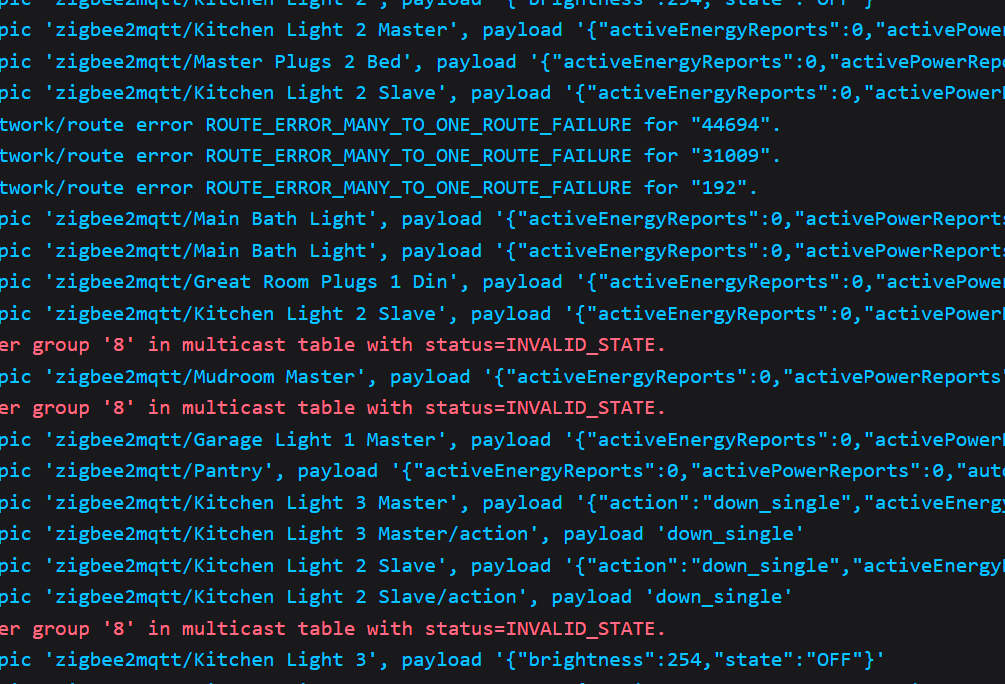
In the below screengrab alone, we see consecutive many to one errors for “kitchen light 1 master”, “main bath light”, “rear flood”, and “porch light”. I didn’t capture the whole log but if there was one that didn’t have the many to one error on the initial startup of MQTT, I didn’t see it. It was dozens and dozens of many to one route errors.

I then also see stuff like this, which leads me to research suggesting that this recommended dongle by @rohan has a maximum group limit of 8

image

But then when I turned off everything but 3 groups of switches, including the coordinator, power cycled those 3 groups, and experienced the exact same problem… it seems like having a coordinator with a bigger group table would not solve this at all. I have 16 groups, because I was told that everything should be group bound even if the group is just 2 switches. And those individual bindings caused other problems that I also don’t want. This behavior also continues when the coordinator is offline, and I think I’m reading that EmberZNet also has a max of 8 groups by default.

It sort of seems to me like there are multiple issues going on here, and I don’t just mean that group bindings have one issue and individual have another.

Grok could be steering me wrong here, but it is pointing out that there is a limit in how many neighbors each router can keep in the neighbor table at once. And because my zigbee network is so dense, there are a ton of neighbors for each switch. So if it’s right and the neighbor table has a limit of 16-26 entries, it has to constantly keep adding things to that list as other things fall out the other end… if that makes sense.

This lead me to an interesting thought. I have 7 banks of 4 switches around my house. But every switch in each of those banks is a router. Why? In the literal sense, it’s because I can’t turn off the “router” function. But if you actually think about it, I don’t need that many routers. If I could turn off the router function of 3 of those 4 switches per bank, I would end up with a lot less siblings and a lot more parent/children relationships. This would cause a lot less changeover in the neighbor table, and potentially a lot less many to one route requests as the network constantly tries to rebuild itself every few minutes.

I also discovered there’s a limit to how many multicast commands can be sent in a given time (8 commands per 9 second window). And I forced that error to happen so that I could verify that it isn’t the same error as the “many to one route error”. Instead, that error is “delivery of multicast failed”. It was nice to be able to confirm I’m not having that issue unless I sit there spamming a switch as fast as I can. In practice, it also doesn’t really seem to be 8 commands per 9 seconds, it seems much higher than that. But it does exist.

Thanks for all the additional details and testing. There are a lot of variables here, so rather than digging too deeply into each of the possible causes right now, I’d like to see how the latest firmware change affects your network.

Our engineer made an adjustment specifically related to routing and bindings:

When sending binding messages, the device will now initiate route discovery. This is intended to help the device quickly rebuild its routing table if the route has been lost.

Given the MANY_TO_ONE_ROUTE_ERROR and ROUTE_SOURCE_FAILURE messages you’re seeing, I’m particularly interested to see whether this change improves the behavior.

I will PM you with the firmware so you can test it. This may help more in your situation where you were using individual bindings, but it would probably be worth it to test in both scenarios. Maybe update one group and update one individual bound device setup and then do testing.

I converted everything away from individual bindings and made them group bindings instead due to some suggestion to do so earlier in the thread.

I can put a group back as individual bindings, but that will take us back to that original problem where every switch has to be toggled half a dozen times to rebuild a route.

Also, from a beta testing and troubleshooting perspective, I understand wanting to go slowly. But will it really tell us anything for me to only update one group? Like the way I am understanding it is that the whole network has a problem. Or at least the part of the network built by the switches does. So if I only update one group, will that tell us anything? Because the many to one error could easily be coming from a router (switch) outside of the group that was updated as the commands are broadcast.

I’m obviously happy to update one group and test it. I’m just realizing I don’t know how the logs would reflect this. Would it tell me that I had a many to one error for the device that’s the source of a command if the issue happened somewhere else in the network? My instinct is yes, but I don’t really know.

Anyway, when you get back to me about which switch this firmware is for (I have Dimmer, Presence Dimmer, and On/Off), I’ll try to find a group that only uses that type of switch and update that one first. Although hopefully there are a couple of that switch side by side, as that’s the easiest way to reproduce this is toggle 2 of them at once.

I think I only put one presence dimmer per switch bank, and filled out the rest with normal dimmers and on/off

I PMd you the file yesterday with some basic instructions (filename was VZM31-SN) so it is for the VZM31-SN. I also mentioned to try two scenarios. One with direct binding (I understand you might need to revert one of the group binding setups) and one with group binding because a change like this should be rolled out slowly. Updating the entire network eventually would theoretically show the full picture, but this could give us info on whether it is the right direction or not. If the switches with this firmware installed rebuild their routes automatically without pressing the button to initiate talking to the devices they are bound to, I think will see an improvement there.

So it doesn’t seem to make an impact on group bindings. It could be slightly better but the performance of those has always been inconsistent. Sometimes it works every other time, sometimes it works 5 times in a row and then doesn’t work 8 times in a row. Bottom line is that it’s not enough better for me to be able to say it’s better than before.

I turn two switches on, wait a second, turn 2 switches off, wait a second, turn 2 switches on. At some point in that sequence, one of the lights didn’t turn on. And I get at least one round of many to one route error.

Also, not sure if it means anything or not, but one of these two groups that I have updated to the test firmware is throwing the “failed to register group ‘X’ in multicast table…” error. That’s not the only group throwing many to one errors

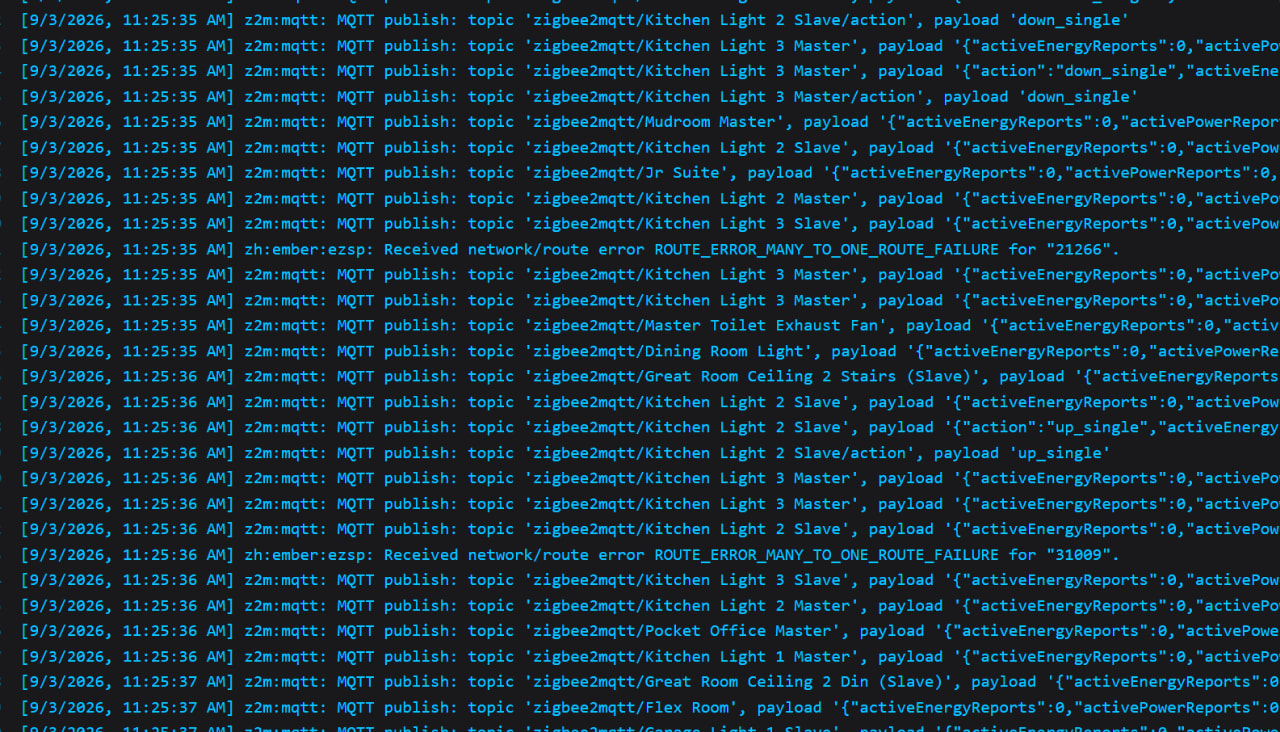
In this test case, still configured as groups, I am flipping Kitchen Light 2 Slave and Kitchen Light 3 Master

192=Kitchen Light 3 Slave

44694=Kitchen Light 2 Slave

31009=Kitchen Light 3 Master

Group 8=Kitchen Light 3

I’m going to go through and switch both of these groups to individual and see if anything changes. I’ll make sure to check if they manage to pair to each other without any toggles or with less toggles than before.

I’ll test the backup power later on, I have a 3d print going and don’t want to interrupt it.

For individual bindings:

on power loss (air gapped both pairs of switches for 10s) they seem to maybe take less toggles to find each other on the network vs before. But they still get out of sync badly after that. Individual has this weird thing where one light will flash off and on in ways I never commanded sometimes (like it isn’t just catching up on commands sent earlier, it flashes more times than there were on/off commands). It does a slightly better job of syncing up if the initial command wasn’t received by the paired switch compared to groups.

21266 = mudroom master. This is the first time I’ve seen an unrelated device throw a many to one error. That’s not to say it didn’t happen before, but I hadn’t seen it before. Regardless, this does show I am still getting many to one errors with individual bindings.

This might be a dumb question, I noticed in the inovelli binding tutorial here: Setting Up Zigbee Bindings • Home Assistant - Zigbee2MQTT | Inovelli Help Center

It doesn’t say once you’ve finish doing an individual bind for one switch, you must do it again from the other switch. I.E. do it from slave to master, and master to slave. Is that not something I’m supposed to do? As it stands I have kitchen 2 slave bound to master per that tutorial, and kitchen light 2 master bound to slave the same way. Did the same thing for kitchen light 3. But if I’m only supposed to bind one of the switches to the other instead of both to each other, maybe that could explain some of the weirdness with individual bindings that I’m having.