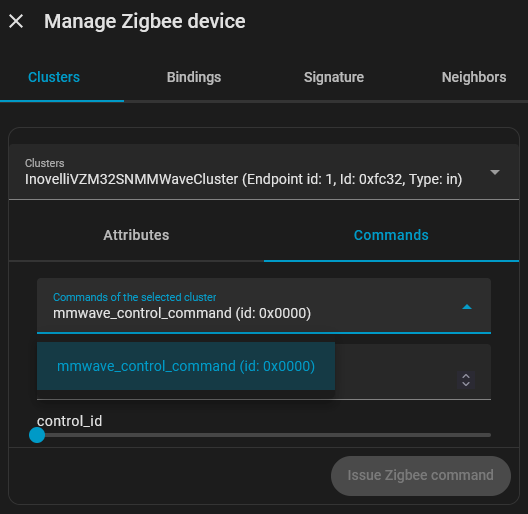
I am having trouble issuing the command to Generate Interference Area with my Blue series mmwave dimmer switch.
Initially after bringing into ZHA, I didn’t even have any command options for cluster 0xfc32 I would also note that the label for Cluster 0xfc32 was “ManufacturerSpecificCluster” instead of “InovelliVZM32SNMMWaveCluster” like is shown in the documentation. Following instructions to install the custom ZHA quirk fixed this, however while I do see the mmwave_control_command option under cluster 0xfc32 now, I do not see the command 0x0001 to generate the interference area (shown in screenshot).
I have also seen instructions to set parameter 111 to achieve the same, but I must be slow because I cannot figure out how to do this on a Zigbee device.
Even manually setting the mmWave Height to a zero value did not seem to mitigate the false positive from the ceiling fan. I’m beginning to suspect a firmware issue. I have a bunch more switches to install, but every room has a ceiling fan and unless this is resolved I’m not going to waste time installing a bunch more - will just have to RMA the lot.
I’ve had a ticket open for weeks and not having much luck getting a response. The support agent didn’t seem to have any experience with the product and told me he was very busy and would try to install one of the switches over the weekend to try to replicate the issue, but that was 2 weeks ago. I’m starting to get some serious Fyre Fest vibes lol…
Did you try using P111 to set the interference area? I have used that to exclude the ceiling fan motion interference. Not sure if you got setting that going.
Still on default - I read in another forum there were some potential issues with HA 2026.2 and the blue series mmWave beta firmware (it COULD be just a breaking change on HA 2026.2 for ZHA or Z2M). Let me know if you do it and see any improvement though…
I have read that 100 times in the documentation. HOW to find the enumerated list of parameters is something I have been beating my head against the wall for days trying to figure out. I’m not sure if it’s possible using ZHA, and if it is I am too dense to figure it out. I spent the last few days playing with height settings, but even with a 1,-1 setting I am still getting false positives. I even tried setting the throw absurdly short and the fan still triggers Occupancy.
Did you get this figured out? I’m having the same issue. I installed the custom Quirk and got more parameters to show up, but still only have 0x0000 as an option rather than 0x0001 under 0xfc32.
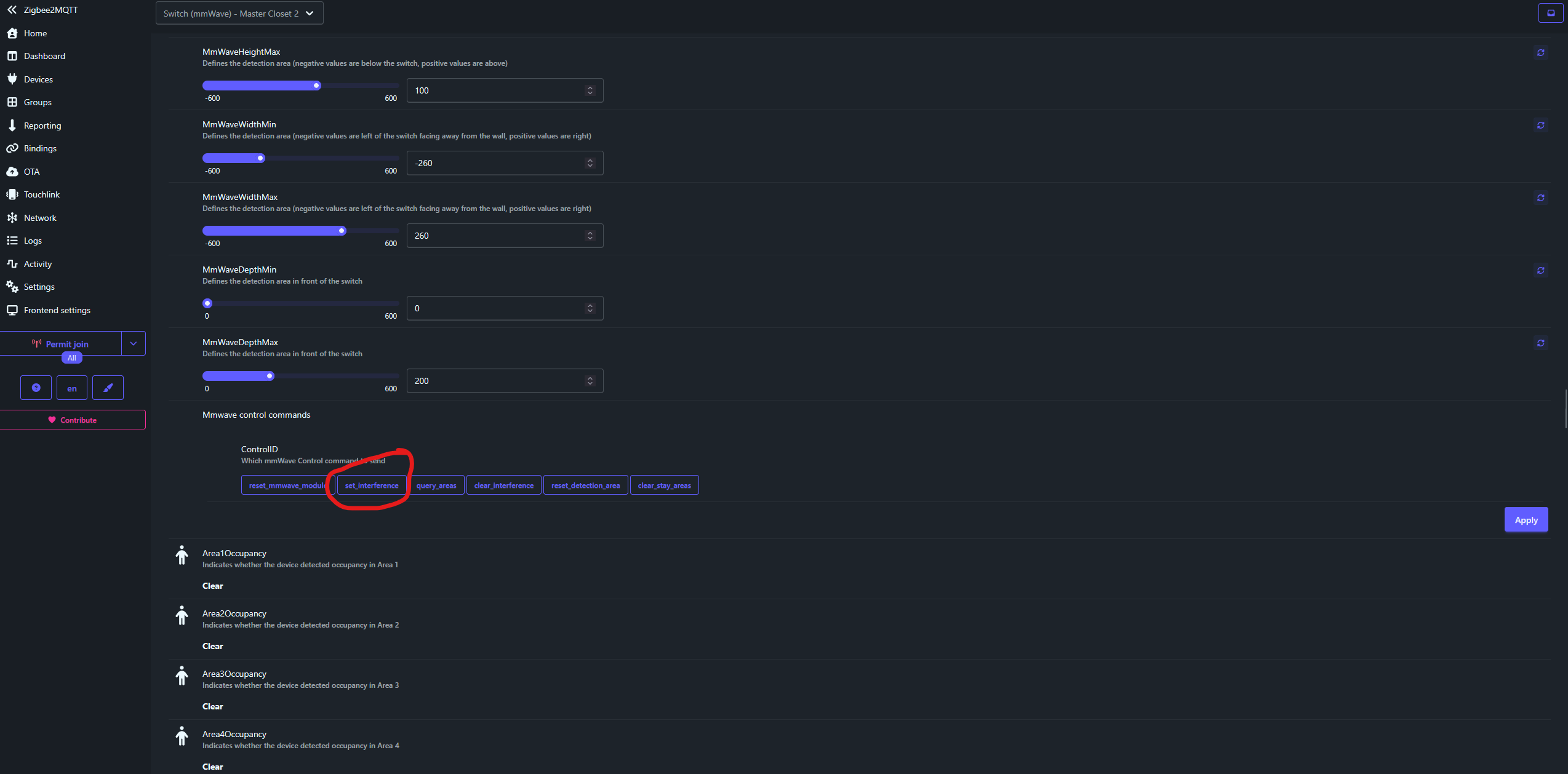
So after my suspicion got the better of me I finally bit the bullet and bought the newish ZBT-2 and stood up Zigbee2MQTT in parallel to ZHA using the ZBT-2 as the coordinator and migrated one of the switches over to Z2M and bam! There’s the option to set interference area… No custom quirks, no guessing at control IDs. What’s more is I could see the Interference Areas update and align in real-time when I requested the Set Interference Area command. I would have given anything for a screenshot from folks claiming to have an intuitive means to reach this setting so here’s mine.
Furthermore, I found the documentation frustrating in how they enumerated the settings based on parameter numbers to indicate where to find the setting. While I know zwave devices use numerical enumeration, I have never come across anything in the zigbee world where that’s helpful and in my case was downright confusing. Ultimately I’m guessing Z2M was prioritized for testing and folks using ZHA may have a harder time with these devices - or at least making the full functionality available.
I feel like the firmware should be designed agnostic of the control plane, so I don’t really think this counts as a solution, so I’ll let the community decide if this should be marked solved.
Another good tool to use, where there is at least experimental ZHA support, is the Inovelli mmWave Visualizer add on for Home Assistant where you can set areas, detection zones, stay zones, and interference zones using a gui. This can also be used to see where the sensor is detecting movement.
Z2M does also have it’s own documentation site that is automatically updated as new functionality is added to the converters.
The numerical identifiers are really only needed when you are developing a converter. For end users, I agree, it’s much less useful in the Zigbee world.
Basic functionality was tested on all supported platforms (Smartthings, ZHA, Z2M, Hubitat) as part of the beta process and Inovelli and beta testers together wrote the necessary drivers for each of those platforms for the basic functionality. The problem with ZHA is that they have gone through a lot of architectural changes and Inovelli’s changes to the quirk needed to support that have been pending merge for 3+ months.
Advanced functionality (multi zone reporting and zone control) was so far only exposed in Z2M because it was user added based on Inovelli’s documentation.
The firmware is designed agnostic of the control plane. Unlike Z-Wave though, this is not “common functionality” that is implemented across hubs, so all of the functionality that is non standard has to be implemented per hub.
Thanks for the perspective @rohan …You have some really great insight that I think would be incredibly helpful if it was more widely socialized. I did not know any of this and so I spun my wheels for months chasing this nuance between ZHA and Z2M. Even with support tickets open with Inovelli nobody was able to articulate any of this to me and didn’t seem readily apparent in the documentation I was referred to by support staff or that I was able to research myself. Hopefully that comes across as objective constructive criticism.