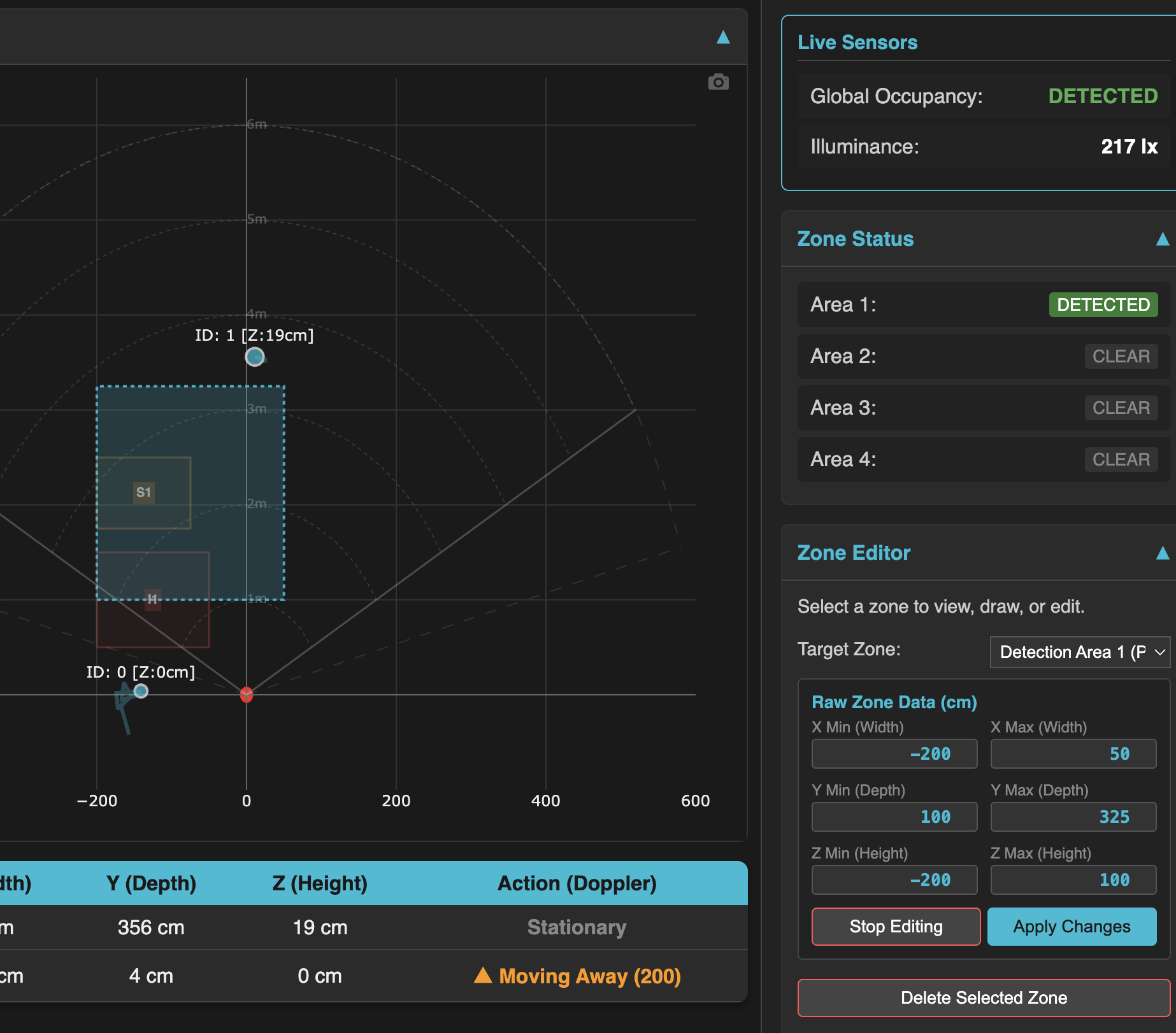
(despite it saying stop editing, this is the saved zone configuration, I just wanted to highlight it for the screenhot). ID “1” target is me. The switch is reporting that area 1 is detected, but the target is not in the coordinates of the zone. If I walk away, the light will immediately turn off.
I am noticing the same issue with my new Blue switch. I replaced a Red mmWave switch with this Blue one because Z-Wave does not support multi-zones, and then I switched ~40 devices from ZHA to Zigbee2Mqtt.
I have not had time to test things well, but it seemed targets matched coordinates better when I was using only two zones and got worse when I added a third zone.
Not sure if it’s the same thing, but I’m finding on one switch that the main occupancy now seems stuck clear while area 1 continues detecting presence.
I had AI collect this evidence:
Evidence:
Over 72 hours, the affected switch had 303 occupied Area 1 history
records, but zero occupied main-occupancy records.
Raw Zigbee messages show Area 1 reporting occupied.
While someone remained in the detection area, repeated direct reads
of endpoint 1 / cluster 0x0406 / attribute 0x0000 returned
occupancy: 0, while Area 1 showed occupied.
I uses Medium sensitivity, Fast trigger, hold 10, stay-life 300, and matching occupancy bindings/reporting configuration. No active interference or stay zones. Target reporting and wired-load control are disabled.
With the solution being to power-cycle the device using the air-gap switch. Not discussed in that thread is an attempt at factory resetting the mmWave module, which if it works would provide a programatic way to automate the problem away.
Because the 3rd party mmWave module is a self-contained device with its own processor it may be that this issue, as well as one I’ve had with detection areas close to the sensors, are firmware/hardware quirks of the mmWave module. Unfortunately, none of these quirks are described in the manufacturer’s documentation so we are left to puzzle these out on our own.