I was able to remove and re-add it using the managed nodes, and then updated to 2.03. However when I go to the device is still says “This device has been provisioned but is not yet included in the network.” It shows all checkmarks in the jsweb console.
@register can you do the two below items and see if it clears the provisioning error
Step 1: Perform the mandatory Air-Gap Power Cycle
Pulling the physical air-gap tab after flashing version 2.03+:
-
Pull out the air-gap tab located at the bottom left of the switch (below the paddle/config button).
-
Leave it pulled out for at least 10–15 seconds.
-
Push the tab firmly back in to restore power.
Step 2: Clear the SmartStart Provisioning Entry
If the switch doesn’t immediately include after the air-gap cycle, clear out the dead SmartStart handshake:
-
Open Z-Wave JS UI (or the Home Assistant Z-Wave JS panel).
-
Go to Settings / Provisioning (SmartStart).
-
Find the
VZW32-SNentry and Delete or Deactivate it.
Once this is done you may need to force a reinterview or do a factory reset and inclusion.
Hoping to make a suggestion for the next firmware change. I know that people have previously requested on device motion triggers based on lux but I am hoping to make this work better off device as well. Forgive me if it has been mentioned before.
Currently the dimmer has only threshold and interval based lux reporting. Hoping a low level or high level reporting value could be implemented.
I have an automation based on being below a specific level and currently the dimmer is overly chatty with lux reporting to make that work reliably. The Aeotec Multisensor 7 has trigger thresholds like this if an example is needed.
It would essentially be a configuration option that would send a report if lux level = x?
I am thinking more like it reports the current state if it crosses a threshold value.
I think I get it. So you could set a low lux report of 100 and a high of 500. The switch would report the lux when it goes below the low or above the high? Sorry if I am not understanding.
You’ve got it, that is how the multisensor works but even just a binary true/false for if it is above or below those values would allow for more precise conditional triggers without the dimmer spamming the network with lux values.
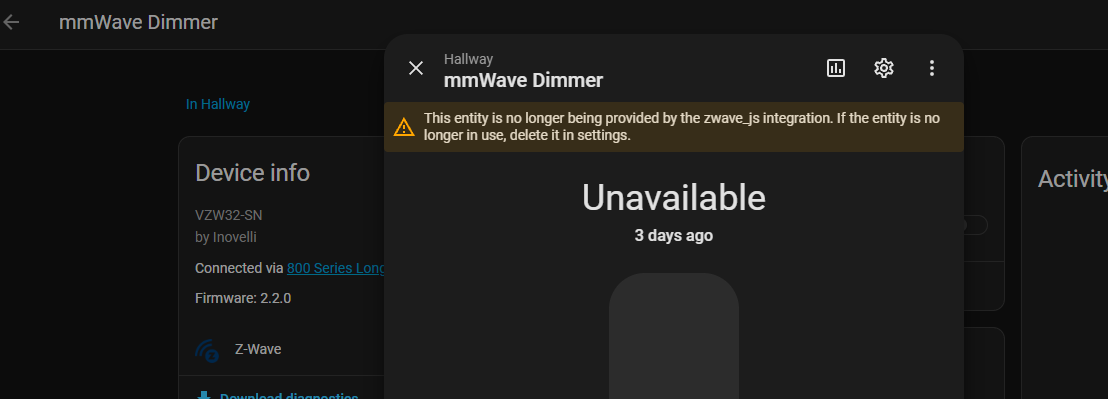
I am having trouble setting Parameter 112 mmWave Sensitivity in both firmware 2.02 and 2.03 beta. I have tried to change this setting using both Z-Wave JS and Z-Wave JS UI in Home Assistant.
In firmware 2.02 if I change the value of P112, it will accept the change, and the new value will show with a configuration refresh in Z-Wave JS. If I then pull the air gap on the switch, after restarting, the value of P112 will return to the previous value. I have found the value for P112 to somehow be related to P113 mmWave Target Speed. If I change the value of 113 from 2 to 0, then change 112 to 0, then change 113 back to 2, the setting of 112 will survive an air gap reset. After some testing, every time 112 is changed it seems to lock-in the current value of 113, so I am able to work around that way.
After upgrading to the 2.03 beta, and doing an air gap reset, I am not able to change the value of P112 at all. The setting always reverts back to 1 Medium after a reset.
@EricM_Inovelli I wonder whether this is a firmware bug - I often find the light on in the Utility Room even though the VZW32-SN reports the switch as off. If I walk into the room looking at the switch, it turns on, and then automations will turn it off. As you can see below, the switch is reporting power usage but fails to report `on` state. The off state persists across reboots of Home Assistant as well. Could this be a firmware bug?
I have 2 other VZM32-SN where I occasionally find the lights on, but I am have not had a chance to pinpoint whether the state is off while light is on. I guess I could trigger a notification every time there is power draw while the switch is off if it helps determine whether this is a single device issue vs all devices.

@register do you have another z-wave controller you can test include the device with.
@ziti85 I’ve been able to replicate that issue and the firmware engineer is looking into it. @xelar I’ve got him looking at what you have reported as well. Are you using the built in P110 to turn the load on or are you using the presence status of the switch to turn the load on through an automation?
@EricM_Inovelli - For a faster response I use P110 to turn on the light, however I use an automation to turn it off. Either the automation is failing to turn the light off because the light reports it is already off, or the automation indeed turns it (state) off but the load remains on.

@xelar I have seen in some scenarios a presence notification not make it to the hub. Because of this, automations that trigger off of this state don’t go off. I wonder if this is the case. @ziti85 There is a new beta firmware that addresses your issue. Changes listed in the top post. In either case, I think it would be good for you both to double check your sensitivity settings on the new firmware to make sure they are what you expect.
FYI, possible bug in 2.04: mmwave entity is always off/empty, even when someone walks in front of the sensor. Red mmwave "motion detection" always "detected" - #8 by ha_fan
@EricM_Inovelli I just noticed the same issue (dimmer state off but load on) with a red series dimmer (vzw31-sn) so I am looking into my mesh for dropped packets. There were indeed some issues which I believe have now been resolved so I will monitor the mmwave dimmers to see if states go out of sync again.
@ha_fan I too just noticed that the presence sensor is no longer working with 2.4. Motion still reports, but presence is alwas “empty” while it worked fine with the previous beta.
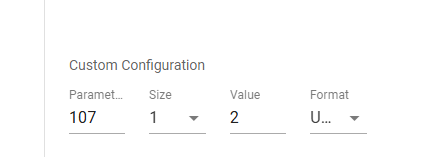
I think you are referring to the “Person in Reporting Area” value? This has been disabled in 2.04 as it is actually redundant. The “motion” notification is supposed to be the same as that report (the same process activates them). It is also a chatty process and created a lot of extra traffic (especially with many switches) because it sends reports every few seconds. You can enable it though if you prefer by setting P107 = 2. We will likely add the config option into the UI for easier changing of it, but you can currently set it with the manual config param field:
Thanks for clarifying!
To confirm, the “motion detection” entity should be on/detected when a person/object’s presence is detected in the user-defined area?
My understanding from @Lance_Inovelli in Red mmwave "motion detection" always "detected" - #3 by Lance_Inovelli was that “motion detection” was on/detected when presence was detected anywhere in the sensor’s range, ignoring the defined area.
The new definition works for me!
Most 60GHz mmwave sensors I’ve reviewed / used seems to track major motion events as “motion” and “breathing / heart beat” as “still”. If one or the other are true, then “presence” is active. In this configuration, motion tends to be pretty chatty unless the cooldown is dialed up, while presence is more stable. After re-enabling P107 = 2, and a brief test, it would appear that the two sensors report the same thing so, as you said, it is indeed redundant.
For every room in my house, I have a Node Red flow that determines “presence” based on more than one input. Where I have the VZW32-FN it is mostly based on the device itself given how good it is once configured properly (and installed in an ideal environment; ie: my 3 are in rooms where the switch is pointing towards the inside of the room, but outside of the house so traffic outside the room has no chance to affect them).
If the VZW32-SN makes a distinction between body movement vs breathing / heart beat, then I would prefer to have both “motion” and “presence” sensors, but if it tracks everything under motion, then I guess one is enough. However, in that case and IMO, the sensor should be called “presence” because a heart beat or breathing are often not understood as a person moving.
Either way… I am trying to figure out (less ideal setups/locations) whether I can add 3 more to my house. 
@EricM_Inovelli Possible bug in 2.0.4? I have P107 set to 2. I walked into a small room and no motion was detected (I noticed after quite some time) but the presence sensor did change from Empty to Occupied upon entry. I had to power cycle (air gap) the switch for motion to be detected. When I left the room, both sensors worked fine returning to no motion / no presence.