Switches not working on backup power

@EricM_Inovelli

Another day, another support post from me. To recap for anyone new, I have 69 inovelli blue switches. Many 3 ways, one 4 way, many single switches. All are smart switches (no aux). I have another thread also related to power outage issues with these switches. Today, I have a much different issue.

I have a tesla home backup system installed at the house. In my case, it is a powershare system, but functionally it would be no different than a powerwall/solar installation. There is a neutral transformer providing a neutral line to the house while the home is on backup power.

Last night, there was a severe storm in the area. My power went out, and kicked over to backup power. This happened a few times, before finally staying on backup power for a few hours. Each time it happened, a random amount of my switches would not work. The switches were all powered, and interacting with them changed the light bar status. They could also be interacted with from home assistant. But the lights they were connected to would not come on. I don’t think there was a specific switch type that didn’t work where others did. But I didn’t test thoroughly enough to be sure I found an on/off switch that couldn’t control its load. For sure both dimmer and presence dimmer had the issue

For a couple of hours I just sat there confused. I thought maybe the powershare neutral transformer wasn’t working, and was very close to ordering a new powershare gateway to install. Something made me go over to one of the switches that wasn’t providing power to its load, and air gap it for 5 seconds. When I closed the air gap, the light came on. I went around and did this for every switch, and every single one worked after being air gapped.

When the powershare system comes on, there is a 2-3 second delay between the power shutting off and the powershare kicking in. At which point the neutral transformer kicks on and the transfer switch flips. My guess is that the switches need longer of a delay between power turning off and back on in order to not have some weird behavior like I am experiencing.

What can be done with the firmware to make the switches compatible with these quick changeover power backup systems? Again, every switch came online every time, but a random percentage of them (between 40 and 70%) were unable to control their loads until they were air gapped. Obviously going around and air gapping 69 switches (because I don’t know which ones are working already) each time the power goes out isn’t really a solution. Can we get some kind of optional delay in the boot-up process? It seems like if the switch just took an extra 5 seconds to come online, there wouldn’t have been an issue.

I’m more than happy to beta test firmware to help get this ironed out.

NOTE: Nothing about how powershare or powerwall work can be changed. Everyone with any of these systems will encounter the same issues, so this needs to be resolved without suggestions of increasing the dwell time on the powershare coming back on or anything like that.

EDIT: Sorry again about the wrong model number tag, I still can’t make a post without picking from that tag dropdown, and it’s for some reason the only tag in that required category available to me.
I would think this scenario is fairly typical for power backup system, including generators, and also isn’t much different from a short power outage of the sort we get in NE Ohio commonly. Power goes out completely for just a second or two, then comes back up completely. We also get brown outs from time to time.

It seems super weird that the switches would boot back up, radios on and working, but that the relay or whatever dimmers use wasn’t working. Assuming this is a software issue, one solution could be to detect certain kinds of invalid states and trigger an automatic reboot.

I really think that if we could get a parameter to add some dwell time in the startup process, for people who run on backup power and have these hiccups, that would be all that was needed. a 5s delay would almost certainly cure it. And if it didn’t, we could find that out with testing. If the parameter was user configurable, anyone with an issue like this could just increase that dwell time until the problem went away.

Automatic resets from invalid state detection would be nice, it could potentially cure a lot of gremlins that more users experience. I am imagining a power on delay would be easier for the firmware guys to do, that’s the only reason I suggested doing it that way.

Bumping this so that the topic doesn’t lock. Power went out again and same problem as before. every load switch needs a 5s power cycle to actually control its own load again after backup power comes on.

When a switch is in this weird state you can still lalk to it with HA… correct? What does it report regarding neutral status (neutral/no neutral) etc? What does it report when it is working normally?

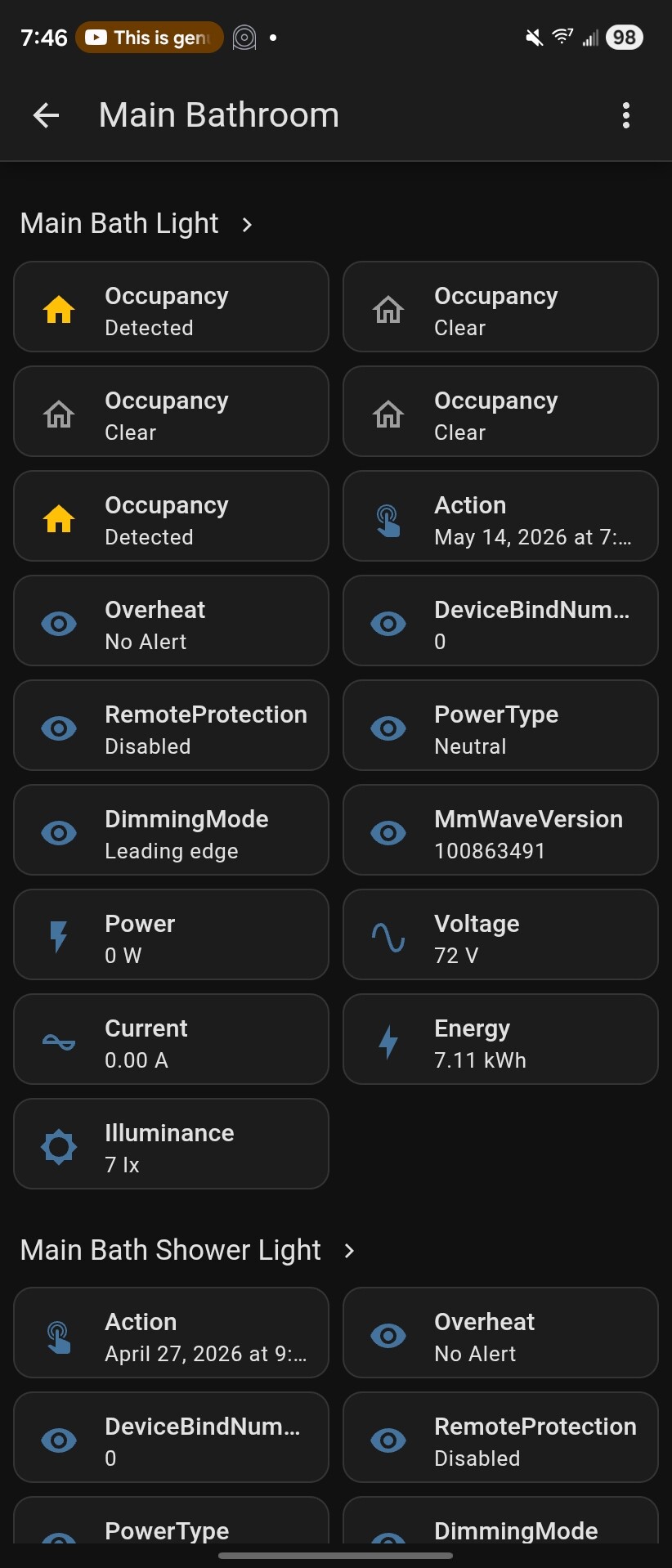
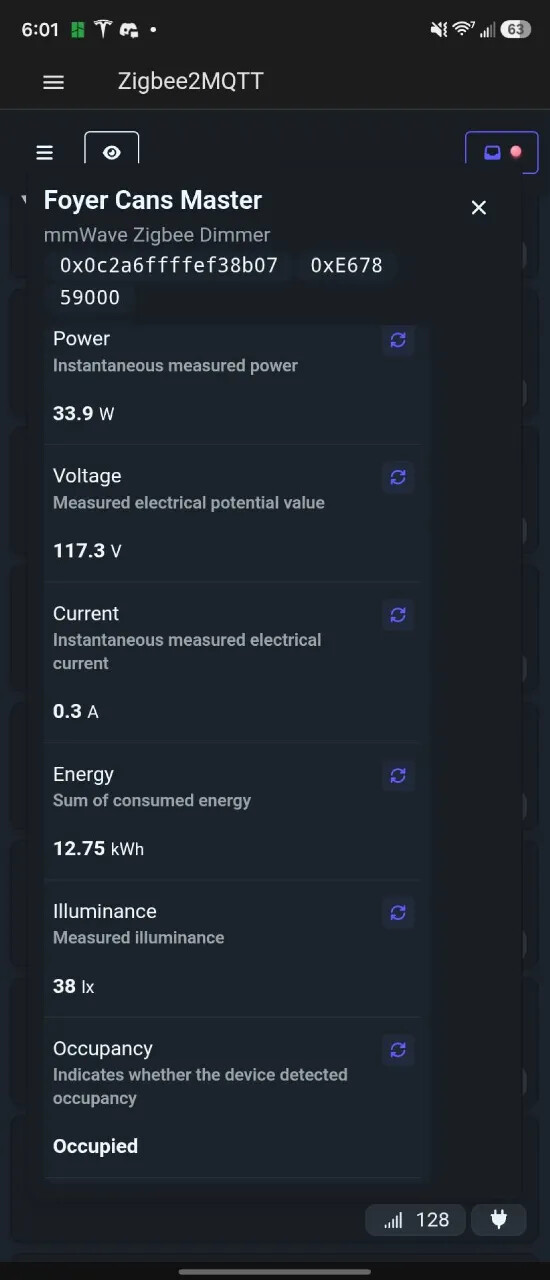
Here’s what it shows on backup power. Interestingly enough, when the power comes back on the lights all do work. But I also know that it isn’t a neutral problem because if I air gap the switches they control their loads again whether on backup power or grid power.

I’m not really sure what 72V refers to, but on grid power it’s showing the same. My 120v is stable

OK so is the above before or after you air-gapped the switch?

The issue I’m trying to help eliminate is that the switch is initially “seeing” a missing neutral which is bringing it up in the wrong mode and then the neutral “turns up” after the line has already come up and the neutral/non neutral detection has already occurred.

Before. The switch indicated the light was on but the light was not on. communication with home assistant worked fine.

Even if what you are suggesting is the case, it seems to me that a setting to delay neutral detection would solve the issue for everyone with any kind of backup power.

To further explain, maybe the events happening are:

-power goes out
-2s elapse
-backup power turns on
-some fraction of a second elapses
-neutral detection has already happened and at the time it thought there was no neutral
-neutral transformer stabilizes
-neutral detection continues to poll the neutral but does not re-enable the load control when it appears

so all we need to do is have a delay on the detection as an option for people on backup power

@agordon117 are the lights all zigbee, controlled through zigbee bindings by chance? I’ve noticed something at least somewhat similar happening, but only with bound devices, and appears to me at least to be an issue (in my case I mean) with the zigbee fixtures/bulbs handling of the situation.

I will have to test this. Not all of the switches are bound, but I don’t know that I can tell you for certain that the 3 and 4 way switches had the problem but the normal ones didn’t. I do know that randomly 40-70% of the lights don’t work until the switches are power cycled after the switch to backup power.

Now, if you’re asking if all of my devices are running in smart bulb mode with lamp relays or bulbs on the other end, the answer is no. very few of them are, and I think those ones work okay (I can test that too).

Well, since there doesn’t seem to be any attention on actually fixing this issue yet, what about a bandaid?

@rohan @EricM_Inovelli How can I remotely reboot a switch? There must be a command I can send to reboot them, it just isn’t something that normally needs done so it isn’t in the documentation (that I can find). If I can just make an automation in home assistant that sends a reboot command to every switch, and I just manually do this in the event of a power outage, I am certain it would fix the issue I am having without having to go manually flip breakers or pull air gaps. The switch is reporting that everything is fine at the time the load doesn’t work, I just have to get it to poll everything again

It might be a little tedious to set up, I probably will have to do it one or two switches at a time, waiting 10 or 15s between commands to make sure each switch is back online before the next command is sent. But then I can have some sort of solution without having to hope that a firmware solution eventually appears in the future.

I can’t help with this issue. I don’t work for Inovelli and only work from the documentation and the endpoints I see exposed as I work on the Z2M converter.

I don’t believe there is a way to issue a remote reboot in the firmware today.

Bumping this again so the topic doesn’t close. Bad storms are expected this weekend so I expect I will encounter this issue again. I just need to know how to do a remote reboot in firmware to bandaid this myself. Or there has to be some new feature to delay when the switches check for neutral (which is what I assume the issue is).

If I’m asking in the wrong place or trying to talk to the wrong people I can try to ask anywhere else that would be helpful. I just can’t allow these things to be ignored though, I spent far too much on these switches for them to not work correctly.

Maybe the simplest answer is just to add a feature to optionally disable the neutral detection and nail it to neutral mode. That feature just got added to the White Fan switch so it is probably fairly easy for Inovelli to add assuming the Blue hardware is essentially the same.

This issue has i believe to be related in some way to your specific type of backup environment or a lot more people would have seen it. In our previous house we had a Generac whole-house backup generator and we never saw anything like this issue (albeit that was with White rather than Blue switches). Generally local electrical codes control neutral switching (power 1 disconnect, switch neutral, power 2 connect is what I’ve seen before though I’m anything but an expect on that type of system). Neutral to ground bonding is also carefully defined.