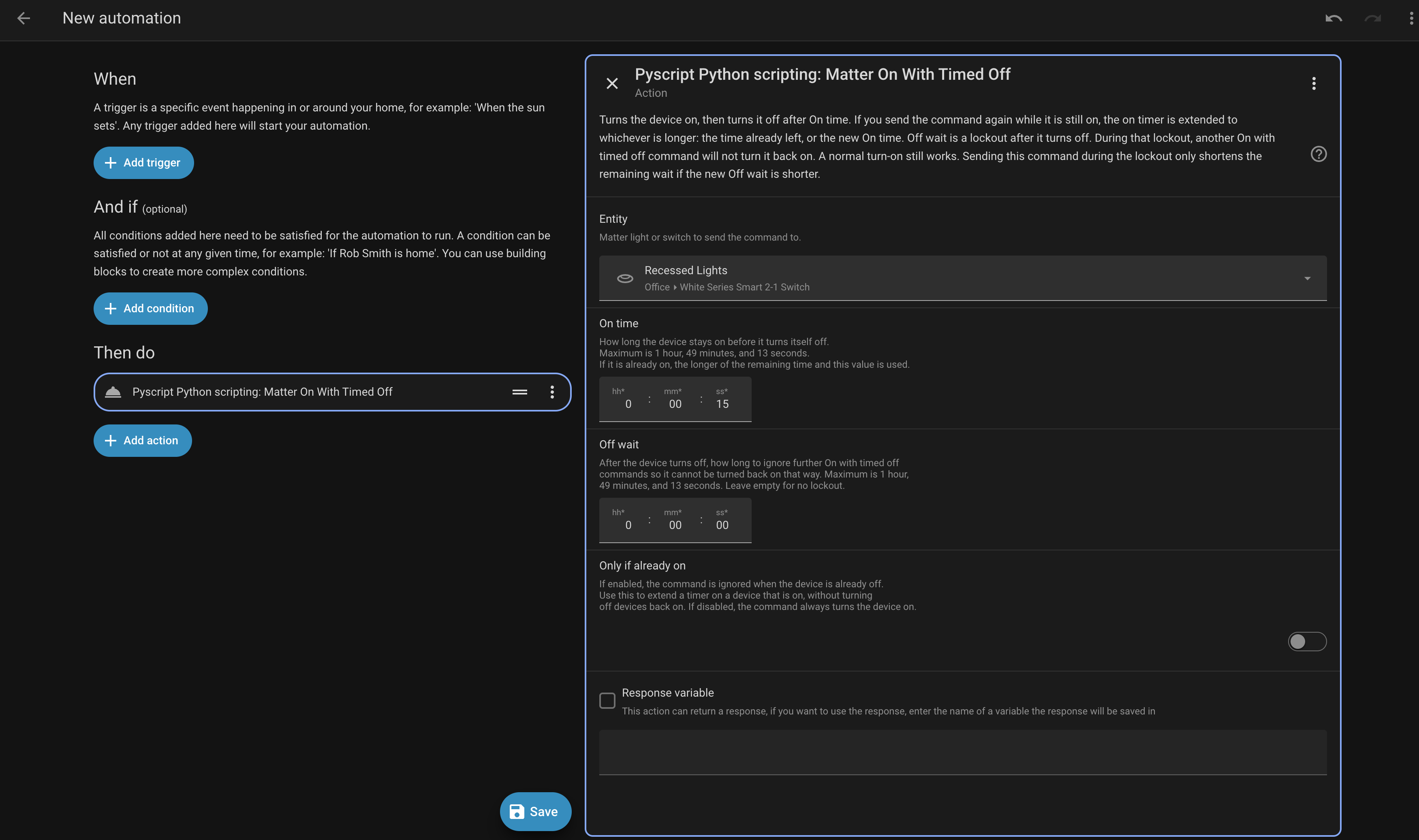
Thank you for your script Ted. I went ahead and ported it to pyscript, fixed support for matter.js and extended it to work with other devices. I’ve validated it works with eve power devices in addition to my inovelli switches.
# ruff: noqa: TRY002

def duraitonToTenthsOfSeconds(duration=None) -> int:
    if duration is None:
        return 0

    TenthsOfSeconds = 0
    TenthsOfSeconds += int(duration.get('hours', 0))
    TenthsOfSeconds *= 60
    TenthsOfSeconds += int(duration.get('minutes', 0))
    TenthsOfSeconds *= 60
    TenthsOfSeconds += int(duration.get('seconds', 0))
    TenthsOfSeconds *= 10
    return TenthsOfSeconds


@service("pyscript.matter_OnWithTimedOff", supports_response="optional")  # noqa: F821
async def OnWithTimedOff(entity_id, OnTime=None, OffWaitTime=None, AcceptOnlyWhenOn=False) -> dict:
    """yaml
name: Matter On With Timed Off
description: |
  Turns the device on, then turns it off after On time. If you send the
  command again while it is still on, the on timer is extended to whichever
  is longer: the time already left, or the new On time.

  Off wait is a lockout after it turns off. During that lockout, another
  On with timed off command will not turn it back on. A normal turn-on
  still works. Sending this command during the lockout only shortens the
  remaining wait if the new Off wait is shorter.

fields:
  entity_id:
    name: Entity
    description: Matter light or switch to send the command to.
    required: true
    selector:
      entity:
        filter:
          integration: matter
          domain:
            - switch
            - light

  OnTime:
    name: On time
    description: |
      How long the device stays on before it turns itself off.
      Maximum is 1 hour, 49 minutes, and 13 seconds.
      If it is already on, the longer of the remaining time and this value is used.
    required: true
    selector:
      duration:

  OffWaitTime:
    name: Off wait
    description: |
      After the device turns off, how long to ignore further On with timed off
      commands so it cannot be turned back on that way. Maximum is 1 hour,
      49 minutes, and 13 seconds. Leave empty for no lockout.
    required: false
    selector:
      duration:

  AcceptOnlyWhenOn:
    name: Only if already on
    description: |
      If enabled, the command is ignored when the device is already off.
      Use this to extend a timer on a device that is on, without turning
      off devices back on. If disabled, the command always turns the device on.
    required: true
    selector:
      boolean:

"""

    global hass  # noqa: PLW0602
    try:
        _ = hass
    except NameError:
        raise Exception("Enable 'Hass is global' in the Pyscript integration options")

    try:
        import asyncio
        import json
        import uuid

        import aiohttp
        from homeassistant.components.matter.helpers import get_node_from_device_entry
        from homeassistant.helpers import device_registry, entity_registry
    except ImportError:
        raise Exception("Enable 'Allow all imports' in the Pyscript integration options")

    # Matter Spec mandates time in tenths of a second (e.g., 60s = 600)
    OnTime = duraitonToTenthsOfSeconds(OnTime)
    if OnTime > 0xFFFE:
        raise Exception("OnTime is longer than 1 hour, 49 minutes, and 13 seconds")

    OffWaitTime = duraitonToTenthsOfSeconds(OffWaitTime)
    if OffWaitTime > 0xFFFE:
        raise Exception("OffWaitTime is longer than 1 hour, 49 minutes, and 13 seconds")

    OnOffControlBitmap = 0
    if isinstance(AcceptOnlyWhenOn, str):
        AcceptOnlyWhenOn = AcceptOnlyWhenOn.strip().lower() in {"1", "true", "yes", "on"}
    if AcceptOnlyWhenOn:
        OnOffControlBitmap |= 1

    entity = entity_registry.async_get(hass).async_get(entity_id)
    if entity is None:
        raise Exception(f"Failed to look up entity for {entity_id}")

    device = device_registry.async_get(hass).async_get(entity.device_id)
    if device is None:
        raise Exception(f"Failed to look up device for {entity.device_id}")

    node = get_node_from_device_entry(hass, device)
    if node is None:
        raise Exception(f"Failed to look up node for {device}")

    try:
        endpoint_id = int(entity.unique_id.rsplit("-", 4)[1])
    except (AttributeError, IndexError, ValueError, TypeError):
        raise Exception(f"Failed to parse Matter endpoint from unique_id for {entity_id}")

    endpoint = node.endpoints.get(endpoint_id)
    if endpoint is None:
        raise Exception("Unable to find the Matter endpoint for this entity.")

    cluster = endpoint.get_cluster(6)
    if cluster is None:
        raise Exception("Unable to find the OnOff cluster for this entity. Your device may not support OnWithTimedOff.")

    accepted = getattr(cluster, "acceptedCommandList", None)
    if accepted and 0x42 not in accepted:
        raise Exception("This entity's OnOff cluster does not support OnWithTimedOff.")

    payload = {
        "message_id": uuid.uuid4().hex,
        "command": "device_command",
        "args": {
            "node_id": node.node_id,
            "endpoint_id": endpoint_id,
            "cluster_id": 6,
            "command_name": "OnWithTimedOff",
            "payload": {
                "onTime": OnTime,
                "offWaitTime": OffWaitTime,
                "onOffControl": OnOffControlBitmap,
            }
        }
    }

    async with aiohttp.ClientSession() as session: # noqa: SIM117
        async with session.ws_connect("ws://core-matter-server:5580/ws") as ws:
            try:
                async with asyncio.timeout(15):
                    log.info(f"Sending Payload: {payload}")  # noqa: F821
                    await ws.send_str(json.dumps(payload))
                    while True:
                        response = await ws.receive_json()
                        if response.get("message_id") == payload["message_id"]:
                            break
            except TimeoutError:
                raise Exception("Timed out waiting for a Matter server response") from None

            if "error_code" in response or "error" in response:
                error_text = response.get("details") or response.get("error") or response
                log.error(f"Error from Matter Server: {error_text}")  # noqa: F821
                raise Exception(error_text)

            log.info(f"Success! Hardware timer sent. Response: {response}")  # noqa: F821
            return response

    return {}
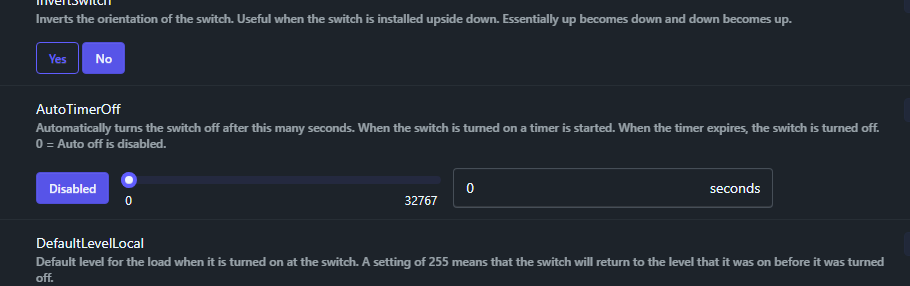
 That, and the functionality is there, might as well use it.
 I’d like to replace the Zooz switches that control these fans and Auto Off Timer would unblock me.