I was able to update to 2x to 2.18. Are you saying the previous versions didn’t try to modify the bootloader but 3.04 is? Any documentation on why 3.04 is modifying the bootloader? Seems like a miss for a paid for product. Garage-ware.
Complete guess, but seems like maybe they needed more space in one part of memory and so they moved things around which requires an unlocked bootloader to do so. I’m not sure though.
So Innoveli knowingly and willful sold defective units with lock boot loaders and released firmware that would fail? There was no mention if you got ripped off with a defective unit the upgrade would fail. Sounds like they should be replacing these defective units. Not so bad for me only have two but very disappointing. What was their end game? Expected us we replaced them with a reputable company therefore no issues or complaints? Burn original customers? Sub par testing of firmware for sure. Sounds really lame to me.
My integrity is way higher especially if I’m taking others money for a product. Definitely would handle this way better than having to write a blog of their failures to even get a clue. Thanks for the info Sam. As you see, we aren’t getting any real answers, response, support or honesty from Inovelli.
Dude, chill. The locked bootloader was and always has been a known “issue” (see #4: Blue Series Switch - Troubleshooting OTA (Over-the-Air) Updates | Inovelli Help Center )
Reach out to support and they’ll help.
For the others in this thread, confirming emailing them is a good route to go. They were very responsive and helpful. While it’s not fixed yet, it looks like they’re working on it.
I’m using version 2.9.1 of Zigbee2MQTT at time of writing this, and I have followed the instructions provided by Inovelli on updating firmware. However, even if I re-interview each device after updating, after a while Z2M reverts to showing the device on old firmware. Especially after I restart Z2M to update that container, all the devices that seemingly successfully updated, then show old firmware. I have Blue series dimmers and fan switches installed in my home.
I don’t see OTA failures in the Z2M log.
Here is a screenshot showing the OTA page of Z2M:
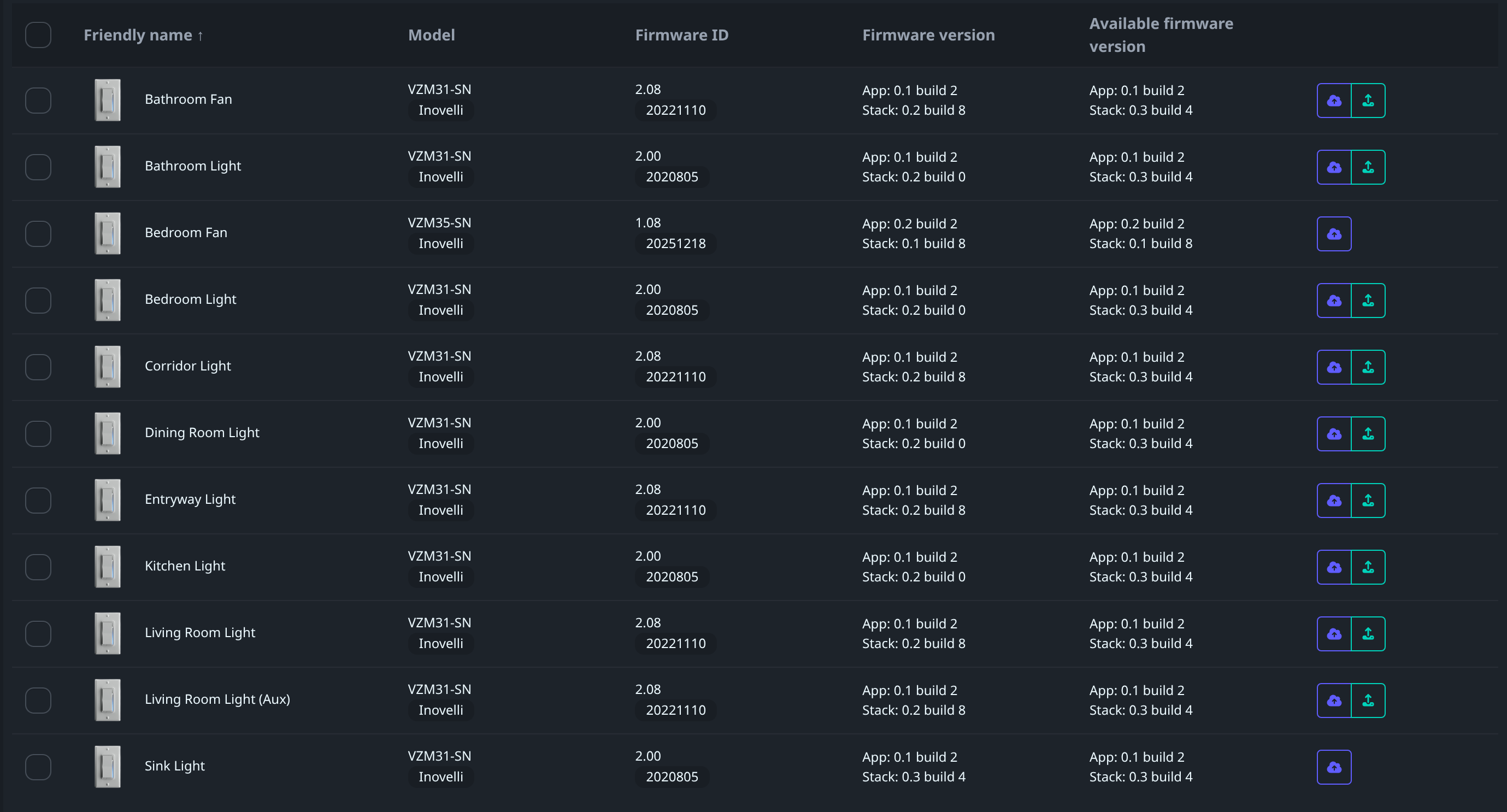
Any help is appreciated.
As mentioned above, contacting support is a way to go. These will need to be reflashed manually, not via an OTA.
I have two Inovelli VZM31-SN switches installed in Home Assistant using Zigbee2mqtt integration. My zigbee dongle is the Nabu Casa ZBT-2.
Both switches are at firmware version 2.18 and Home Assistant is telling me there is an update to the firmware. This is in the OTA section of Z2M:

Both say they successfully update and the App: and Build numbers match the available firmware build. But the firmware version never goes off of 2.18.
A day or two later, I get the firmware update notification again, and it looks like as if the firmware never updated. I have factory reset the switches, pulled the air gap, rebooted home assistant completely and nothing works.
Is this an Inovelli issue or Z2M issue? I saw a couple of posts about confirming cluster settings and they are set correctly according to the posts.
Any ideas?
Thanks,
Scott
As the recent posts in this thread indicate, contact support for next steps.
I am trying to update to firmware 16909060 on Home Assistant…it goes through as completed and updated but then it doesn’t seem to stick - HA tells me again to update…is this a known issue and any solution? I tried pulling the tab under the switch but didn’t fix…
@pdawg17 What is the date code of the switches? Also what FW is on the switch currently?
I have the same issue - trying to update from v2.18. I found an old thread referring to the same issue - looks like a USB flasher may be needed.
There’s a newer thread (but same issue) – contacting support for next steps is the right call.
This post is from the newer thread…
Yep, I’m going to move these . . .
For anyone flashing their own devices (after contacting support) - I’ve verified that the SI-DBG1015A programmer works, and pinout on the switch is (square pad is pin 1) :
1 - 3V3
2 - SWDIO
3 - SWCLK
4 - RST
5 - GND
Should go without saying but don’t do this while the switch is connected to mains power!
Technically you can flash them while connected to main, but have to be careful. The air gap is pulled so technically you’re only powering chip with USB after that.
Updating firmware on Hubitat c8 pro, currently running 2.18, after the update still running 2.18, switch goes thru the upgrade process leds show progress. Refresh status still running 2.18. I followed the same process to get these updated to 2.18 its pretty straight forward press button, watch status refresh.
How does one get to the current version ?
Update…..all my “newer” switches updated I have others which are coded 2208 that will not upgrade
I have had to unpair and re-pair switches to see the updated firmware or you can try to re-pair in place
Tech support responded to me I need the USB module to fix my issue, I provided my address over week ago when I asked when I would see the device..its been crickets….
It takes a while but they will send you the USB module. They are being passed between each person who has the issue. When I was finished updating mine, Inovelli had me send it off to the next person on the list.