Is there a way to set the switch to only come on if the illuminance level is below a threshold or can this be implemented? I know I can make an automation in home-assistant for this, but is there a way a parameter can be set so that instead o the light turning on automatically when it detects motion all the time, it’ll only happen if say the illuminance level on the light sensor is below 200lux or something?
I don’t know if that’s possible on-board but here is my automation. It runs every 15 mins and checks if the illuminance reading is above or below 500, then enables/disables occupancy detection.
alias: Office presence detection toggle with lux
description: ""
triggers:
  - minutes: /15
    trigger: time_pattern
conditions: []
actions:
  - choose:
      - conditions:
          - condition: numeric_state
            entity_id: sensor.office_downlight_switch_illuminance
            above: 500
        sequence:
          - action: select.select_option
            metadata: {}
            target:
              entity_id: select.office_downlight_switch_mmwavecontrolwireddevice
            data:
              option: Disabled
    default:
      - action: select.select_option
        metadata: {}
        target:
          entity_id: select.office_downlight_switch_mmwavecontrolwireddevice
        data:
          option: Occupancy (default)
mode: single
Out of curiosity, why run on a schedule instead of triggering when the illuminance crosses 500 in either direction?
If I want to do this in Hubitat using Rule Machine (RM), I assume I would do a « Set Parameter » command with the value of 110 as the first parameter, and 0 to 3 as the second…?
These are the listed option, so I assume 0 is disabled, and 3 is « On when occupied »… Correct?
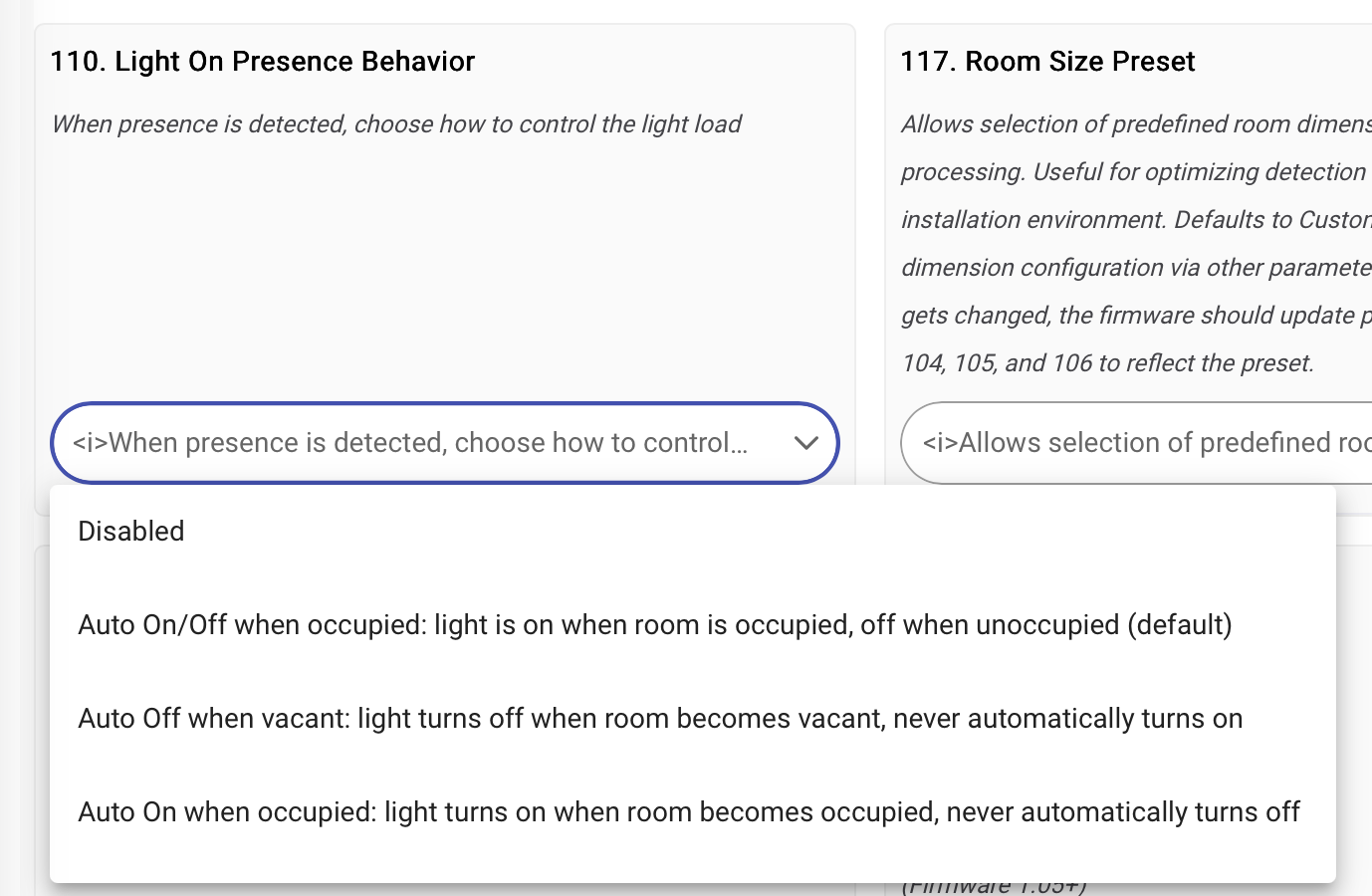
Is there a way to read that parameter in RM so that I don’t constantly re-write it?
Would it be crazy talk to just leave 110 at Disabled and use RM to action the lights based on a Motion Active trigger all boxed in by a Lux-based conditional (Req’d Expression or otherwise)?
I suppose something akin to a Private Boolean would help too, since I haven’t paid attention to often motion-active events come in once they start.
Then I guess you’d need another rule to handle turning stuff off too… Man, it ain’t ever easy 
Does Hubitat not let you write an automation like this? Handles on/off based on occupancy and illuminance fairly easily in Home Assistant with a single automation.
Yes, I could absolutely do this as a RM - That’s what I did before, and what I do in every other location. Just looking at options - I kind of like the option of the switch turning on and off without needing to communicate with the hub every time… 
That’s slick!
For folks familiar with Groovy (vs YAML), I’m sure it’d be possible to write an app for Hubitat that would be a similar all-in-one solution. Heck, even for folks like me who couldn’t code my way out of a wet paper bag, I suppose it wouldn’t be too hard to vibe code said app with AI.
I just don’t have the patience or interest to do it myself 
Did you get this working with RM? I get errors when trying to set it. I too prefer not having to involve the hub for every motion event - defeats the purpose of an integrated solution if I can’t get the speed of on device processing.
If you do get it to work, mind sharing your rule?
I gotta think Eric M is scheming on some way to add Lux-based triggering to the driver (and/or firmware?  ) such that it can all be handled “in switch”.
Aside from the various zone-mapping/scheming posts, integrating Lux seems to the most popular request thus far.
No luck unfortunately…
I’m hoping the same!
I cannot use Rule Machine to set a parameter for my mmwave. Hoping to change settings based on Lux levels and time of day (i.e. switch to only turn off at night or only turn on when lux levels are high enough, or change a default dimmer level to be lower at night than during the daytime). I keep getting errors in the log and settings dont take. I have tried every which way and get the same error:
org.codehaus.groovy.runtime.metaclass.MethodSelectionException: Could not find which method setParameter() to invoke from this list:
The action i have is the following
setParameter(13, 5, 1) on Primary light
I have tried with and without spaces, without the final “, 1” that the GUI uses when sending comments (13, 5). All lead to the same outcome.
I wasnt sure if this should have its own topic, have already reported on the consolidated red dimmer thread so apologies if this isnt the standard procedure - feel free to delete if duplicate.
I created the new post since it’s broader than lux sensing. This is all RM settings changes through Hubitat. All good as long it’s in the queue for review, just don’t want it to get lost in the feature request.
You can use rule machine to set what level the light will turn on at, it is just not very intuitive how to do it.
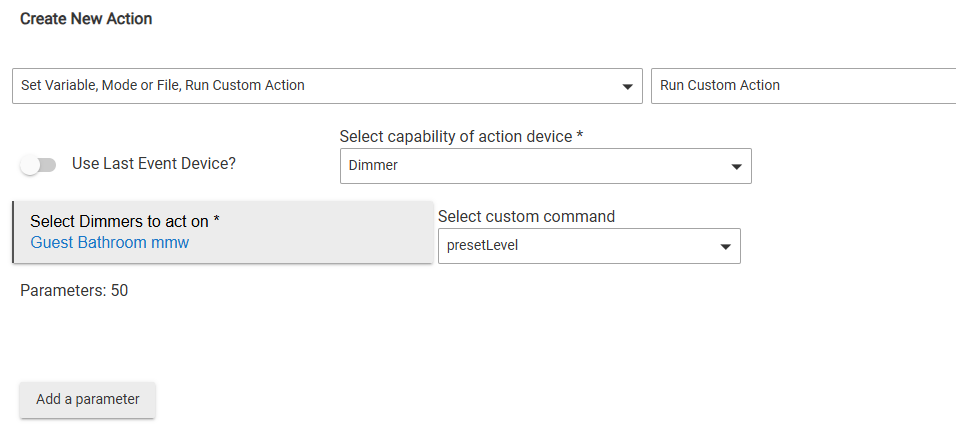
“Parameters: 50” was added by clicking “Add a parameter” and adding a number. This sets the level the switch turns on to without actually turning it on. You could set a rule that at certain times of the day when lux below a number and other switches off or below a level the preset gets changed. Basically set it so if dark and lights off it sets it low so you do not flash bang yourself in the middle of the night, but still have it turn on full bright if the attached room has its lights on full. This does not allow a zero so you can’t use it to not turn on the lights, but you could maybe set it so 1% is below what the leds need to turn on and set that. Dunno if that would be bad for the lights though.
Thanks for the idea! Though unfortunately even a low % is quite bright for night. We should really be able to use RM to setparameter as it was designed to be used. Hoping it can be addressed in the next set of updates to driver.
There are situations where that would run the automation multiple times in a short period and send lots of data over my zigbee network. Every 15 mins seems acceptable, maybe even 30 mins or an hour.
When I want to rate limit an automation on Hubitat to prevent that I simply add conditionals like this one to only send the on command if it is off.
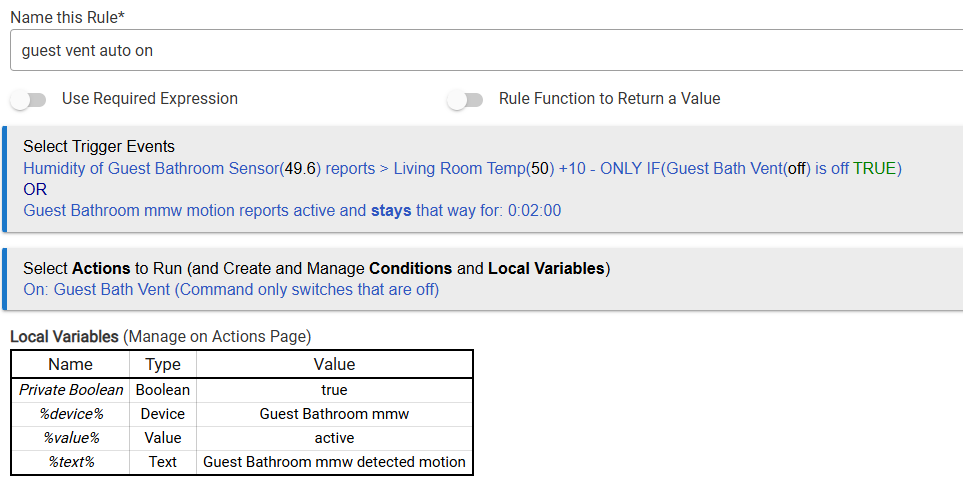
and for the off trigger I’ll us a conditional and a variable.
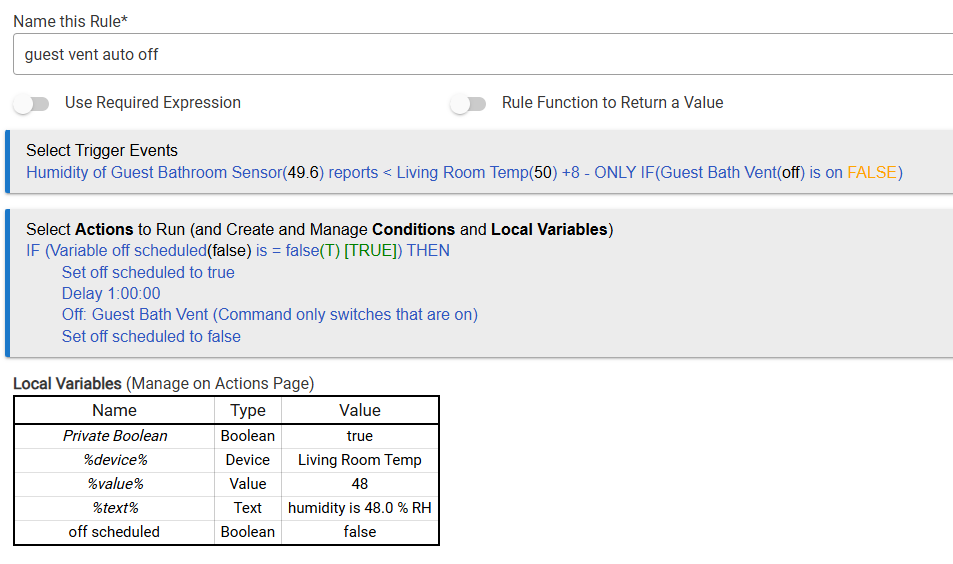
So this turns on the bathroom fan if I am in there 2 minutes or the humidity in there is 10% higher than the living room, but only if the fan is off. This way it is not constantly turning it on. Then for turning it off since I want the fan to run a while to dry out the room or clear the stink it sets a variable to prevent the trigger from running multiple times, waits, turns off the fan, then clears the variable so it can be triggered again.
Doing something like this with conditionals for lux level needed to trigger it would allow you to have the light only turn on when needed at the level you want, and only turn off when you want. So long as your z-wave network is healthy and your hub not overloaded you should not see any noticeable delay compared to on device triggering, and have minimal traffic since you would only be adding the command to turn the switch on.
On device triggering is nice in some cases, but this being a smart device means you are not limited to that and get the add on of rules to a stealth sensor.
Nice solution. I like it for specific use cases. However in this case (illuminance) I would still like the switch to operate the lights even if the hub isn’t available so I’m trying to do everything as elegantly as possible without relying on hub-controlled automations.
I get that and do like local when possible, but have not had a hub issue in years since switching to hubitat. I have only looked into it a little but there appears to be a HA to Hubitat bridge. I was thinking about getting HA for more powerful visualizations and what have you, but leaving devices and base automation on Hubitat for the reliability.
There’s much more that could go wrong, its not just about the reliability of the operating system - which even has to go down at times for updates. There’s also the networks - zigbee, wifi, etc. These are failure points that have nothing to do with Hubitat or HA. Even the hardware that you’re running the OS on may be down or inaccessible for many reasons.