Between 1.05 and 1.12 my lights ended up dropping offline after about a day after the upgrade. After chatting with AI, It is my understanding that there is a major upgrade in communication or security protocols between matter 1.0 and matter 1.4 that can cause this. I ended up factory resetting my switches and re-adding them to Home Assistant, and that appeared to fix it. I did it immediately after I noticed the drops, so I cannot say if it would have been re-occurring like your issue from 1.05 to 1.1.5.
1 Like
Thanks Ted. That was going to be my last resort if the upgrade doesn’t fix it. I’m suspecting I may have to do that though 
Others have had instability on the latest firmware, but thread is such a mess in general there’s really no way to tell what the root cause is. If you look at the various forums for thread/matter, there’s a lot of people with inexplicable issues with all kinds of devices. That said, I have a sneaking suspicion the firmware does not play well with the VTM35s (fan switch) and VTM36s (fan/light module).
@ethandlowry I’d probably hold off on re-commissioning your devices. It’s a lot of work and unlikely to fix the issue. Re-interviewing is much easier, and from what I understand it accomplishes the same thing.
That may well help. Matter 1.4 appears to be more “chatty” than earlier versions and Inovelli’s implementation is offering more features etc.
I noticed less Matter issues when I moved HA to a faster PC. I originally started with HA with a Pi4 and rejected that pretty quickly. I then tried an older quad core PC that I had lying around with an all cores benchmark or about 3500 and that was much better. I then moved to a 16Mb Quad Core 8 thread PC with a benchmark of around 8000 (still very slow by today’s standards) and things improved again markedly.
I would also take a look when you have a device down whether it is a Matter issue or a Thread issue. If you “ping” the device from the “Device Info” page in HA and you don’t get a response it is probably a Thread issue, if you do it’s probably a Matter issue.
I took the view that having a single OTBR (border router) being also run by HA also was probably a bad idea (asking too much of one device) so my OTBRs are all AppleTVs or HomePods (I have 4) and HA is Ethernet/5GHz WiFi connected to them (no Thread dongle attached to the HA instance). This distributes a lot of the Thread traffic load since traffic that goes between the OTBRs goes over Ethernet or 5GHz WiFi rather than Thread which are much bigger “pipes”. Reviews that I have read seem to indicate that Apple has a pretty solid Thread/Matter implementation.
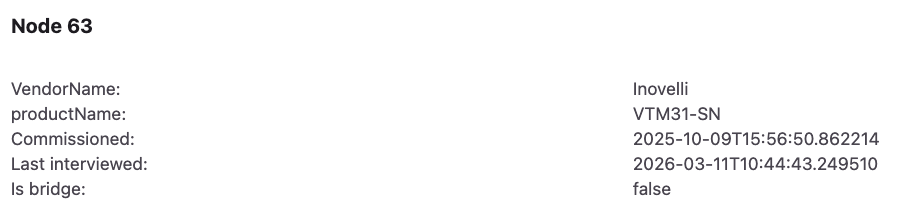
I’m not sure what removing and re-adding the devices to HA will achieve. I would however check in the HA Matter Web interface and see when they were last interviewed. If the date is before the date of your upgrade to 1.1.5 then it appears the interview process failed and you should ideally re-interview the device from the Matter web interface.
I get that thread can be a mess; but considering my setup was rock solid for a year + before this upgrade it seems pretty clear that the firmware upgrade is the root cause. I’m not convinced a re-interview would do anything. That should be occurring every time my HA Yellow reboots, which has happened numerous times during these issues. I will flip to matter.js after getting my CM5 upgrade today as I’ve read numerous posts about people switching to that resolving issues similar to mine. That will be my next course of action; if that still doesn’t help I’ll look deeper.
Actually no, the re-interview process only happens automatically when the software version changes.
I get that thread can be a mess; but considering my setup was rock solid for a year + before this upgrade it seems pretty clear that the firmware upgrade is the root cause.
As I said, Matter 1.4 is more “chatty” than earlier versions and Thread also is more sophisticated (more features etc) and that may have pushed the CM4 “over the edge” in your case.
This is a fantastic response. Thank you Andrew. I did have in the back of my mind that maybe I should flip to Apple Thread. I already own a HomePod that can do this. The benefit to this would be adding additional border routers would be much simpler than doing that with my HA Yellow Thread. 2 years ago I had merged my HA Yellow and Apple Thread networks into one, but seemed to have random issues so I stopped doing that. Wonder if that would be more stable now.
Yeah sorry, that response wasn’t directed at you. I just replied to your post. Thank you for explaining the re-interview process though. I misunderstood that.
No problem…. This is what the logs look like at the end of a successful matter software upgrade (I just upgraded a VTM31 earlier this morning),
2026-03-11 06:40:03.929 (MainThread) INFO [matter_server.server.device_controller] <Node:63> Starting update using OTA Provider.

2026-03-11 06:40:03.930 (MainThread) INFO [matter_server.server.ota.provider] Starting OTA Provider

2026-03-11 06:40:03.930 (MainThread) INFO [matter_server.server.ota.provider] Commission and initialize OTA Provider

2026-03-11 06:40:04.124 (Dummy-2) INFO [chip.ChipDeviceCtrl] Established secure session with Device

2026-03-11 06:40:04.665 (Dummy-2) INFO [chip.ChipDeviceCtrl] Commissioning complete

2026-03-11 06:40:04.665 (MainThread) INFO [matter_server.server.ota.provider] OTA Provider App commissioned with node id 990063.

2026-03-11 06:40:04.815 (MainThread) INFO [matter_server.server.ota.provider] Waiting for target node update state change

2026-03-11 06:40:04.916 (MainThread) INFO [matter_server.server.ota.provider] Update state changed from <UpdateStateEnum.kIdle: 1> to <UpdateStateEnum.kQuerying: 2>

2026-03-11 06:40:05.892 (MainThread) INFO [matter_server.server.ota.provider] Update state changed from <UpdateStateEnum.kQuerying: 2> to <UpdateStateEnum.kDownloading: 4>

2026-03-11 06:43:48.861 (MainThread) INFO [matter_server.server.ota.provider] Update state changed from <UpdateStateEnum.kDownloading: 4> to <UpdateStateEnum.kApplying: 5>

2026-03-11 06:44:14.051 (Dummy-2) CHIP_ERROR [chip.native.EM] <<5 [E:11024r with Node: <000000000000003F, 1> S:56919 M:267071806] (S) Msg Retransmission to 1:000000000000003F failure (max retries:4)

2026-03-11 06:44:29.201 (MainThread) INFO [matter_server.server.device_controller] Interviewing node: 63

2026-03-11 06:44:29.202 (MainThread) INFO [matter_server.server.ota.provider] Update state changed from <UpdateStateEnum.kApplying: 5> to <UpdateStateEnum.kUnknown: 0>
You can see the “Interviewing node: 63" log entry on the last but one line. This also updates the last interviewed date in the Matter Web UI (Note the time/date here is in UTC).
1 Like
Yup, I looked after your last response and see all my devices show last interviewed on 2/18 which is when I upgraded the firmware and all this non-sense started. 
I think (note think) the best approach is just to use one Thread OTBR “provider” rather than trying to use the HA Thread implementation AND Apple’s. In my case HA simply runs Matter over Ethernet/IPv6 to one of the OTBRs (no Thread used in the HA Instance) and Apple takes care of the Thread part). I consider the AppleTVs and HomePods to be “free” since I use them with TVs and as speakers anyway.
1 Like
Fun thing. It looks like it has now been released to HomeKit. And now Apple Home is saying updates to 1.1.5 are available for my dimmer switches. All good so far. Except that I updated the switches to 1.1.5 via Home Assistant a couple of weeks ago, and Apple Home actually shows that the switches have firmware 1.1.5. Fun times.
@Smog_Privacy ahhh I actually think this is expected. We had an issue with our compliance request that we fixed so there is a newer 1.1.5. It has a couple minor bug fixes, but mostly it brings the software version up to par with the new numbering our products are using. I mentioned it a little earlier but wasn’t sure about how your scenario with multi-admin would play out.
FWIW having a new release with the same version as the old release is confusing Home Assistant at some level of the stack (people are debugging). It’s causing the system to think there is an update available, but then not actually update.
In general, probably not a great move to release a new firmware version with a duplicate version.
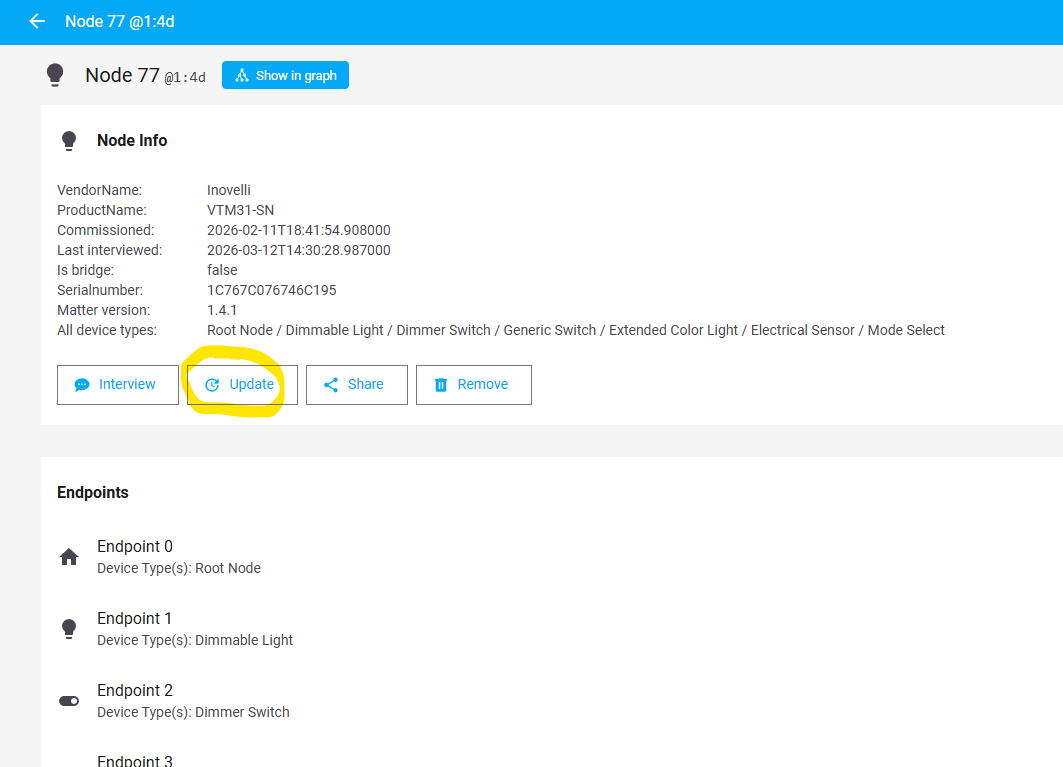
@harryh From our testing, the matter server detects the update but Home Assistant does not display it because the version string is the same. Unfortunately, we had to keep that the same for the compliance record. This can be resolved by updating through the matter server user interface or waiting until 1.1.6+ to be released.
The bug fixes are minimal and most users will not notice them so it is ok for users to not update to this firmware if they want to wait.
3 Likes
I updated 38 dimmers using this method with no issues.
I’m a bit confused regarding the 1.1.5 update on Apple Home. Today I got the notification that updates were available for my 4 dimmers. I had turned off automatic updates for accessories as I expected that then I would be able to update individual switches and not have it trying to update all at once. However what I was presented with was an update all button and then below that another update button on the screen. When I tapped the second update button then it said update requested and in a small amount of time the 5 entities that show up for the switch. The fact that there are 5 entities confuses me a bit. I know one is the actual switch control of the light and one is the LED strip on the switch. I’m guessing one is humidity sensor. Not sure what the other two are. After the first switch did update though all that shows now is the “update requested” and no other switches have updated and it’s been well over an hour since the one switch updated.
I was under the impression I would be able to individually control when each switch actually tried to update. What should I have expected and will the other 3 switches eventually update or do I need to do something?
Once you get the notification, you should be able to browse to the individual switch, and from there tell it to update.
When I open up the individual switch settings it just says update requested. So evidently it thought I wanted to update all at once. The one switch updated but now the other three just have that update requested on what was probably the update button. Hoping I don’t have to jump through a reset or something.
I have tried pulling the air. gap on one and having it reboot… But all three dimmers now just show "requested’ and the button is greyed out. So unless someone has a magic incantation and tell me what band of garlic to shake over the switch to get them to actually do the update then it looks like I"m going to have to do a factory reset. I just didn’t realize I had to drill down into each switch from the update screen on Apple Home into the actual switches to get to where I would have a button that let me just update that specific switch. Not my finest moment as I’m just not that familiar with Apple Home yet… but I got tired of fighting with Z2M, HomeSeer, and other third party bridges trying to get automation to work. I looked a couple of times at Home Assistant and thought that was another nightmare in its own right. I just want something that the wife likes and can deal with when she no longer has a resident geek in house. I am not planning on being the ghost in the machine and keeping this stuff running forever. Before I do a factory reset on each of the 3 dimmer switches I will try rebooting the Apple TV that is being used as the main hub for the Matter / Thread network. My motto for home automation: Always Something™
Issues solved. Rebooted the Apple TV that is set as main hub for Apple Home. Then I got the ability to go to each switch settings and telll just that switch to update. Doing one at a time works well. The cause of my initial confusion was that when Apple Home noticed that update was available the software update screen showed two buttons. The first said “update all” and the second button showed the new firmware version with a button that said @update” next to that label. I expected it to show me a list of devices if I selected the second button. It does not. So both buttons on the software update in Apple home do the same thing. They try and do upside all. This worked for one switch and then all the other switches were just showing “requested “ on a greyed out button. Reboot of the main hub then let the Apple home app to show that updates were available for all the switches that needed it. Getting out of Apple home settings and just going to each switch and then selecting the accessories settings for just that device gave me the option to just update that switch. Went very quickly and it appears that the settings I I had set for things like default dim levels are still there. So Apple could improve the screen for software updates.
1 Like