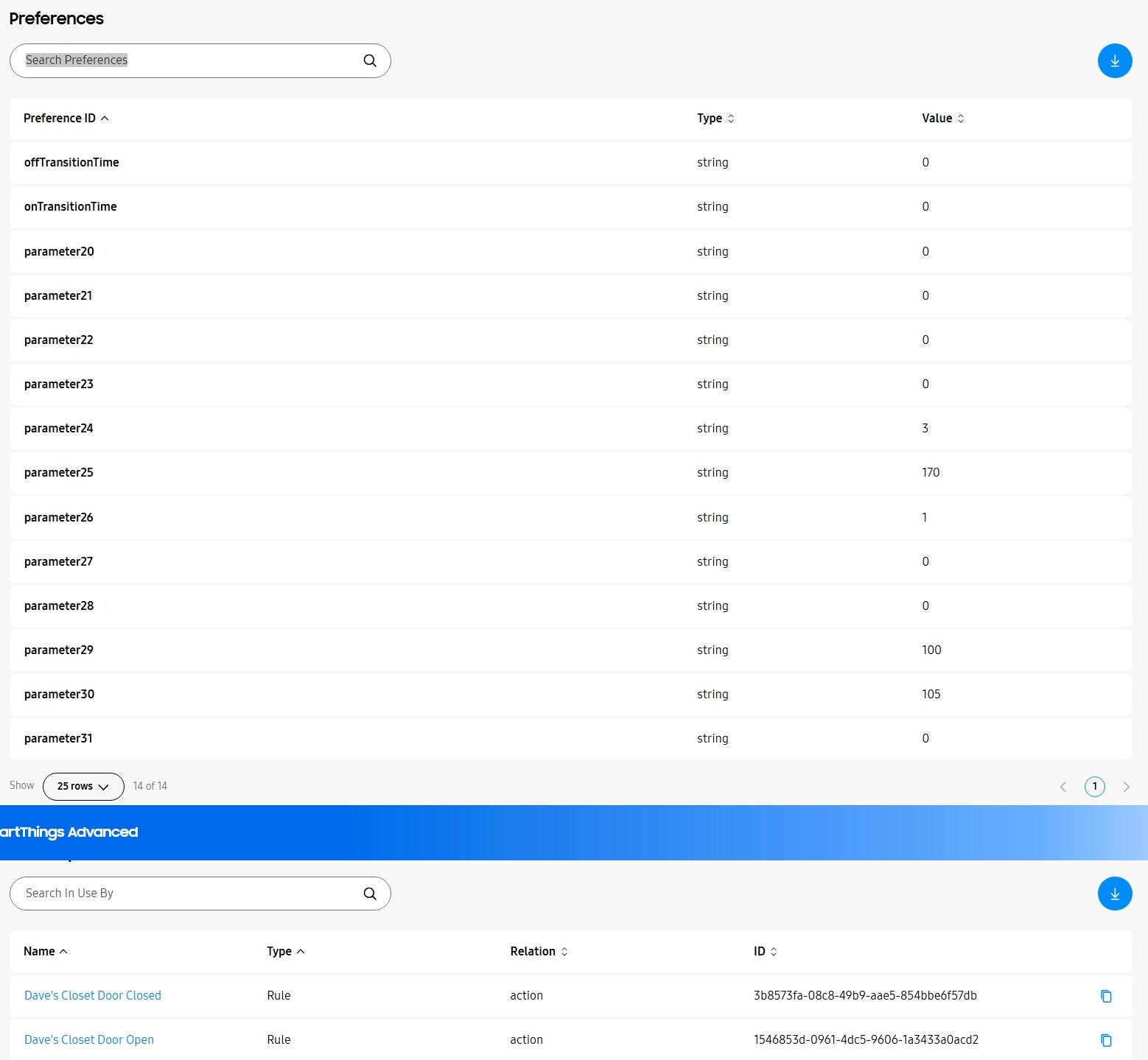
The reason for this is pretty easy. If you look at the Matter Web UI and examine Endpoint 0 (Root Node) and Select “Basic Information” (Cluster 40) and scroll down you will see two entries that relate to Software version.
The first one (“SoftwareVersion”) is the “real” software version that is used by Matter to identify whether there is new software available. If when the Matter server checks the DCL for a device and shows an available version number greater than the “SoftwareVersion” it currently has for that device then the Matter server considers a new software version is available and communicates that to HA Core. The SoftwareVersion uint can be any uint, it does not have to relate to the version number actually displayed to the user. This is exactly as per the Matter spec. In this case the SoftwareVersion of “1.1.5r2”, (the latest version for the VTM31) is 1150, the SoftwareVersion of the original “1.1.5” was 115. 1150 is greater than 115 so the Matter server “sees” that a new version is available.
The second attribute (“SoftwareVersionString”) is a text string to be displayed to the user to represent the current software version in a specific device. It is also what CSA publishes as the released version of the software for a particular device). In the case of HA Core it is only considering this string and both “1.1.5” and “1.1.5r2” have the same SoftwareVersionString of “1.1.5”. This means HA core is being “told” by the Matter Server that a new version is available but when it compares the new SoftwareVersionString being offered by the Matter Server with the current SoftwareVersionString that it has for the device it sees them as the same and hence does nothing.
In reality, HA Core should probably base upgrade availability decisions on “SoftwareVersion” rather than “SoftwareVersionString” since that is what the Matter server does. However, whether this is actually worth fixing since it will not happen that often and there is an easy work around (use the Matter UI to do the upgrade) is debatable.
Can you explain what the bugs are that were fixed in 1.1.5r2? How would we know if we are impacted and should upgrade if the actual bug fixed in the release aren’t public? This thread which lists every firmware version has no mention of this mysterious R2. Really bizarre that you released R2 so silently, especially when there are so many users having issues related to 1.1.5.
Thread network instability mainly. Seems to be more about the amount of extra sensors that are being exposed now causing a lot more traffic for users that have many white switches throughout their home. So…not really a bug with the firmware itself; but a result of the firmware upgrade. I had to update my Pi after upgrade as I didn’t have the memory necessary to successfully manage all the extra data. It seems to have stabilized now that I have 8GB of memory in my HA Yellow (versus the 2GB before). However, if your a person running into issues and see comments about a hidden 1.1.5 release and don’t know what bug fixes are related to it, it would be difficult to know if they would have any relevancy to you. Thank you for updating the info at the top of this thread!
Ah, I see. Yes, I am aware of the extra traffic from the devices getting more sensors / reports. We haven’t looked into addressing that with a firmware change yet, but we can certainly consider it. Most users have reported better reliability because there were a lot of bug fixes in the newer matter sdk (which we are using), but I know there are still some concerns out there with large networks. It may be useful to better be able to choose which clusters you want reports from and the frequency. In Zigbee and Z-wave we can adjust the frequency of reports and there probably similar configuration with matter. My guess is that it is already there but there needs to be a user interface to easily allow the configuration of them.
Sounds good! I love all the extra data, so not complaining about that It does seem to be pulling energy usage a lot though, so maybe the time for that could be reduced.
As a note; I opened a bug report for HA related to it not detecting a new (R2) firmware is available due to the SoftwareVersionString not being different, while SoftwareVersion is.
Smooth update on Apple Home from beta fw 1.1.1 to official 1.1.5 on 22 switches. No issues to report thus far on a very large Thread network with a mix of Apple, Aqara, and IKEA TBRs and over a hundred devices. I typically have problems with the White Series Fan Switches going no response every once in a while but haven’t encountered that since the dimmer switch update. Might be coincidence, but figured it’d be worth mentioning just in case. I don’t know what magic goes on behind the scenes with these things, I just know what I’m experiencing as an end user.
I will add that it’s still odd to me that the LEDs have adaptive lighting as an option in Apple Home, but that’s a personal gripe more than a major issue, I think.
I had a few of my switches that were multi-way with dumb switches seem to forget they were in multi-way with dumb switches after the update. Not a huge deal because they didn’t seem to forget anything else so reconfiguring that setting seemed to get me back functioning. Running everything through HomeKit.
This is related to the update advisory they released. I had to update my multi-way after the upgrade as well. Posting the link below incase you missed it. You may want to review to be sure nothing else needs to be fixed on your end.
All was good when I was using 1.0.5. Then I installed the 1.1.5 update using Apple Home. At first I thought things were good, but then I noticed every now and then the LED strip would turn on white for a second or two, then turn back off. So I went and did a factory reset on all the switches and re-added them to my Apple Home. It did not fix anything, I still see the flash. I do not want the switch LED strip to be on when the lights it controls are off, and having the strip flash in the dark is distracting. It’s not just happening on one of my switches, it’s happening on many of them after they updated. (1) What does that mean? (2) How do I stop it?
I am using Smartthings. My VTM31 Dimmer are at FW 1.1.5. Don’t know when updated but today my switches started acting odd. When they switch on the blink once. When they switch off they dem down to off. I am using them as regular switches, no special dimmer settings. Other than that, they work fine. Any ideas?
@dsanders@crashtestwalrus can you provide any info on how your switches are configured. Especially the one that you did a factory reset on so I can try to replicate it. I haven’t seen this reported yet.
@grabuckfarm2 I wonder if your settings need to be reconfigured after the update. If you are using the Inovelli driver you should be able to pull down on the device screen to “refresh” it and it should update your driver specifically for the fw version that is installed. Once you do this there should be several new options in the “Settings” section. Can you change those away from the setting they are on and then back to the setting that you want? This will confirm that everything is set the way you are wanting.
Ok. Set the On & Off transition time to instant & they work as expected. Get message ‘This device hasn’t updated all of its status information yet’. Check again later.’ Don’t know how to pull down on the device screen to “refresh” but after reconfiguring settings I am happy with the switches. Thanks.
One is configured as multi-way (dumb), dimmer mode enabled, instant on enabled, ramp rate [off to on] (parameter 2) set to zero, led indicator intensity when off (parameter 11) set to zero, switch delay time (parameter 13) set to zero.
Another is configured as single pole, on/off mode enabled, instant on enabled, ramp rate [off to on] (parameter 2) set to zero, led indicator intensity when off (parameter 11) set to zero, switch delay time (parameter 13) set to zero.
@EricM_Inovelli I have 14 switches in various modes. They all seem to be doing this. I am using them with Apple HomeKit. The modes that I have are single pole smart bulb mode, multi way with aux switch in smart bulb mode, and multi way with aux switch non smart bulb mode. I have the LED configured to be off when the light bulb is off on all of the switches. The switches that were in smart bulb mode had to be configured for that again once the software updated but that was mentioned in the release notes. I haven’t actually tried to factory reset any of the switches yet because since a bunch of them are in smart bulb mode it is a pain to delete them from Apple home, re add them and set all the automations again so the buttons control the lights.
Thanks, is it completely random or are you able to capture it on video?
Edit: also, does it only occur when the LED intensity off = 0? Actually, now that I am thinking of it, are you setting that setting via the local configuration mode? I am assuming since Apple Home doesn’t expose that setting. Just gathering info to try to replicate.
I configured by pressing the buttons on the switch itself, yes. I haven’t tried setting the off intensity to not-zero as that’s not what I want, but I guess I could try. I don’t know if it’s random, but it does not happen often enough for me to know when it’s going to happen. Just often enough that when it’s dark (lights are out) then I notice it when it eventually flashes.

 It does seem to be pulling energy usage a lot though, so maybe the time for that could be reduced.