It doesn’t seem to be happening on a regular interval but I have enough switches that when one lit up I was able to capture a video of another one a few minutes later. It is telling me the video is too large to post here so here is a link to it.
That video looks exactly like what is happening with mine as well.
@crashtestwalrus video
1 Like
We have had this issue as well. I noticed one of the offending switches was grouped, but only had the load and not the RBG indicator. I tried ungrouping them and then regrouping them and haven’t seen it flash since.
Also, to answer the question about local configuration it definitely is all local configuration since Apple home doesn’t let you configure those things in the app.
@crashtestwalrus @dsanders do you have any groupings setup? We are still trying to replicate this.
@EricM_Inovelli I have groups of lights in my home setup, those don’t include the dimmer switches though. The dimmer switches are shown as one device in Apple home by default, I can try changing that to show it as five individual devices and see if that solves the LED lighting up.
Edit: The switch I flipped the setting on to display as separate devices is still lighting up periodically. So that didn’t appear to fix anything.
I do not have any groupings. I factory reset the switch, changed its configuration, added it to apple home.
Since the LED bar is white, we believe it might be related to adaptive lighting, but we are still investigating.
I did inadvertently turn on adaptive lighting when apple home asked me about it. Not sure if there’s a way to turn it off - I poked around and didn’t see anything.
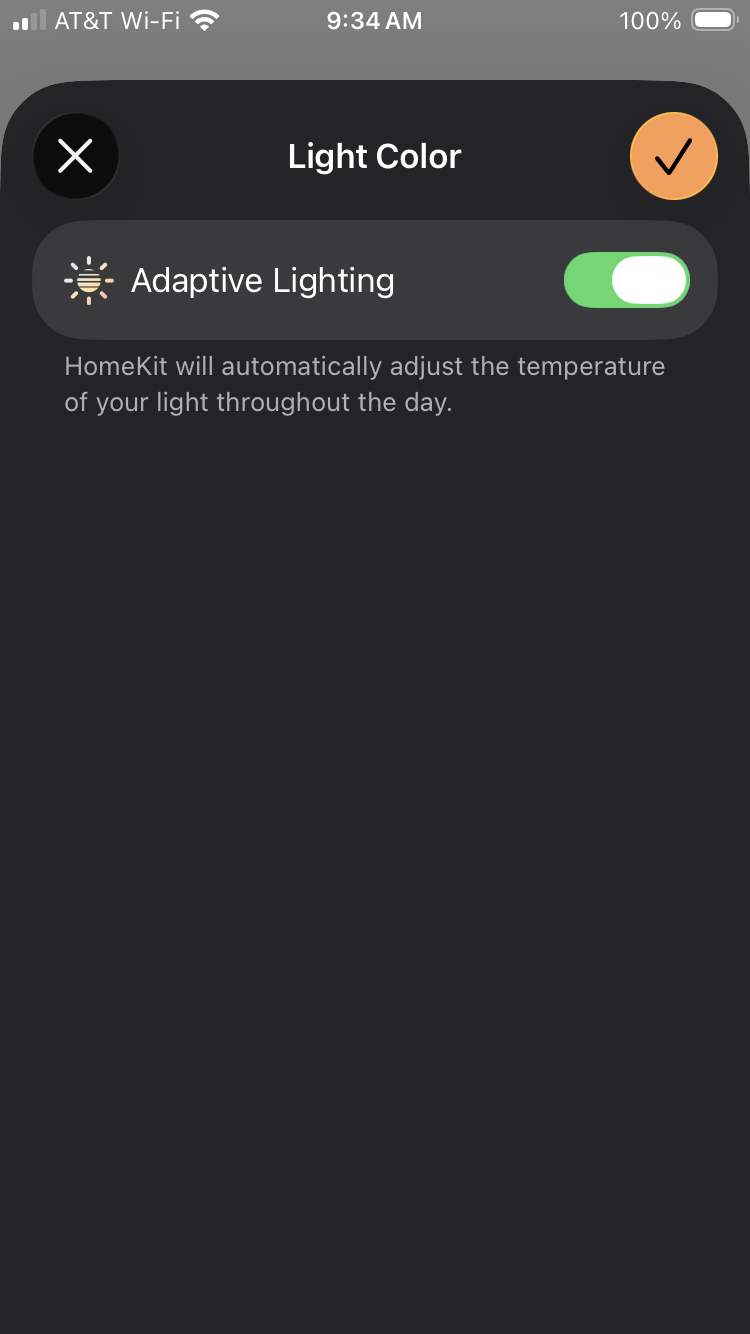
Manually turn on the LED bar from Home, set the color/brightness etc of the LED bar to any value and turn it off. That should disable adaptive lighting.
1 Like
If you goto the panel for the RGB indicator and turn it on it will say at the top whether it is in adaptive mode and the brightness control (bottom left will have a circle around it).
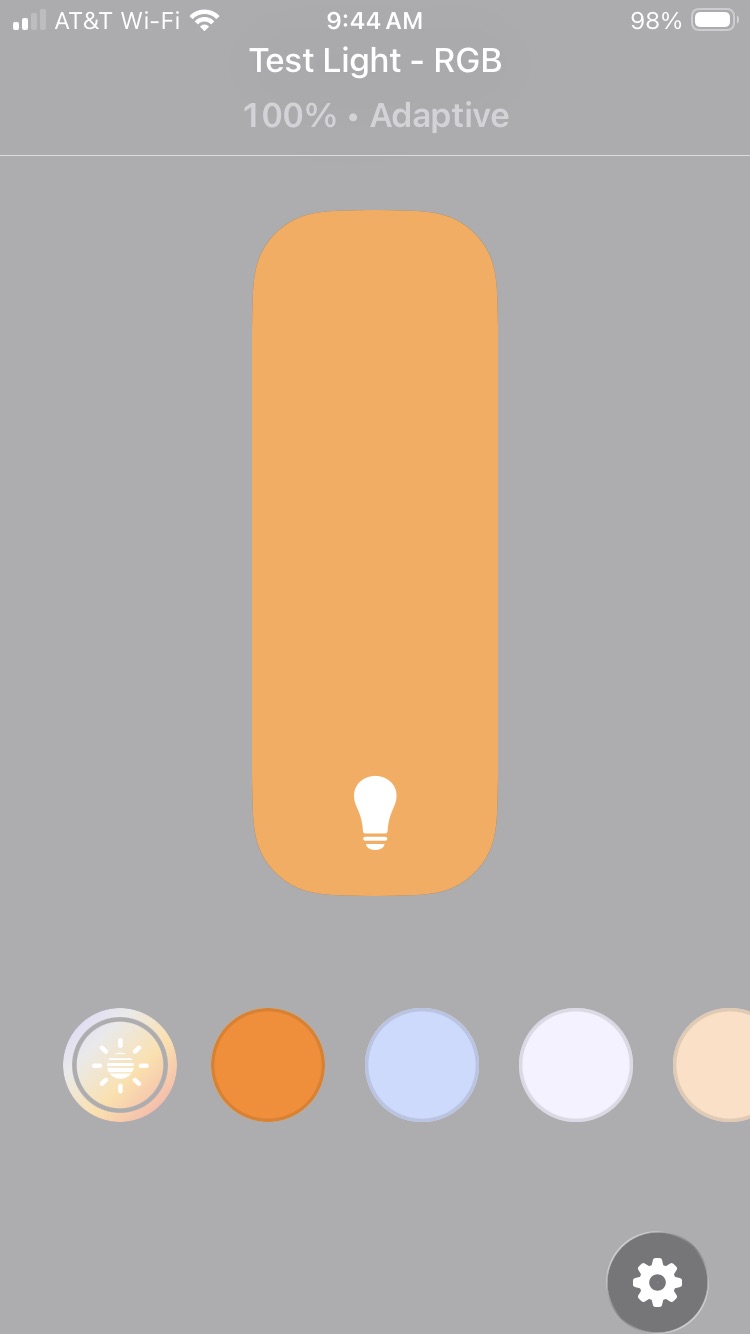
If you tap any of the color presets then it will turn of adaptive lighting for that RGB. Otherwise scroll all the way to the right and click on the color wheel button.
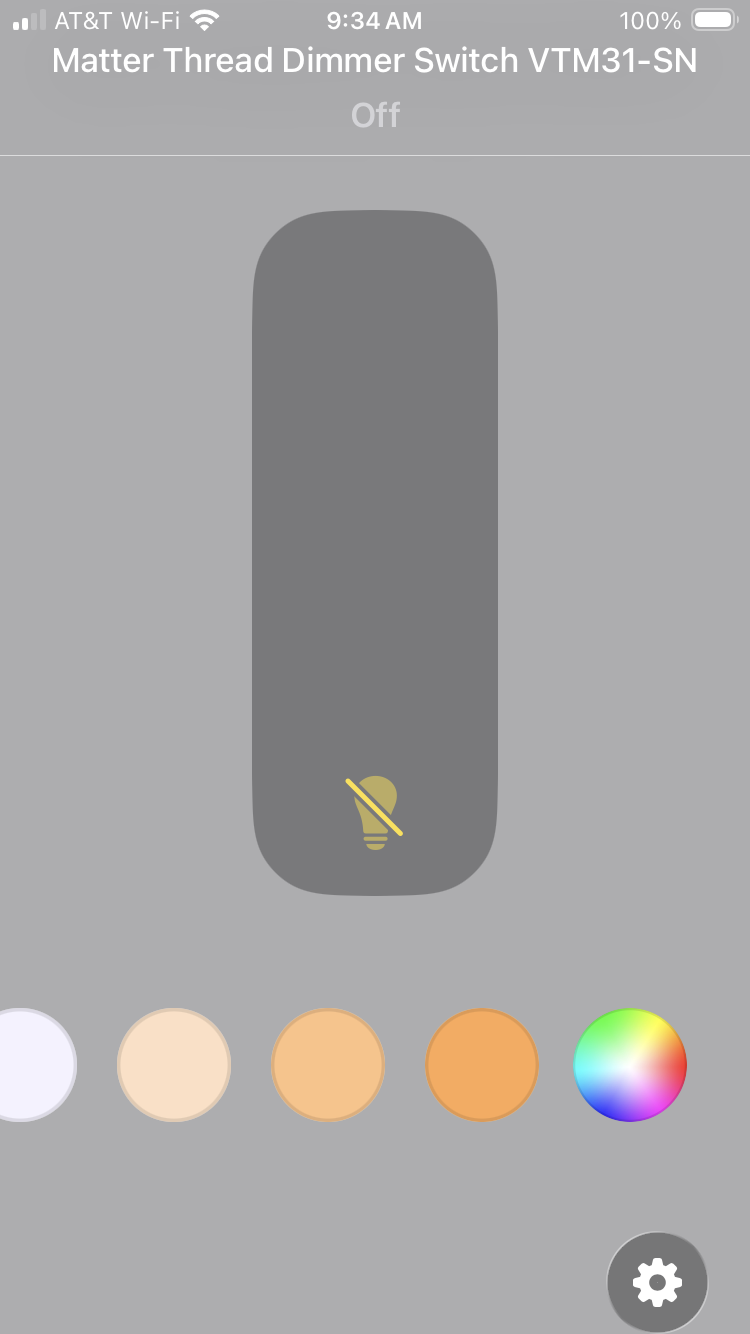
You will then get a panel where you can explicitly turn off adaptive lighting.
I have a test VTM31 set up in Homekit and in adaptive mode and I’m keeping an eye on it (normally I just use Home Assistant and operate the switches via Home using the HA Bridge) . So far I have not seen the flash. My guess is it happens when Home thinks it is time to change the RGB color.
They hid that switch well, I don’t think I would have ever thought that choosing the color wheel would bring up an adaptive lighting setting. I figured it’d be under the gear. Anyhow, I switched it off on all my dimmers – Hopefully that does the trick. I’ll try to keep an eye on it when it gets darker.
1 Like
I also just switched off adaptive lighting on some switches that were just flashing. I will report back if it fixes it.
After the latest firmware update, some of my Inovelli White Series multi-way setups with dumb switches are reporting the wrong state. Mechanically, the lights work correctly from any switch, but in certain positions the LED bar stays on (or turns back on immediately if controlled from the smart switch) and the smart home shows the light as “on,” even when it is actually off. This never happens in reverse - always falsely on when actually off.
I’ve verified wiring, reconfigured the switches, factory-reset, and even replaced a unit, but the issue persists. These setups were stable for over a year prior to this update.
AI seems to think it’s “phantom voltage” from the travelers. Has power sensing through travelers changed in the latest firmware? Any other recommendations?
After turning off the adaptive lighting, I haven’t noticed any flashing for the past two nights. Hooray!
1 Like
I have experienced exactly the same symptoms for one of my dimmers, you did a good job of describing the situation. In my case, it had also been working correctly for nearly a year but lost the ability to detect the power state of the light after upgrading firmware to 1.1.5. I had previously seen similar symptoms on another dimmer running 1.0.4 (and also switches from other vendors), the difference here is that this switch was working correctly on 1.0.4 and only began losing power state after upgrading to 1.1.5.
In both cases, my circuits are wired in a long loop (probably 75 feet total) with the travellers and load in the same 14/2 Romex, so excessive electrical noise seems a reasonable explanation. My guess is that 1.1.5 is somehow more sensitive to noise than 1.0.4 was.
I’ve gone back and forth a few times with Lance from Inovelli, who has been helpful but we haven’t yet been able to resolve the issue.
Thanks for describing your experience, it’s helpful to have more variables to consider.
One of my problem circuits is fairly long. It’s a 3-way setup (1 Inovelli + 2 dumb switches) in a 2-story entryway, with the Inovelli at the top of the stairs. I don’t know the exact routing, but even a straight run would be 50+ feet, and in reality it is likely longer due to framing, doorways, and other obstacles. Line and load are in the same box.
The second problem setup is shorter in distance but more complex. It’s a 5-way (1 Inovelli + 4 dumb switches). Given the number of switches and the routing constraints (multiple doorways, etc.), I would expect more opportunity for induced noise. In this case, line and load are in separate boxes.
If the length/complexity of the run is the problem, I’ve got one more that I’ll be on high alert with - it seems to be working fine for now, but it’s an almost identical setup to the first one I described but into basement. Saving grace there may be that my load run is shorter there. Lower ceilings and end of that run is very close to the light fixture.
Glad there’s another with this issue. I had nearly convinced myself I made it up.
I’m also glad to know that I’m not the only one who experienced this after updating the firmware. It sounds like our switches are wired pretty similarly as both of my problematic ones have line and load in the same box. The one that was giving me trouble on 1.0.4 was a 5 way like yours with 4 dumb switches on a really long branch; I ended up replacing the dumbs with aux switches and that fixed it. I figure I will also have to do that with the switch that started misbehaving after updating if we can’t find a software solution.
I updated all of my White Dimmer switches in Home Assistant a few weeks ago. Today I received a notice to update them again from 1.1.5 to 1.1.5 (1150).
- Installed version: 1.1.5
- Latest version: 1.1.5 (1150)
Is anyone else getting this second update?