Yes, that is normal. @EricM_Inovelli explained it here. The items marked with a * in the release note are the items that are changed in 1.1.5 (1150) vs 1.1.5 (115)
@cpaholovach That is an update cleaning up a few items,
Fixed unexpected behavior during the startup stage.
Resolved an issue where the EP6 LED notification did not behave correctly after a power reset.*
Fixed a bug where LED intensity (On) could not be set to 0.*
Added an “Off” option to the LED effect settings.*
Double tap config to clear notifications disabled (it was also disabled in 1.0.6 but accidentally got re-enabled). The same functionality can be enabled with an automation.
** These changes are part of second release of fw 1.1.5
I updated from 1.05 to 1.15 via smartthings and my n-way with aux switches unable to be controlled via aux switches. I set them to dimmer+aux mode. Both up/down paddles on the aux switches will only dim lights down all the way to off. The aux switches cannot turn on lights or dim up. Any solution? Id like to avoid factory reset.
There is an issue in some lighting circuits where the switch is having a hard time detecting the state of the dumb switch. Our engineer is working on a fix for it.
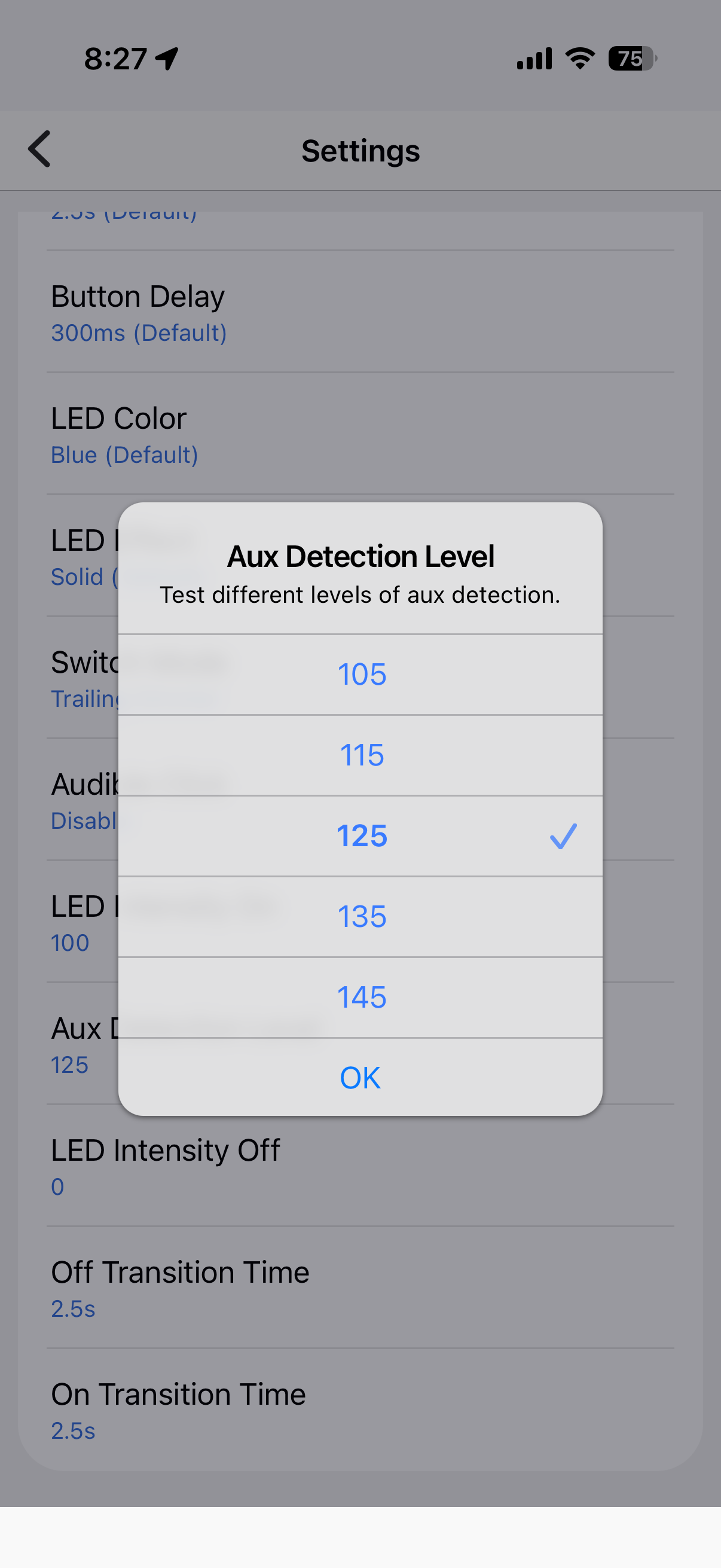
@dtdfusion there should be a setting for the device called “Aux detection Level”. Please incrementally increase it until the problem is resolved.
2 Likes
I’ve emailed about this as well.
I’ve upgraded and factory reset several of my white series innovelli dimmers to v1.1.5. Now all the hooked up aux switches are no longer registering the up paddle event. You can see this in the smart things app. The main switch works just fine. Settings are set back to multi way+aux.
Now my aux switches can turn off lights, but not on. Previous firmware worked fine and still do for those switches I have not upgraded yet. This appears to be a bug in the production release of 1.1.5.
Eric replied to me in the firmware thread and suggested to up the “aux detection level” in the setting until it works.
Almost certainly related to the reports immediately above: Enbrighten Add-On Toggle Switch, 46200 aux switches on a 4-way circuit are registering only up presses for me. Which will toggle the light both on and off. But no dimming function.
Last night, before I unset and re-set the “Multi-Way with Inovelli Aux Switch” setting, one of the aux switches was registering down presses (not up) and the other one was vice-versa.
I located an “Aux Test” but no sensitivity setting exactly in HA.
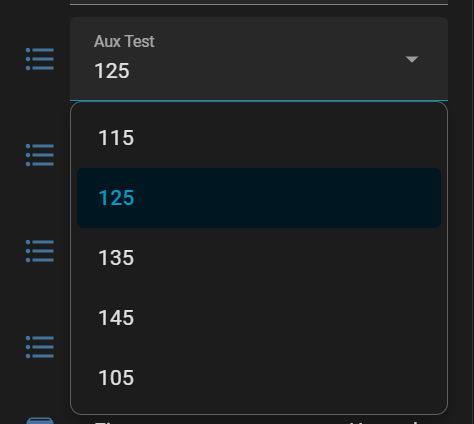
The only setting that seems worthwhile is where it was at (125). All the others seem to disable the aux switches entirely. Though, one gotcha to look out for is that after making a change to this setting, each aux switch will apparently succeed in having one last toggle received by the Inovelli switch, after which, they are just ignored altogether.
With them at 125, up-presses remain read by the Inovelli and are toggling the lights on/off with no dimmer functionality.
I also use Enbrighten aux in 4-ways. I have 3 sets and setting the aux detection to 125 in Smartthings have solved my aux paddles not working correctly.
1 Like
Would you please (re)confirm that both up presses and down presses continue to work for you? I only get up presses currently. And holding it for dimming control does nothing.
Are yours working (and continuing to work after an initial test) with all presses and with dimming?
Thanks!
–Bri
@BriBriBri ill test again when i get home tonight and will update you.
update: i just tested and confirm my 4-way with enbrighten aux switches work correctly.
We have a beta firmware (1.1.6r1) that can help resolve the aux or dumb switch issues people are having (details in the top post). If you would like to try it please PM me and I will share how to access the update.
Interesting, my aux switches work fine until I try to engage the dimming functionality from them. At which point they start registering only up toggles that register as both on and off (toggling it). Proper functionality is then restored by operating the dimmer functionality from the inovelli itself. And then, sometimes, I just walk up and try it after hours of not thinking about it and it’s also just working again properly.
Oh well, glad to hear a firmware update will fix it soon (or now, for the brave).
I’d like to test it
1 Like
If you have Home Assistant the ability to change the AUX sensitivity is already in 1.1.5. It’s termed “Aux Test”.
That is understood. My prior posts mention tweaking it to limited effect. Including a screenshot of the setting. That setting, in and of itself, is not the fix.
@BriBriBri I will have to check with our engineer as it is the first time the setting hasn’t been able to fix the issue. Are you able to check the line voltage in your house by chance?
Line voltage throughout the house on both phases tends to be about ~123v. Tested by multimeter at circuit breaker and at various outlets. And also reported by various devices.
I’ll try all those values in the setting again. Do I need to do anything to make them take effect other than setting it, and waiting a moment to make sure it applied? Perhaps my prior testing was too hasty?
Thank you!
–Brian
Additional testing done.
105
–main switch works normally.
–If turned on at main switch, aux switches can turn off. But only once. Cannot turn back on from aux switch.
–if turned off at main switch, aux switches cannot turn on.
115
–main switch works normally.
–aux switches work normally until dimming is attempted via aux switch (holding up/down). After which, aux switches will only work with up presses which HA reports alternatively as up/down presses and this works to toggle the lights on/off.
–proper operation of aux switches (except dimming) is restored by using the dimming function at the main switch. Up/down presses are both then recognized at the aux switches. But attempts to use dimmer (hold up/down) will put them back into “up only” state.
125
–Same as 115
135
–main switch works normally.
–aux switches work normally until dimming is attempted via aux switch (holding up/down). After which, aux switches do not work at all.
–proper operation of aux switches (except dimming) is restored by using the dimming function at the main switch. But attempts to use dimmer (hold up/down) at aux switches will put them back into non-operative state.
145
–same as 135
Overall switch settings screenshots included.
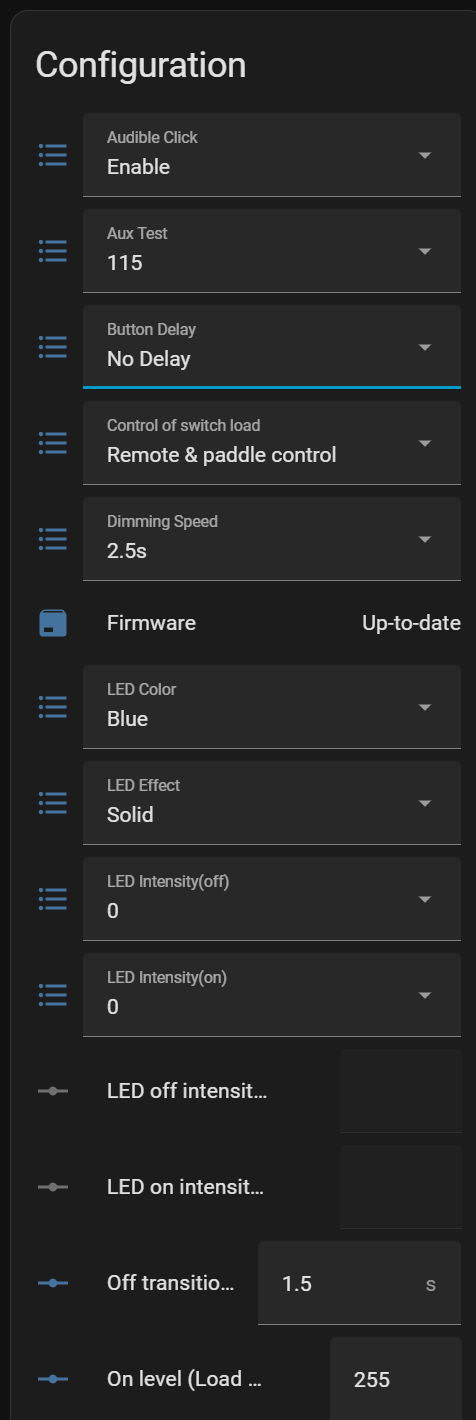
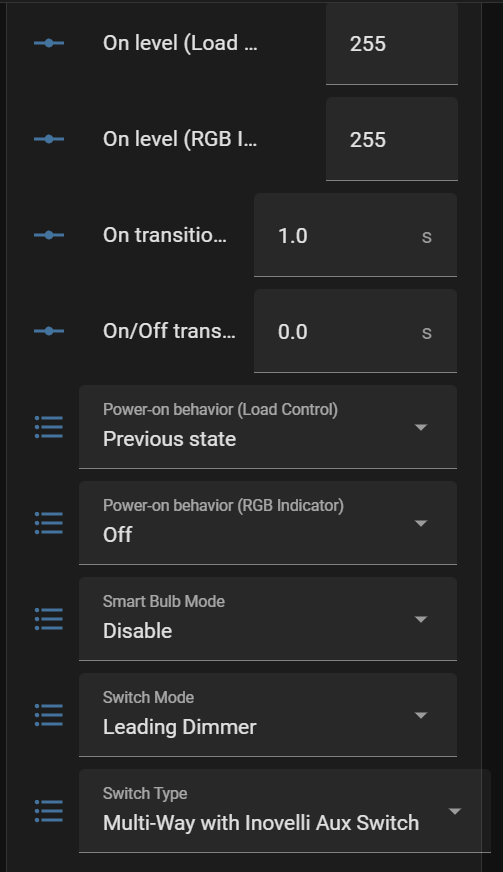
Thank your for digging in some more. Is your configuration neutral or non-neutral? Are you having this experience on one circuit or are there multiple? Does changing Button Delay to 300 make a difference?
There is a neutral. This is my only 4-way circuit in the house. All my other (standard) dimmer Inovelli switches are working fine. I tried the 300ms button delay setting, just now, with no effect on the issue.
Thankfully, this isn’t a super-critical issue. My family is used to just pressing up to toggle on/off while this persists. But I appreciate your continued interest in what is seeming more and more like an edge case. I do have a spare dimmer I can try if/when it comes to that, as well.
Thanks again!