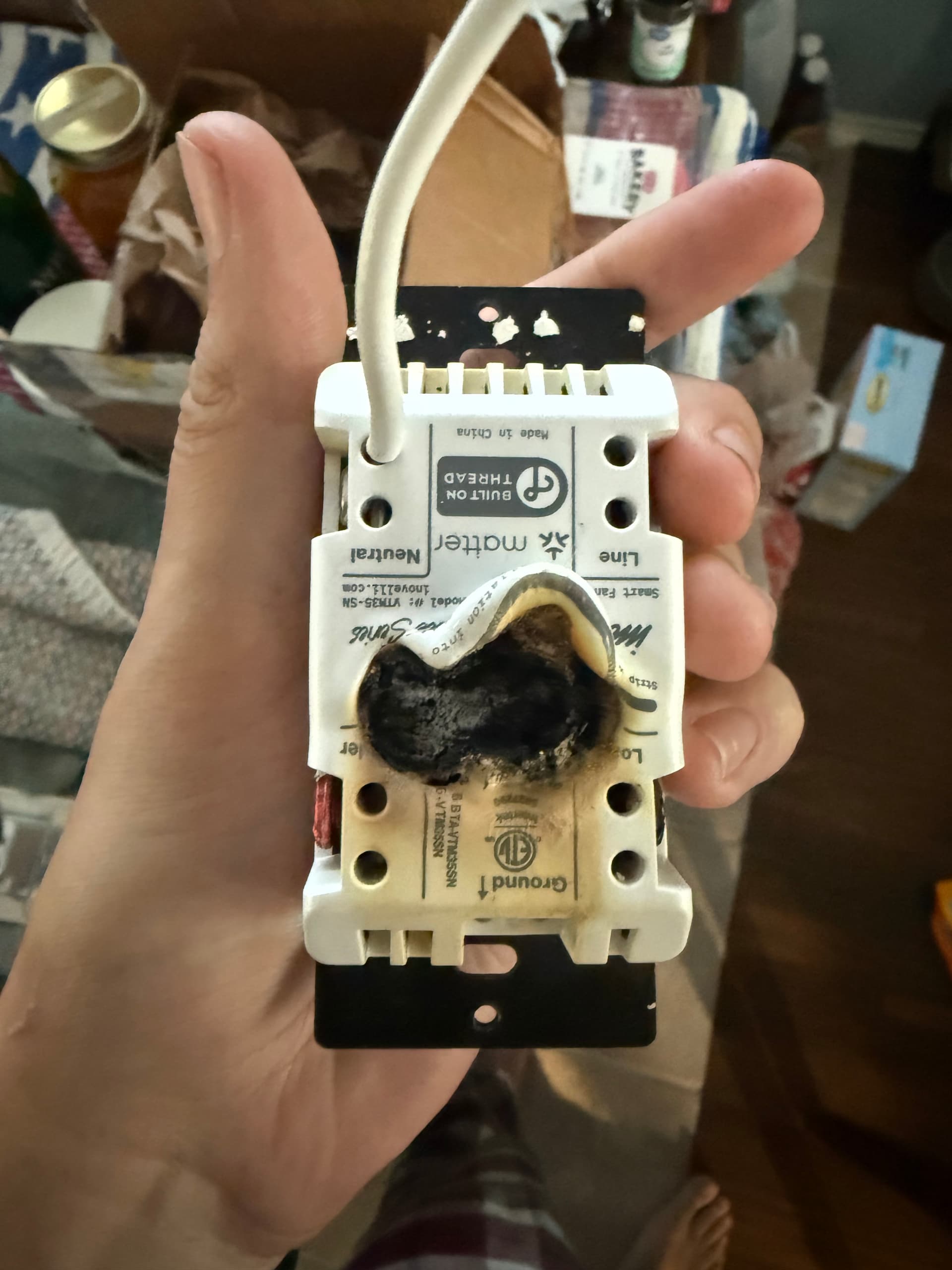
Just wanted to supply a heads up to people, I installed a good number of White Series switches back at the beginning of the year and one of them started smoking/melting the other night and almost caused a fire.
My house is a 2005 build and my 2 bathrooms (and the master closet) appear to share the same line wire. It starts in one bathroom, then goes to the other, then the closet. The builders daisy-chained the line using the connections on the original light switches, so I did the same. I had family over because my sister-in-law is recuperating from surgery here and I had just come in the door a few hours before from moving my girlfriend across the country. Both bathrooms had their lights and exhaust fans on from someone making the house extremely smoky during cooking, plus the closet light was left on. The first switch in the series was a White Series fan switch, and my girlfriend and stepmom happened to notice after about an hour of the fans being on that smoke was coming out of the bathroom, so we turned the breaker off, and found a melting/burning fan switch.
I believe this happened because the daisy-chain was putting the current through the switch and overloaded it. I just spent the last several days checking every switch box and adding pigtails to change this and be sure.
It isn’t a knock on the product itself, besides some Thread network instability that I’m hoping will be solved with 1.4 (and Eve finally fixing their Thread issues) the switches have been absolutely great. I just wanted to place this as a warning to anyone trolling the forums before install, as I quickly checked the installation guide after the fact and didn’t see any warnings/recommendations about this. I did speak to a friend in Europe and pigtailing is code there and my father says good electricians do it here in the states, but it seems like the daisy-chain setup is technically to code in most US jurisdicitons still and I would guess is likely common for builders grade homes like mine.
Do you mean all the downstream switches were on the load of that switch? Using the two holes in the line section to take the line in and pass the line out downstream would not have done that since they are basically clamped by a metal plate and effectively pig tailed in the switch.
Was that controlling a bathroom fan? If so, which one? I have not seen a bathroom fan that can be used on a fan controller. I have only seen ones that are on/off only unless they have their own speed controller.
@jonahmmay in addition to some other the other questions asked, could you draw a quick diagram of the wiring? I think I understand, but want to make sure I have it correct.
As @cfoos1 asked the switches were linked downstream by putting two wires in the line side. I would imagine if I put the downstream switches on the load side they wouldn’t work unless that first switch was turned on. I haven’t taken the cover off the exhaust fans to grab the make/model, but it seems like since the fan switches can be on/off or multi-speed it wouldn’t be a problem. Individually, I have run these fans for hours without issues, just never at the same time until now.
That fan has an AC motor so it’s certainly compatible.
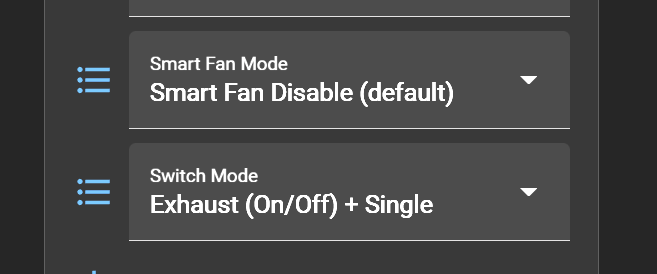
Was the fan switch set to the Exhaust (On/Off) mode? I’d be surprised if the motor in that fan supports variable-speed operation. Exhaust fans with that capability use a motor specifically designed for multi-speed operation. So, if your switch was set to the Ceiling Fan Mode, that may have caused an issue with that motor.
Yes, it was just set to Exhaust (On/Off) mode. Until the other night, it has been installed since probably February or March. With family in town, that was probably the first time we ever ran both fans on that circuit at the same time or for that long, which is where I’m thinking using the line side of the switch as a pigtail may have been the problem. It would have been handling the load of two of these fans, plus a dozen LED bulbs across itself and the downstream switches.
I can’t get the latest settings in Home Assistant since the switch is in a box to be sent back under RMA but I used the exact same config for both exhaust fans.
So, putting both lines in the two holes for the line would not have made it so downstream things could cause an issue. If you look in it you basically clamp the wires between two metal plates and no current for the other switches would have gone into that first one.
From the site
Motor Engineered For Continuous Operation No
I would check to make sure the fan did not overheat and seize up. These rely on the air flow to keep the motor cool and running them too long or with restricted air flow can cause issues.
Basically, I don’t think the other switches would have caused an issue and this is down to a fan or switch issue.
Yeah, it was a working theory but I’m no electrician. Thankfully my father was here, and he has plenty of experience with GC work though he never went through trade school. He just told me many electricians pigtail with wire nuts or wagos now instead of at the switch as it is generally thought to be safer since you’re not passing the load through that connection. Plus, if a switch fails it doesn’t take out the downstream devices. I had a buddy who lives in the Netherland back that up and tell me newer code there is to do the same. I could be butchering the explanation.
The fan doesn’t seem to be seized up as it works with a dumb switch but given its 20 years old, I’m replacing it (and the other 2 in the house) tomorrow just to be safe. Plus, a new one is only about $20 and for the same CFM rating uses 1/3rd the amperage while making half as much noise.
I’m thinking that if the power monitoring feature ever comes to the fan switches like what is in beta for the 2-1s right now, I may set some HA alerts to track power draw and let me know if they start to get high and to turn off the switch as a safety mechanism.
Are you confident that the wires were tightly held in the clamps? If there was a loose wire and it arced (especially without an arc fault breaker), it could be a contributing factor.
I gave everything a good tug test before I put it all in and it seemed snug. I also didn’t see any signs of damage on the wire itself, just a lot of heat and smoke from where the center of the switch melted. I’ve also ran this switch before for 15-30 minutes and never noticed it get warm or smoke.
That being said if that could have happened I would hope the move to wire nuts would alleviate the chance of it happening again, as I’d only have to get one wire snug under the screw instead of two at the same time.
Very strange, I don’t see the issue immediately other than possibly a loose connection like @rohan mentioned. I’ll PM you so I can get you a label to ship it for investigation. I’ll also refer our engineer to the thread to see if he has any other ideas.
I lived in an apt with aluminum wires so I know all too well what loose wire damage looks like, and the line holes are too clean. Hard to tell on the load due to discoloring from the obvious issue… arcing leaves tiny pits in the wire. If you look at the wire that was in the load hole and it is not discolored and does not have any little pits on the surface, it was probably not the connection.
Hopefully you can get that sent back and they can have someone do a postmortem on it. If you are replacing the fan I would see if you can send the old one to them as well so they can test it in various conditions on other switches to see if they can reproduce this.
Manufacturers really need to stop using those screw clamps. They are useless. Everytime I have used them, they’ve come undone no matter how much I tighten them and then test them out. Even more if you put two wires in there. They just loosen up over time as switches are used and vibrations from doors or walls. Maybe if they had teeth on them that would bite into the wire or a one way push I’d trust them again
Always do a wire loop and pigtail if needed to jump to another switch/wire.
One way push connectors are referred to as “back stabs” and are much less secure than wrapping around the screw or using the wiring plates that tighten with the screws.
If you’re using the plates properly, there should not be any issues whatsoever. Problems tend to occur when using a power tool like a drill or impact driver to tighten them. This tends to strip out the plate and then it doesn’t tighten again (and needs replacement).
One thing to note though: The Inovelli switches are not designed for the wires to be wrapped around the screws. You need to use the connectors as designed and tighten the clamps on the wires.
Looks like a switch failure not related to daisy chaining the hots to me as well. Just checking that to daisy chain, you were inserting two wires into the “line” holes (picture shows both holes empty).
I just had a bad day with my fan switches. I have, or had, 4 blue fan switches (VZM35-SN) in my bathrooms connected to exhaust fans.
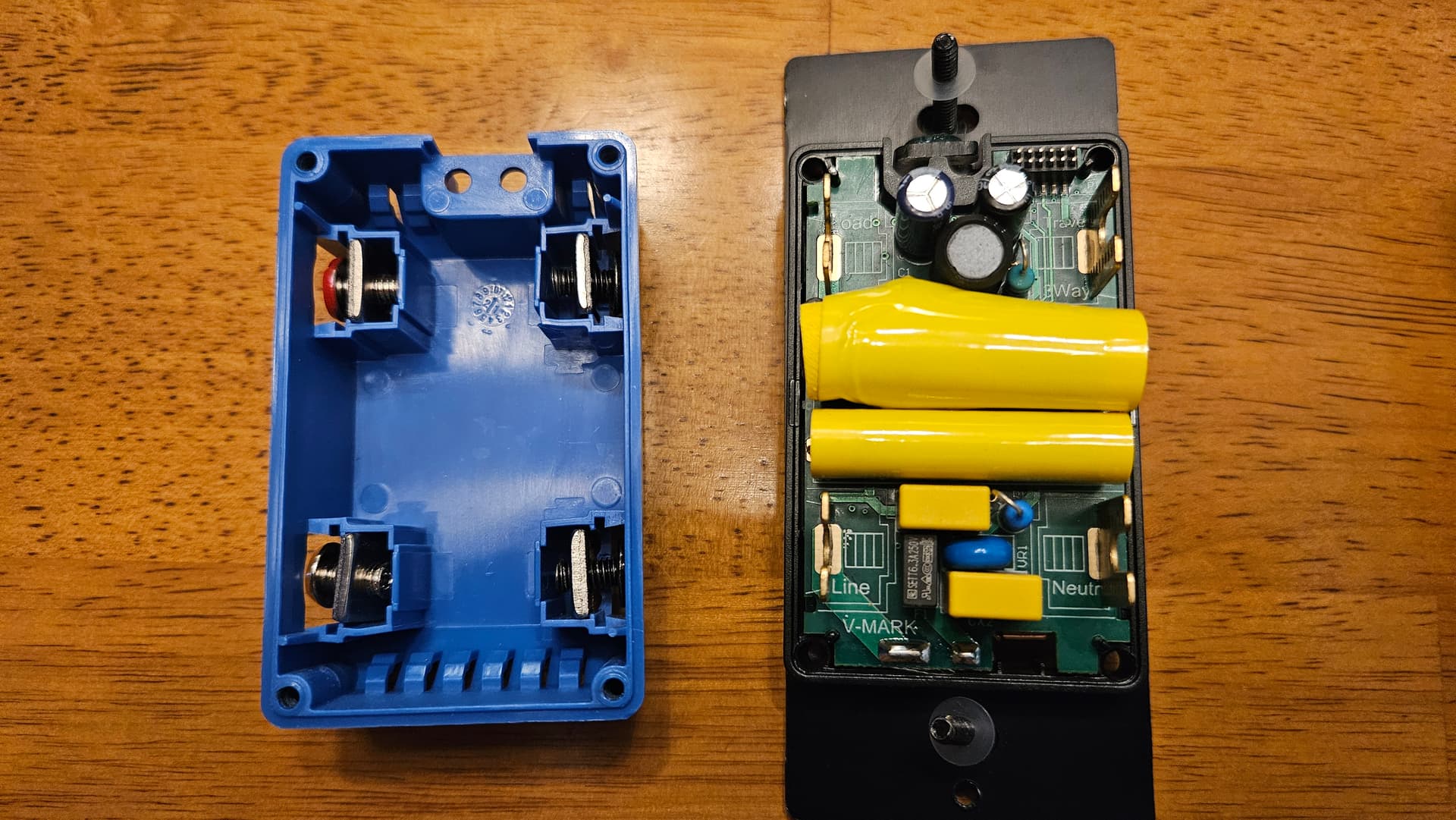
One failed this morning when I was in one of the bathrooms. I heard a pop and then smelled burning shortly after. The fan had noticeably slowed, so I quickly turned the switch off. Later I uninstalled it. This is what it looked like on the inside. Notice the swelled capacitor.
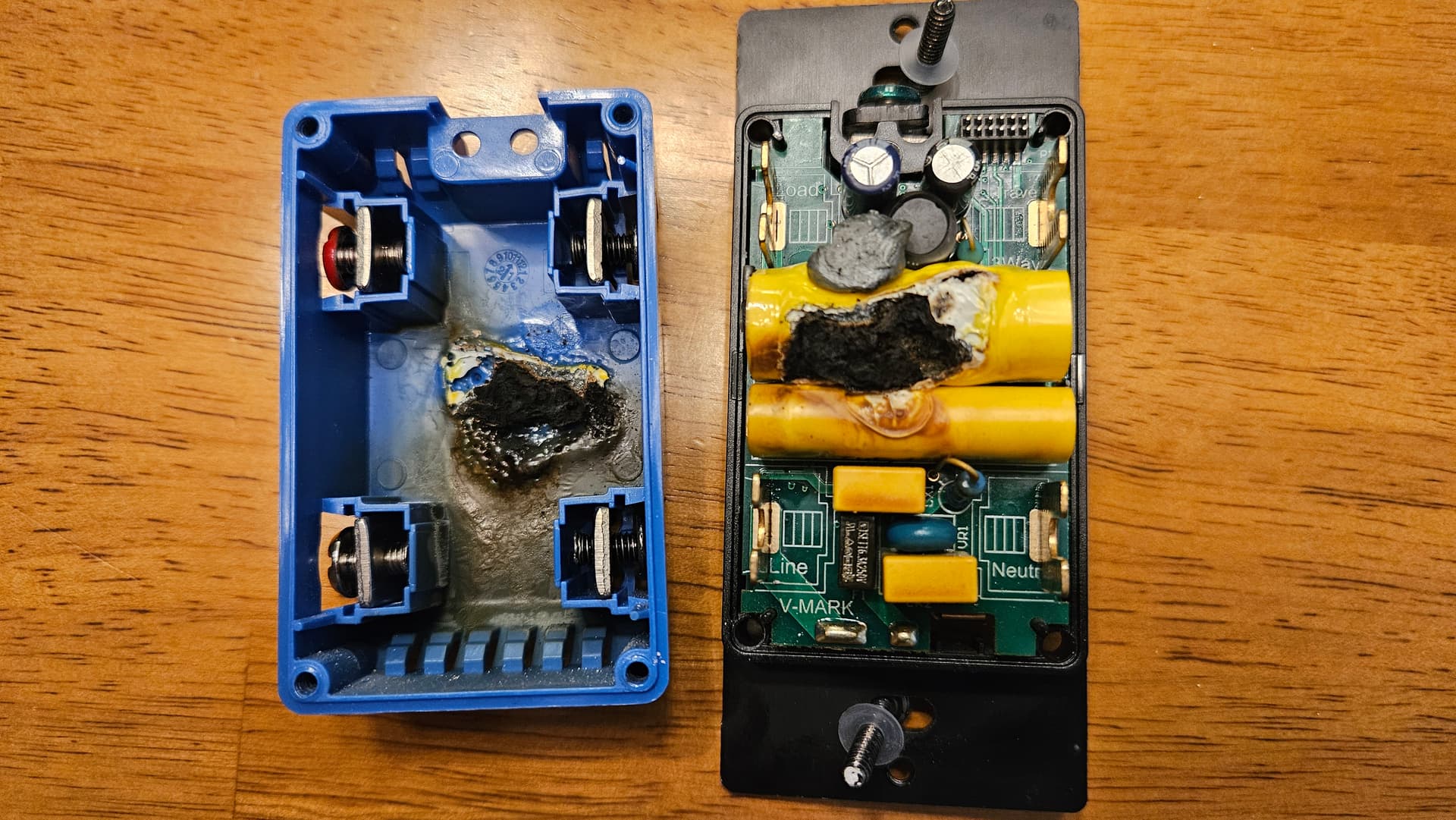
Several hours later in a different bathroom where someone was taking a shower, a similar situation occurred. It wasn’t caught and stopped as quickly, so it ended up looking like this:
After that, I took out the remaining 2 fan switches, disassembled, and visually inspected them. They looked fine, so I reinstalled and ran them each for 15 minutes. Nothing happened to either of them. Then I disassembled again and visually inspected them and they still looked fine.
All 4 have been installed for several months. The 2 that failed were installed for the longest - 10-12 months - and used most often.
Dang, that is crazy. To see this twice around the same time is not expected. Especially since these are the first reports I have seen. Can you give me more info on the fans that are attached? I’ll PM you and hopefully we can get the switches back to investigate what is going on.
I love the screw clamps, and have never had an issue with them. Having the right kind of screw bit really helps, though. These made all the difference for me… Amazon.com
They are WAY better than the push-in style that is so common.
Hey, can you elaborate on this? I have a large Thread network with a mix of White Series switches, Eve products, and Nanoleaf Essentials bulbs. It is anything but stable. After having to rebuild it from scratch again I unplugged my SmartThings v3 Hub, which was broadcasting its own Thread network and I was hypothesizing that on power cycle, some devices were getting stuck on it (which makes no sense per the protocol since they weren’t auth’d to it, yet I was out of ideas). So, what these known issues?