I recently installed a white series dimmer. My setup:
Device: White Series Smart 2-1 Switch (1) by Inovelli. Hardware: 2.1. Firmware: 1.0.5.
Paired to a Home Assistant server through a ZBT-2 radio (and a couple of thread routers hops).
Wired to a couple of philips hue bulbs. The white dimmer is in Smart bulb mode, so the bulbs are always powered.
Home Assistant automation to turn on/off the hue bulbs (as well as other bulbs, also always powered) on paddle presses.
Instant mode enabled (I don’t need multitap).
Even with this setup, I see a noticeable delay (a bit under 1s) between physically pressing the paddle and seeing the lights turn off.
I ran a few tests:
From a computer connected via wifi, turning on/off the lights in the Home Assistant UI results in a near instant reaction. So the cumulative computer → home assistant → bulbs delay is negligible.
From that same computer, changing parameters like the led color on the dimmer also gives an instant reaction. So the cumulative computer → home assistant → dimmer delay is negligible.
Using another thread device (ikea door/window contact sensor), with a similar automation, I get near-instant reaction. So the “battery powered sensor” → home assistant → bulbs delay is also very small.
If I disable smart bulb mode, I see the lights wired to the switch turn on/off near instantaneously (so the “instant mode” appears to be working), but the ones that rely on the automation have the same delay.
In both smart bulb and non-smart bulb mode, if I double-press the paddle, I see a “Pressed twice” event in home assistant.
All of this leads me to the following conclusions:
The thread/wifi/zigbee networks are not to blame, and neither is the home assistant automation speed.
The “Instant mode” does not seem to affect the behaviour communicated to Home Assistant at all. It might make the local wired switching faster, but that has zero effect in smart bulb mode. The matter behaviour still appears to have a delay and send multi-tap events.
I understand some are waiting for direct matter binding, and it might indeed be an improvement when it becomes available in Home Assistant, but I’m not entirely sure that’s the case if the problem is that the matter behaviour ignores Instant Mode.
Is this a known issue? Any additional tests I could perform to better identify the problem? Is there any way to improve the situation?
I have delays in mine too. Bit of a setup difference, I’m using the White Series On/Off (not a dimmer), but otherwise very very similar to what you described. I can’t tell much of a difference between Instant, 300ms, and if memory serves even up to the 900ms delay. That is, there’s a delay no matter what I do and it doesn’t seem to change much.
I’d be curious if you get the same behavior in this test that I do…. In Home Assistant, go to settings then integrations then matter, and click on one of the Inovelli Switches. On the right side, there’s an Event viewer where you can see events as they come in. Leave that open and tap the switch. What kind of a delay do you see? Mine is a noticeable delay (between switch and Home Assistant). I believe this is the root of that delay. And mine doesn’t get better when I go to Instant mode.
I posted in separate threads and had a few people make helpful suggestions (trying to add all to the Apple Matter network), and maybe a few other things. But none made any difference.
I’m really hoping someone from Inovelli could dig in and see if they can reproduce this, in order to figure the cause. Over the past 2 months I’ve learned to live with the delays, but they are indeed highly annoying.
Leave that open and tap the switch. What kind of a delay do you see?
Yes, I see a noticeable delay. It appears in the Home Assistant app roughly at the same time as the lights reacting (actually the lights turn on very slightly before the UI reports the event, there may be a tiny delay in the app).
The one event that appears instantaneously is releasing after holding the button:
I start holding a button (for example paddle up). After a delay I see “button being held” in the app.
I release the button. There is a “Released after being held down” event instantly.
This reinforces my thought that the communication is fine, it’s “just” a software issue where the instant mode is ignored by the logic that sends the matter event.
EDIT: I created a technical support ticket #69402315, hopefully it’ll get some official eyes on the issue.
I’m kinda glad you’re seeing the delay in the app, meaning it’s not just my setup with Home Assistant somehow causing it. Does point to either the switch or HA, and not network latency, bad connection to the ZBT-2 antenna, etc.
I tried your test by the way (hold the button, then release). It was what I’d call “nearly instant” to get the event to show. Like to the point where I’m sure I’d be happy with that trivial lag, which could literally just be the Home Assistant UI updating or something like that.
Also I tried again tweaking between “instant”, “300ms” and “900ms”. There are differences I can see in when the event shows-up, but it’s definitely not instant. I do feel that the 300ms delay is longer than 300ms, but that could be the “plus X” where “instant” is really “instant+X” and that scales up, giving the overall feeling of the extra lag.
Btw, for what it’s worth, my On/Off switches are on Firmware 1.0.3. I think the Dimmers have a different “current beta” Firmware, but mine is (as far as I know) the most recent beta.
Matter local binding makes a huge difference in latency for me. I’m using the white dimmer switch in smart bulb mode with Nanoleaf Essentials bulbs (the thread version).
I’ll look into that, it’s probably the long-term solution once it’s properly supported everywhere.
Is there a limit to the number of targets for local binding? I have ~a dozen bulbs to turn on at the same time. Matter group/multicast binding would be nice but doesn’t look supported by HA just yet.
But in this case I find it unfortunate that it could work through the hub (the network latency being entirely reasonable), and the only reason it doesn’t appears to be a firmware decision.
I’m not from Inovelli but I took a quick look at this and I’m not sure the latency is in the White Switch but in the way that HA (in my case) is “soaking” the switch push transition before it declares the on/off to have occurred.
I have “Instant On” set to on and the switch delay set to zero. The switch is configured as On/Off
I have a switch on the bench (not in the wall just in a “new work box” plugged into an outlet), That means I can have the switch right by the Mac displaying HA. I’ m looking at things in HA on the “Device info” page for that switch. If I look at the switch state or the activity log then I do see a delay after I click the paddle on and off before the switch state changes. This fits with what I see in reality.
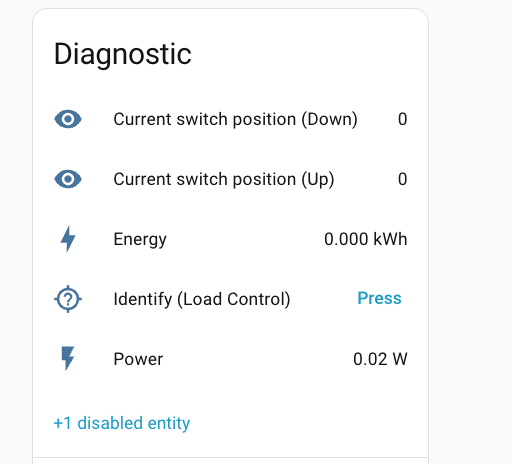
HOWEVER, I enabled “Current switch position (Down)” and “Current switch position (Up)” in “Diagnostics” at the bottom of the page. This shows a “1” if the paddle is pushed and a “0” if it is not. On that display I see essentially NO latency at all (see picture below). Click the paddle you see a 1, release it you see a 0 with no visible delay. This observation essentially eliminates the processing of the paddle up/down event inside the switch which was a thought in another thread on this subject.
I’ve done a little embedded design and it is typical to wait for the button to transition to un-pushed (0) before processing the event and in this case I believe HA is doing just that. This approach is pretty normal in switch design (and is generally the more accurate than triggering on the down event). It also appears that HA is trying to detect a long push event (irrespective of the settings of the switch).
It’s my guess (note guess) that is what is causing the perceived delay issue since it appears HA does not start “soaking” the transition until it sees that the button has been released. My guess (again guess) is that other hubs do much the same.
I have to say the “delay” doesn’t particularly trouble me (since I prefer reliability over speed) but this may be a steer as to what is going on for those who do.
Oh interesting! Indeed that diagnostic reacts faster than the button press event.
I admit I currently don’t fully understand how the processing/interpretation is split between the switch and HA. I’ll look a bit at the matter integration. In particular, is this diagnostic sent independently by the switch, or is it a “view” on the same raw data as the button press events?
Very interesting test! I enabled that “Current Switch Position” (normally hidden in Home Assistant) and gave it a shot (switch installed in-wall, running 1.0.4 firmware). I got a very similar result to you I believe. I also set the switch to Instant mode (normally 300ms), to try to remove any of that doubt.
My observations:
The Button Pressed value (1) showed up nearly instantly.
The Button un-pressed value (0) took slightly longer to show than above, but was still very fast.
There was still a very noticeable delay until the “Button Pressed” event showed up.
However, I would not draw the conclusion that it’s Home Assistant doing this. I say this, because it’s the events with multi-tap possibilities showing up (something like “Button Up pressed, 1 time” versus “Button Up pressed, 3 times”). I’m 95% sure that is not Home Assistant making that determination, but the switch itself. Meaning I that I think:
The switch is sending the rawest data (Button Up position [0=not pressed, 1=pressed]) nearly instantly. Good thing!
The switch is delaying the “Button Pressed and # of presses” event. Or, Home Assistant is somehow not processing that fast enough, but I don’t think that there’s message prioritization changing timing, certainly not consistently slower due to that.
I think the way to maybe differentiate best between those possibilities would be by digging into some raw Thread/Matter logging data to see when events come in. But that’s beyond my normal wheelhouse. And I’d sure expect in Inovelli Engineering’s area.
100% think this test was very interesting, proving it’s not ALL traffic from the switch-to-Home Assistant that is delayed. Kinda nice to rule-out a fundamental bottleneck like that.
I don’t disagree, I’m guessing and that is a very imprecise science. However as you say, this test shows that there is nothing fundamental “broken” in the way the white switch handles matter and sends data our to the Hub (HA). It will take investigation by someone with better test suites than either of us have to get to the bottom of things.
I’ll jump in here with observations from Hubitat as this behavior is consistent in my testing both within that environment, Apple Home, and Smartthings. What I found when writing a custom device driver for Hubitat, is that this behavior is related to the interplay of the switch and matter subscriptions rather than being solely the fault of either the switch or the matter controller. When I was building the device driver, to get button presses working, I initially subscribed to just the Matter Attributes (1 for pressed and 0 for not pressed) for Endpoints 3-5 (the buttons). When in Smart Bulb Mode, I would get instantaneous button presses in the logs. Things would be incredibly quick and meet the expectations for most users. The catch is that a user could not use multi-taps.
To get multi-taps working, the Matter Controller would need to use a Matter Event subscription. When subscribing to events for multi-tap, this is what introduces the delay that everyone sees. The matter controller is actually waiting for the final command (button 1 pressed 3 times, etc…) before executing whatever automation was created.
From what I can tell, Instant On only disables multi presses when controlling the load. Smart Bulb Mode is not impacted in any way by that setting. What needs to happen, and what I ended up doing in Hubitat, is creating a custom preference that basically says if I select this option the device driver will only subscribe to Matter Attributes. This allows for Button 1 to turn on my Hue group, Button 2 to turn off my Hue group, and Button 3 to turn on a specific scene. If the switch was one where I wanted the full multi-tap possibilities, I left it subscribed to Matter Events.
Thanks…. that is a great explanation of what is going on.
There is already a setting in HA to set the button delay to None. From what you are saying a change would be required to the HA driver for the White Switches to change the Up paddle and Down Paddle On/Off transitions to map to the pressed/non pressed Matter Attributes rather than using the Event subscription when button delay is set to zero. This would then match what the switch does when delay is set to zero for the load. No multi-taps for the Up and Down Paddle but multi-taps still working for the config button.
The question is do we have anybody who would like to take this on and would the HA/Matter guys approve it when the work is done.
I just ran a quick test for a single switch. I use Node Red in Home Assistant to monitor for Events and take action. In this case, button up causes a call to the Hue Bridge to turn the light on and set a color (RGB value depending on time of day).
Anyhow, I replaced my State Change block looking for the Up/Down events to instead use the entity with that raw Button Position, and only take action when a position goes to 1 (ie pressed). I saw a high percent of times (I’m gonna say 30% plus) where Node Red missed the button press because I pressed and released. I don’t know what their poll frequency is, or if it was a Node Red issue of similar origin. Or, most likely, both combined somehow!
But, my results…. When it registered a push, it was very fast turning the light on and off. Much better than using the “normal” event which would support multi tap even if the delay was set to zero (instant). However it did miss a high percent of my presses, requiring me to press it again, or press and hold to guarantee it registered. I suspect that’s all on Home Assistant or Node Red, but I suspect it does indicate there’s a lot of noise with trying to do it “too fast”.
Just another data point into the mix…. I’m definitely not jumping to re-do all my back end mappings given that event loss ratio, unfortunately.
The button delay setting seems to have no impact on the switches ability to multi-press. I’m running 1.1.1 on my Whites and have that setting to no delay. I can still multi-press and have it logged by the Matter controllers (Hubitat and Smartthings). Same is true when it’s combined with Instant On and No Button delay. Multi-press still works in Smart Bulb Mode. The only way I can speed up button presses is to remove the Matter Event subscription and just use the Matter Attributes. I lose multi-press in that scenario, but the speed is worth it in my use case.
One other thing you can try is to write your rules based on the the switch turning on and off if you are not using multi-press for the top and bottom paddles. Even in Smart Bulb Mode, the switch “turns on and off” as events in the logging (at least in Hubitat and Smartthings). If you set your automation towards that, the Instant On logs faster than the button press. This would leave Button 3/config as multi-press.
One catch going this direction is if Button 3 turns on the light in addition to the up paddle. The switch does not turn on with Button 3 (obviously). To turn off the light, write your automation for the bottom paddle to be either Switch turning off or Button 2 pressed. This way you can get the light off if it is activated with Button 3. You would be sending a double off command if you used the top paddle, but it gains you some ms in speed.
I tried setting the “Light (Load control)” turning on/off as a trigger for an automation, but at least for me on Home Assistant, it seems to trigger at the same time as the button press event (with the same delay). Unfortunate, as it would have been a nice workaround.
If you want to try that you would need to use the sensor value of the Up and Down button. I tried it in HA and the response is almost instantaneous. However occasionally a value change gets lost (as already said above). That means you would need to use the conventional Button Up Event as a backup in case the sensor transition does not make it. In that case you get the slower transition. In 80%+ of tries you get the fast transition.
I don’t like doubling up on the event processing but with what we have today it’s the only way I can see to get things to work like you want.
This is what I mocked up, I’ve tried it on a test switch only but on that one switch it seems to work.
Here is a slightly better version of that quick hack. It’s still not ideal and I’m sure someone could come up with something better but it seems to work reasonably well.
I came up with a similar setup, very much a hack. Up and down sensor based presses have a 2 second timeout period after the initial sensor press, where additional presses are ignored, which I think accounts for the inconsistency mentioned a above. Not entirely sure how to unsubscribe from matter events as jb10 mentions, but meh, all I need is a hack until I do matter binding (I’ve been holding off due to reports of state loss in HA).
I’m running a custom device driver in Hubitat to play with the Whites. This is what allows me to test various different scenarios. I’m not a Home Assistant user, but jumped into the thread to add perspectives I’m seeing with these devices using other controllers. The behaviors are roughly the same.
With the above said, I’ve been doing three different tests in my home environment with the switches connected to both Hubitat and Smartthings. I’ve got the switches configured using (1) Matter Attributes only, (2) Matter Events only, and (3) For Buttons 1 and 2 I have a custom “fast push” where the InitialPush is used to determine button press and it ignores everything else. For scenario three, this means I’m subscribed to Matter Events but have basically disabled multi-press for Buttons 1 and 2.
With the three scenarios, I’m seeing some interesting results. For scenario 1, using Matter Attributes only (0 –> 1), Hubitat logs the switch turning on and off faster than Button 1 push and Button 2 push. When I switch to scenario 2, Matter Events only (multi-press available for Buttons 1-3), Button events are faster than the switch in Hubitat. For scenario 3, Buttons 1 and 2 Fast Push (i.e. subscribing to only the Matter Event InitialPress and dropping everything else), Button events are both faster than the switch and their is a slightly larger gap between the Button event and the switch. This leads me to think that an option to subscribe to only InitialPress via Matter Events might be the fastest possible way to get Button events with the caveat being that you would not be able to use multi-press on those Buttons.
The fun catch to all of the above is that this is what I see in Hubitat’s logging. When I look at the basic logging that Smartthings provides, the switch event is always first compared to the Button press. In some ways, this makes sense. While I can disable or enable certain things within Hubitat, Smartthings does not allow for that customization. So, in that environment, the switch turning on/off always “beats” the button press.
Basically, I’m not sure if there is much that can be done. It might be possible to customize some of this via device firmware or via the drivers within each individual controller. Even then, we are talking about ms; though, every little bit of speed would help.