I noticed “dumb switch” mode isn’t an option in a 3 or 4 way install. The instruction page currently talks about the depth of the switch. Is this a hardware limitation? If not, can we get a workaround?
There is immense value in these switches going into a multi-way install.
You can do multi-way, you just need to do it with aux switches. It is a hardware limitation as I believe the mmWave sensor stuff took up a lot of space on the board, so the dumb switch support had to go.
But apps look like they can’t access this info. Various apps (Basic Rules, Rule Machine, Simple Automation Rules) set to look for motion from the switch don’t ever get triggered.
Is the motion detection event not set up to work with Hubitat’s motion device logic?
Following up to say the only way I have been able to activate smart bulbs based on movement in Hubitat is to set parameter 52 (smart bulb mode) to Enabled, parameter 110 (light on presence behavior) to Auto On/Off, and to then create an automation that looks for when the switch turns “on” (just the flag, as power is always provided due to parameter 52) and to then tell the corresponding smart bulb(s) to turn on. None of the built-in “motion” activations see the switch’s motion event.
So, I do think everything is working correctly on the switch’s end, but the integration with Hubitat is somehow not correct for what it needs for motion activations.
Just installed the first of my red mmWave switch replacing a Jasco motion sensing switch in a room roughly 400cm left, 400cm deep, 200cm right. What I have observed is the switch really struggles to cover the room. It particularly has issues on the left side, depth and right it does ok. But for some reason it misses things after about 300cm to the left. (I suspect this is just a physical limitation of the field of view pg33 of manual, and I will just need to deploy 2 switches 90deg offset from each other to achieve good coverage)
Update: I added a 2nd mmWave switch on a wall 90 deg offset from first wall. The two together provide amazing coverage for the room. So while I wish the FoV was closer to 180deg, quantity has a quality all of its own. I am very happy with the reliability of detection 2 provides.
I also notice compared with the blue mmWave switch it does not seem to have the flashing indication when it is detecting something in the room. Wondering if I need to do something to configure that or if it is just a difference between the two skus.
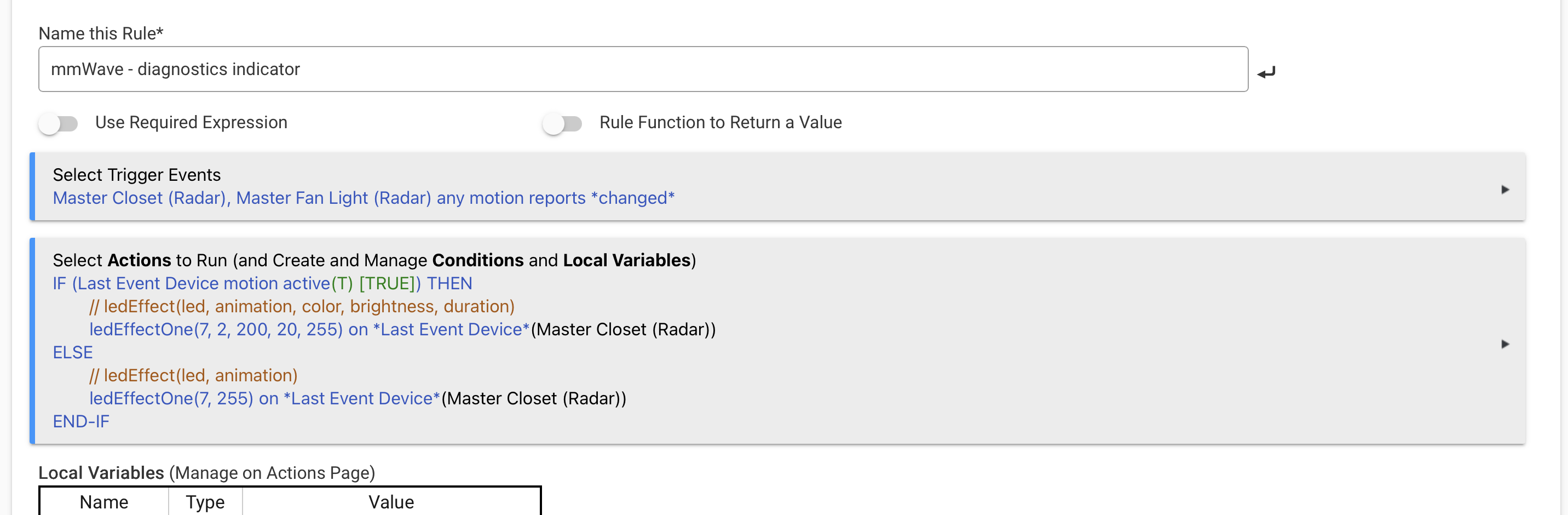
I would really appreciate a simple walk-test toggle. I know I can configure the switch to flip the lights or whatever when it detects motion, but I’d really just like an option “for the next 10 minutes, make the LED bar red whenever you detect motion” and make it really sensitive so I can wander around and get a sense for where the boundaries are, what my settings are doing to it, and generally not have to be staring at my phone looking at homeassistant’s presence readout.
^I setup this rule in hubitat for this purpose. It has hub round trip so it is not as responsive as it would be if switch had feature built in, but it provides a mechanism to see when switch is and isn’t reporting motion.
The Hubitat driver (or maybe device) has a bug in how it reports the current floor setting. If one sets it to -70 it will read back with some positive value like 154. (These numbers are not exact)
Then when one changes another setting it will write 154 back to switch as the new floor resulting in the motion detection ceasing to function. I have noticed this behavior on multiple red switches but not on the blues.
I recently installed the Red Series mmWave Switch (VZW32-SN) on my Samsung SmartThings hub.
It appears setting Parameter 110 has no effect. No matter what I set this value to the behavior of the motion based off/on continues to remain the default behavior. I have installed 2 switches now that do this. Anyone else experiencing this?
Mine are working properly. I’ve had 110 set to both settings, and the behavior works properly with both. I’d try a factory reset to see if that resolves it.
Also, what driver are you using. Post a screenshot of the driver page.
Just got my switches and tried to install and set up one of them with Home Assistant. I could not get it to include in my z wave network. The instructions in the manual for Home Assistant are dead links, so I’m not sure where to go. I will try again tomorrow but I must have tried 10 times and no matter what I did the switch would blink red at the end of the inclusion process.
It turned out to be my zwave usb stick. It decided to act up and re plugging it seemed to do the trick.
I do have a question though - this may just be a limitation but my light switch is right next to where i have a speaker mounted on the wall and there’s really no way to move it. Set to its defaults it seems like it is getting in the way of detecting anything that the speaker is blocking line of sight to.
Is there any way to tweak settings to try and improve on this?