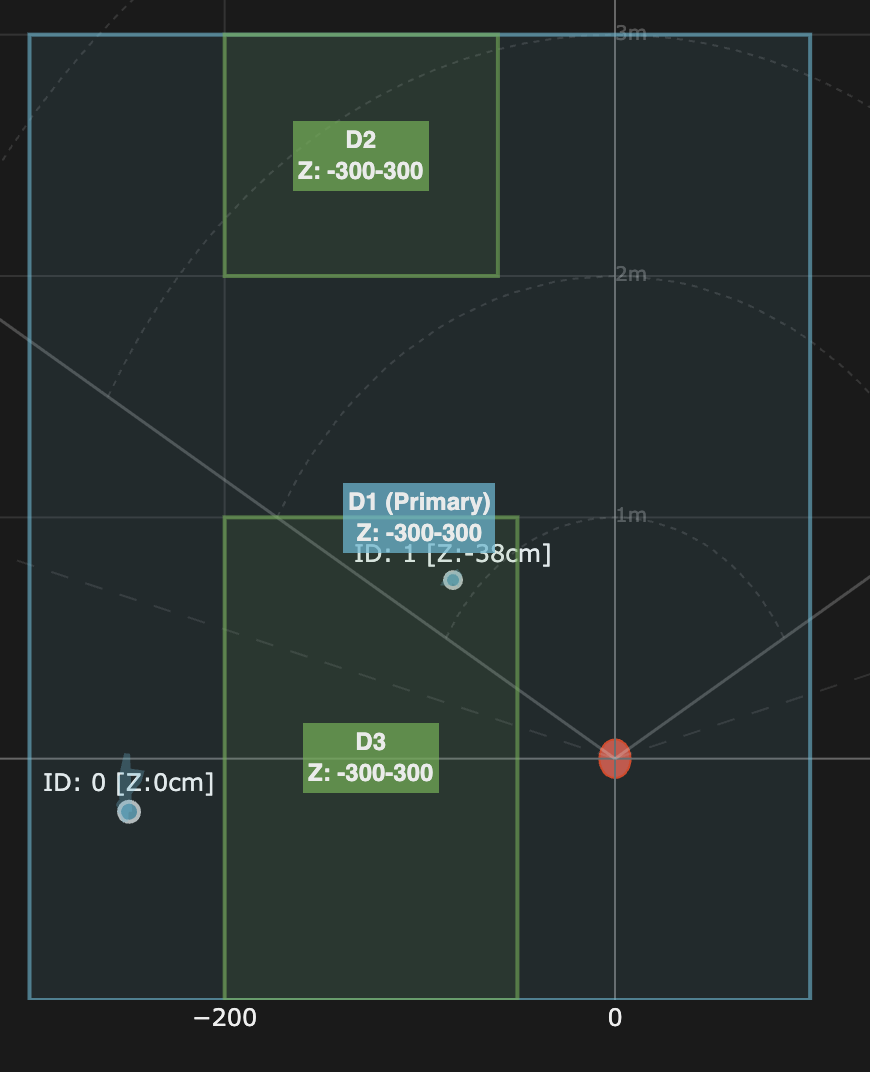
As others have mentioned here (and in the firmware update thread), I can also report that I am experiencing the same bug with stay area width/x-coordinates unexpectedly sign-inverting. I am confident that this is a firmware bug.
I enabled debug logging in Z2M, here’s the pertinent parts of the transaction.
Set command:
{“level”:“debug”,“message”:“z2m:mqtt: Received MQTT message on ‘zigbee2mqtt/Guest Bedroom Lights/set’ with data ‘{“mmwave_stay_areas”: {“area1”: {“depth_max”: 104, “depth_min”: 0, “height_max”: 128, “height_min”: -116, “width_max”: 0, “width_min”: -208}}}’”}
Transformed into a converter command:
{“level”:“debug”,“message”:“zh:controller:endpoint: ZCL command 0x0c2a6ffffef1b051/1 manuSpecificInovelliMMWave.setStayArea({“areaId”:0,“xMin”:-208,“xMax”:0,“yMin”:0,“yMax”:104,“zMin”:-116,“zMax”:128}, {“timeout”:10000,“disableResponse”:true,“disableRecovery”:false,“disableDefaultResponse”:true,“direction”:0,“reservedBits”:0,“manufacturerCode”:4655,“writeUndiv”:false})”}
I unfortunately don’t see the raw bytes of the transmitted payload in the message, but I set the exact same coordinates on a detection area and they worked successfully - so given that the detection and stay area implementations share the same code in zigbee-herdsman-converters (thanks @rohan!), I’m confident that the data was serialized correctly.
Here’s where the new parameters come back from the device:
{“level”:“debug”,“message”:“zh:ember:ezsp: ezspIncomingMessageHandler: type=UNICAST apsFrame={“profileId”:260,“clusterId”:64562,“sourceEndpoint”:1,“destinationEndpoint”:1,“options”:64,“groupId”:0,“sequence”:69} packetInfo:{“senderShortId”:19383,“senderLongId”:“0x0000000000000000”,“bindingIndex”:255,“addressIndex”:255,“lastHopLqi”:144,“lastHopRssi”:-75,“lastHopTimestamp”:191241502} messageContents=1d2f122204040000d000000068008cff80000000000000000000a8fd58020000000000000000a8fd58020000000000000000a8fd5802”}
In the payload, we can see d000 - the 16-bit hexadecimal representation of 208 (instead of -208)
The parsing code also extracts this value as 208, and it is also in the wrong coordinate (it’s been swapped with xmin):
{“level”:“debug”,“message”:“zh:controller: Received payload: clusterID=64562, address=19383, groupID=0, endpoint=1, destinationEndpoint=1, wasBroadcast=false, linkQuality=144, frame={“header”:{“frameControl”:{“frameType”:1,“manufacturerSpecific”:true,“direction”:1,“disableDefaultResponse”:true,“reservedBits”:0},“manufacturerCode”:4655,“transactionSequenceNumber”:34,“commandIdentifier”:4},“payload”:{“count”:4,“xMin1”:0,“xMax1”:208,“yMin1”:0,“yMax1”:104,“zMin1”:-116,“zMax1”:128,“xMin2”:0,“xMax2”:0,“yMin2”:0,“yMax2”:0,“zMin2”:-600,“zMax2”:600,“xMin3”:0,“xMax3”:0,“yMin3”:0,“yMax3”:0,“zMin3”:-600,“zMax3”:600,“xMin4”:0,“xMax4”:0,“yMin4”:0,“yMax4”:0,“zMin4”:-600,“zMax4”:600},“command”:{“name”:“reportStayArea”,“ID”:4,“parameters”:[{“name”:“count”,“type”:32},{“name”:“xMin1”,“type”:41},{“name”:“xMax1”,“type”:41},{“name”:“yMin1”,“type”:41},{“name”:“yMax1”,“type”:41},{“name”:“zMin1”,“type”:41},{“name”:“zMax1”,“type”:41},{“name”:“xMin2”,“type”:41},{“name”:“xMax2”,“type”:41},{“name”:“yMin2”,“type”:41},{“name”:“yMax2”,“type”:41},{“name”:“zMin2”,“type”:41},{“name”:“zMax2”,“type”:41},{“name”:“xMin3”,“type”:41},{“name”:“xMax3”,“type”:41},{“name”:“yMin3”,“type”:41},{“name”:“yMax3”,“type”:41},{“name”:“zMin3”,“type”:41},{“name”:“zMax3”,“type”:41},{“name”:“xMin4”,“type”:41},{“name”:“xMax4”,“type”:41},{“name”:“yMin4”,“type”:41},{“name”:“yMax4”,“type”:41},{“name”:“zMin4”,“type”:41},{“name”:“zMax4”,“type”:41}]}}”}
{“level”:“debug”,“message”:“z2m: Received Zigbee message from ‘Guest Bedroom Lights’, type ‘commandReportStayArea’, cluster ‘manuSpecificInovelliMMWave’, data ‘{“count”:4,“xMax1”:208,“xMax2”:0,“xMax3”:0,“xMax4”:0,“xMin1”:0,“xMin2”:0,“xMin3”:0,“xMin4”:0,“yMax1”:104,“yMax2”:0,“yMax3”:0,“yMax4”:0,“yMin1”:0,“yMin2”:0,“yMin3”:0,“yMin4”:0,“zMax1”:128,“zMax2”:600,“zMax3”:600,“zMax4”:600,“zMin1”:-116,“zMin2”:-600,“zMin3”:-600,“zMin4”:-600}’ from endpoint 1 with groupID 0”}
I was able to work around this bug by sign-inverting the x coordinates used for stay areas. However, this leaves me a bit worried about whether these coordinates are being correctly transmitted to the mmWave control chip.