I’ve got a few of these Delta BreezGreenBuilder GBR80Hs in the bathrooms of the house. They are AC exhaust fans that have a humidity sensor that can be used to control the fan. These were installed by the builder when the house was first built ~10 years ago. There are two ways to wire these fans:
-
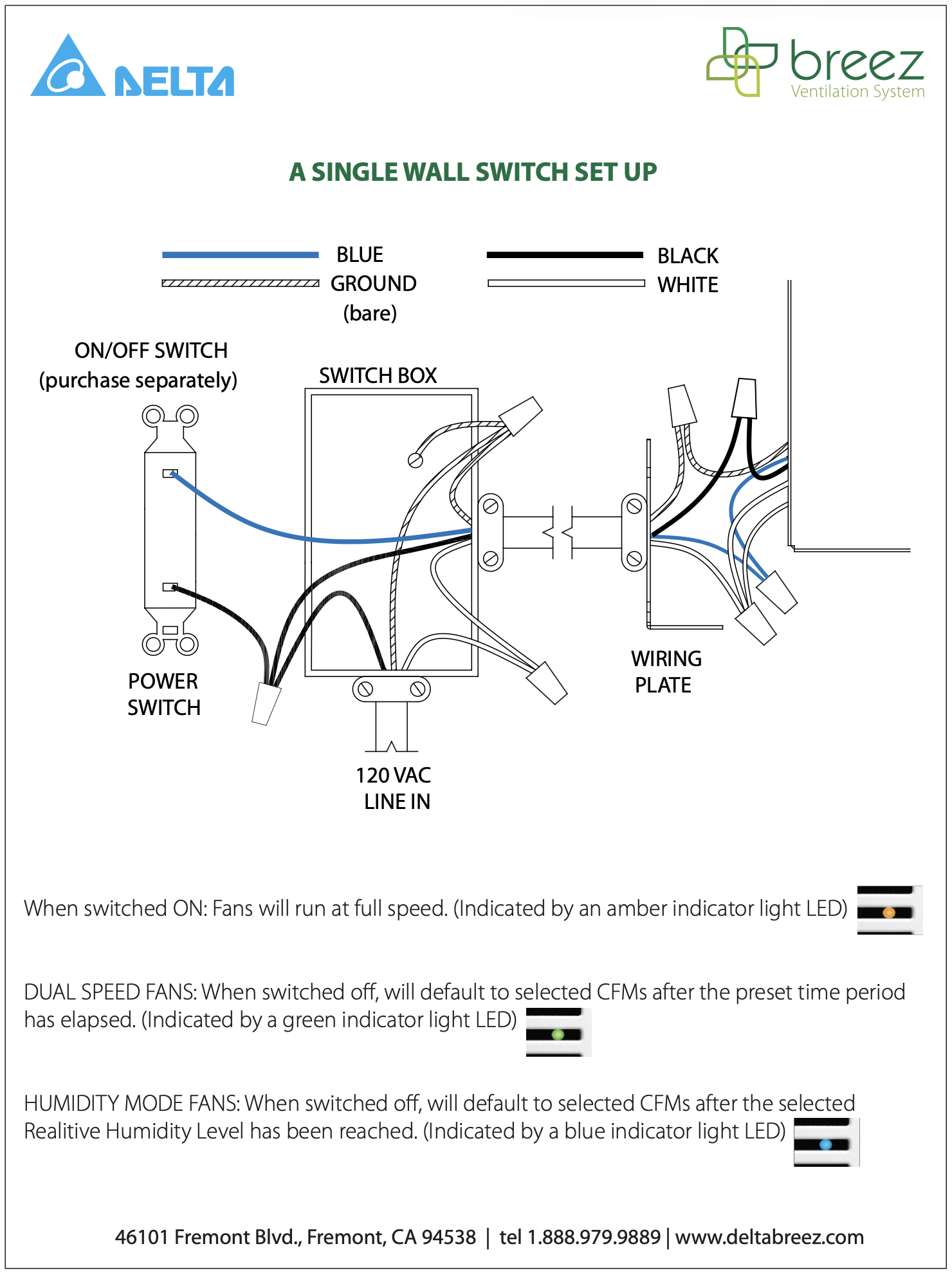
With a single switch, as explained in the Single Wall Switch Set Up.
- In this setup, either the switch or the humidity sensor–when humidity is above the threshold–will turn the fan. But the fan only turns off if both the switch are off, and the humidity is below the threshold–with a timeout.
- This is the setup I have.
- For posterity, the wiring diagram looks like this:
-
With two switches, as explained in the Installation & Operating Manual.
- In this setup, the “power” switch turns the fan on, and the “mode” switch makes the humidity sensor control the fan–above the threshold the fan is on, with hysteresis.
- I don’t really know the behavior of this setup, because none of the fans are wired this way.
- For posterity, the wiring diagram looks like this:

These fans have worked fine: when it’s humid, the fan comes on; if you flip on the switch, the fan comes on; if it’s not humid and you turn off the switch, the fan goes off; if it’s humid and you turn off the switch, the fan stays on until it’s below the threshold.
I just tried to install a VZM35-SN on one of these fans, and I cannot turn it off.
- The switch is using the neutral wire.
- The line is going to the line of the switch.
- The “blue” wire from the fan–which is actually red in my house, because it’s normal Romex 14/3 wiring–is going to the load.
- The settings in Zigbee2MQTT are:
- “SwitchType” came as “Aux Switch” when I paired it, so I changed it to “Single Pole.” No difference.
- “SmartBulbMode” is “Disabled.”
- “OutputMode” is “Exhaust Fan (On/Off).”
- “PowerType” is showing “Neutral.”
- The only thing that works to turn the fan off is pulling the air gap (which is a non solution).
I saw this thread: White Fan Switch Load Always On, which is about a VTM35-SN, not a VZM35-SN. But since pulling the air gap works, I assume it’s not the same issue.
I saw this thread: Blue Series Fan Switch Load Always Hot Even When Smart Mode Is Off, where the solution was to update the firmware. This switch is on firmware 1.08, which seems to be the latest version.
I saw this thread: Blue fan switch - smart bulb mode always on (I don’t know if a Zephyr and a VZM35-SN are the same model) where the solution was to manually disable Smart Fan Mode. I tried that, but no difference.
I saw this thread: Inovelli Blue fan switch won't turn off(smart fan mode disabled), where the suggestion was to factory reset it. I tried that, but no difference.
As far as I can tell, this should be behaving like a regular on/off exhaust fan. But it’s not. It’s like it has constant connection from line to load. I’ve installed two other VZM35-SNs so far on AC ceiling fans, and those have worked okay. So I at least know that when it’s a plain old AC fan, I can wiring these VZM35-SNs up properly. But I’m pretty stumped on this one.
Will the VZM35-SN not work on this fan because of its wiring setup? Or is this a firmware issue that I’m not setting up properly? Has anyone run into a similar thing before (maybe on a different fan)? Am I using the wrong switch entirely? Should I be using a VZM30-SN? The GBR80H says it consumes 12 Watts, which seems way under the 1800 Watt rating for a VZM30-SN. Or, would it not make any difference and/or the VZM30-SN isn’t rated for exhaust fans? Any other thoughts about what might be the issue?
 .
.