My bad, it is cm. As an example I have a standard height wall switch set to -70 to keep the robot vacuum from tripping it. That’s about 27 in so that would make sense.
I just check mine in Home Assistant and I guess the default is -75 for floor and +75 for ceiling. I really don’t understand this. I would think the default should use and 8 foot ceiling and the standard for the US for mounting the wall switch is 48 inches. So if you need to hit the ceiling and floor you need just over 121 cm. Not sure what is needed for best practice on a mmwave device as I never set one up.
That helps, thanks. Follow-up question, if I may…
If P108 = 15" and P114 = 10" (or vice versa), then is the ultimate “no more motion” report issued at 25" when zero occupancy?
But you don’t need to hit the ceiling as you aren’t detecting motion up there. It can actually cause issues with it triggering from someone on the floor above the switch, either seeing through the floor/ceiling or due to the small movements of the floor/ceiling itself.
I am a bit perplexed, P114 is the MMWave Time Out, so this would be measured in time not distance and P108 also a measurement in time. As to how the summation is done fed back to the sensor I would have to dig into it. These are to me, kind of the start and stop confirmation (check and balance) for events within the defined area outlined by the other parameters for the sensor.
Thanks, I’ll be interested to hear if you discover anything…
I agree it makes sense that they are somehow symbiotic WRT to the stop confirmation – I’m just curious to better understand it (i.e. do the 2 times stack together, does one time trump the other to make the call, etc).
It’s more just a curiosity for me though - thank you!
I agree with this statement. My question started with how do I not sense below the switch. I asked above why 75 cm above and below for the default.
The way I’d think about it is this:
- You can define a box in front of the switch where presence is detected. You can define the floor and ceiling height, left and right width, and depth (near and far). These are in cm. Note: this can (and in some cases should) be smaller than your actual room size to avoid triggering for pets, fans, or to account for some variance in distance.
- Sensitivity determines how much motion will trigger presence detection. This is 1-3 (low, medium, or high)
- Hold time looks at motion moving out of the room, such as when you walk out. It will wait the defined number of seconds before setting presence to empty. This helps if you don’t want it to clear right away.
- Stay life determines how long to wait if the sensor loses you but you didn’t walk out of the room (i.e. you were sitting or laying too still). This is in 50ms increments (1=50ms, 2=100ms, etc.). I have this set to a much higher setting in bedrooms.
I am unable to find the setting to change the mmWave timeout. The documentation says it’s parameter 114, but in the Zigbee configuration there is no 114 (or hex 0x72 which is how I think they are number in the Zigbee configuration), and there is no entity on the switch to change that. Do I have to install the custom quirk I’ve seen further up to expose this setting, or am I missing something obvious?
Yes, you’ll need the custom quirk to expose the mmWave parameters until ZHA releases the update.
You can also access this via ZHA by going to Manage Zigbee device » Clusters » InovelliVZM32SNMMWaveCluster » mmwave_hold_time (id: 0x0072).
But the UI isn’t as nice as when you have the quirk installed.
Thanks. I couldn’t find it there, but what I’m learning is that the parameter names in the documentation do not match the names in the Zigbee device management (and don’t always match what the quirk exposes). Having three different naming conventions (with only one documented) makes it hard to figure things out when you’re starting up.
I had difficulties as well in finding different parameters in home assistant zha. There needs to be a table that shows the name from parameter to each of the supported device (zha, etc) . The UI with the quirks install is very difficult to read. When you use manage there are many different places you need to look to find the correct parameter. I understand with the many options it will take time to iron this out.
Hoping someone could help me troubleshoot some presence detection issues I’m having. It seems like my switch isn’t detecting micro movements like breathing or typing on a keyboard properly and keeps turning the lights off on me. I tried resetting the mmWave module via Parameter 111’s reset command as well as via the airlock method described in this thread earlier too.
I’m sitting in the center of the room, well within the detection area I have configured and my body is perpendicular to the switch such that it has a perfect view of my hands typing/ my chest and stomach moving with my breathing/my cat cleaning herself. If I do a really deep inhale/exhale like a heavy sigh, it does sometimes trigger the presence detection but not always.
I don’t have any interference areas and I’ve ran all of the “Clear Interference Area” / other reset options for the mmWave sensor too.
My parameters in Home Assistant:
Hold Time = 10 seconds
Stay Life = 18000 == 15 minutes
"mmWaveDepthMax": 425,
"mmWaveDepthMin": 0,
"mmWaveDetectSensitivity": "High (default)",
"mmWaveDetectTrigger": "Fast (0.2s, default)",
"mmWaveHeightMax": 150,
"mmWaveHeightMin": -150,
"mmWaveHoldTime": 10,
"mmWaveRoomSizePreset": "Custom",
"mmWaveStayLife": 18000,
"mmWaveTargetInfoReport": "Disable (default)",
"mmWaveVersion": 100863491,
"mmWaveWidthMax": 200,
"mmWaveWidthMin": -300,
Increasing the Hold Time to like 60 seconds does work to keep the lights on but that would make it take 60 seconds for the lights to turn off after vacating the room, from what I understand?
Can confirm seeing the same issue with Smartthings also, It took a while to figure out which setting I changed that did it. Glad it’s a known issue, hopefully we see a fix soon.
Also it’s only when it’s set to dimmer (I guess this might be obvious)
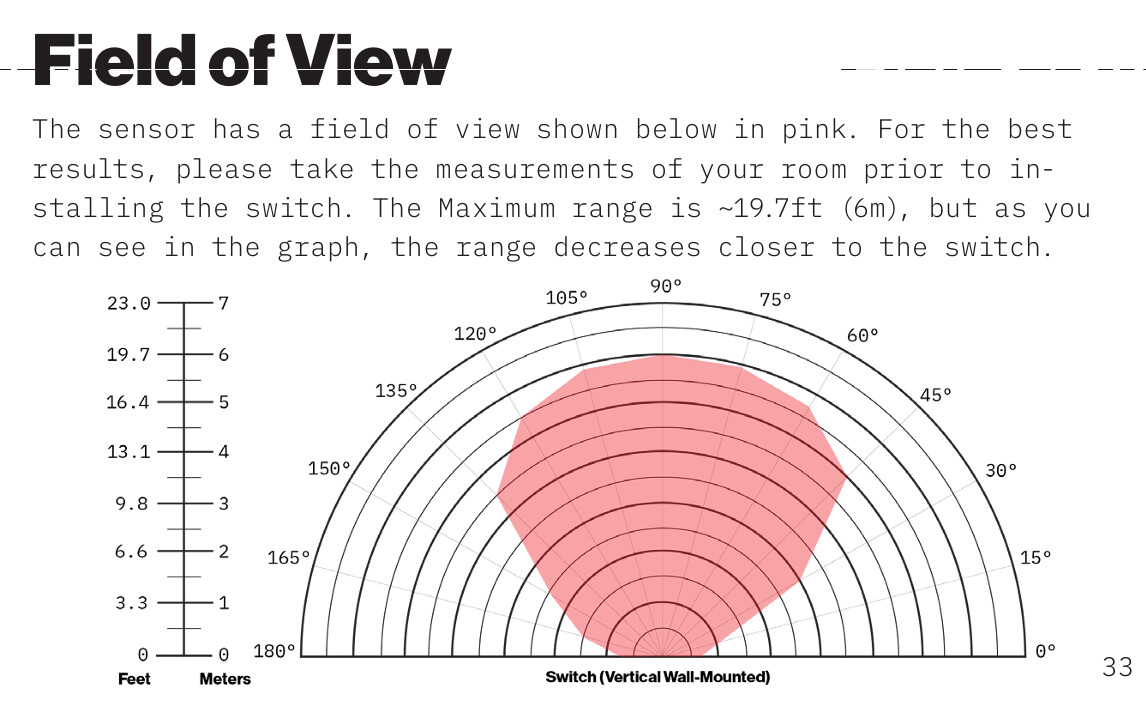
This isn’t really a bug or enhancement, but does anyone know the mmWave sensor field of view (i.e. the angle the sensor can see)? I’ve got a bunch of these installed now, and I have a couple of rooms with notable dead spots that I’m pretty sure are caused by the field of view. One of them is expected, as it’s in the corner on the same wall where the switch is installed (I’m sure the sensor does not have 180 degree field of view). But the other is disappointing, as it’s about 8 feet down the wall but also about five feet out. And I was really expecting the sensor to have a wide enough field of view to see that spot. For now I’m augmenting with other mmWave sensors I already have laying around (Everything Presence units) to cover the whole space, but I was hoping to avoid that.
I believe I read in the past that it’s 120°.
I am also having this issue. Also the range seems off. When the depth is set to the max (600) and I am sitting within that range, I can’t even get it to detect by waving my hands a lot. Is there an update or something I can do to make it detect micro movements or larger movements within the range?