The quirk definitions in the Inovelli fork of zigpy/zha-device-handlers are here:
https://github.com/InovelliUSA/zha-device-handlers/tree/dev/zhaquirks/inovelli
@chrisdfw If you would like to make a contribution, can you use this branch?
InovelliUSA/zha-device-handlers at inovelli-vzm32-w-entities
@nirmalspeed that is strange and not what I would expect. Before setting any settings (so after a factory reset and then maybe put it in smart bulb mode) does it still lose you? Resetting the settings would rule out anything that I can think of that would cause this. The default settings have a large detection footprint, high sensitivity, etc. My office switch is about 6 feet away and I am 10 to 15 degrees to the right as well. It keeps track of me all day long . . . even if I “stop moving” after eating a heavy lunch LOL.
These are my settings:
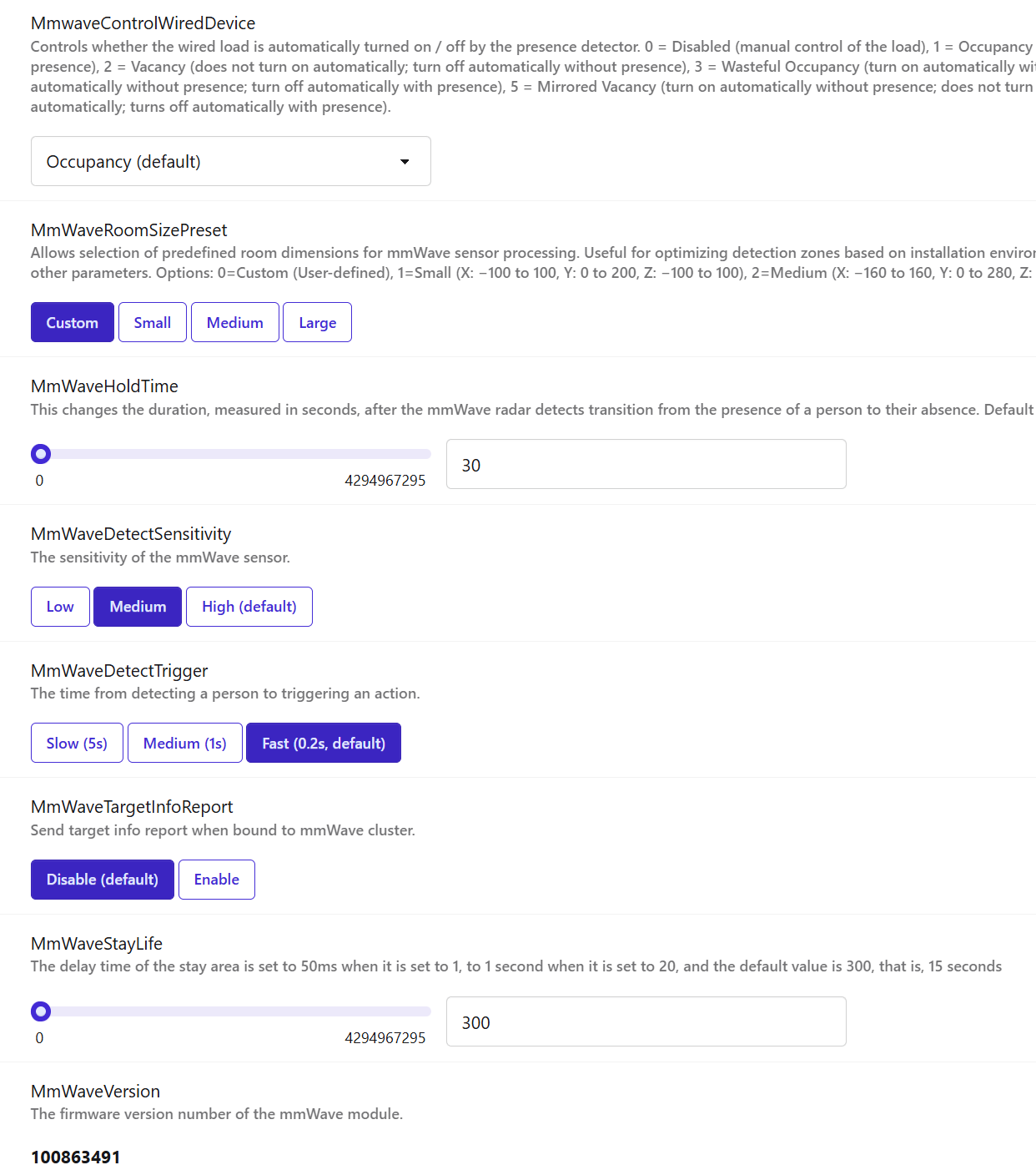
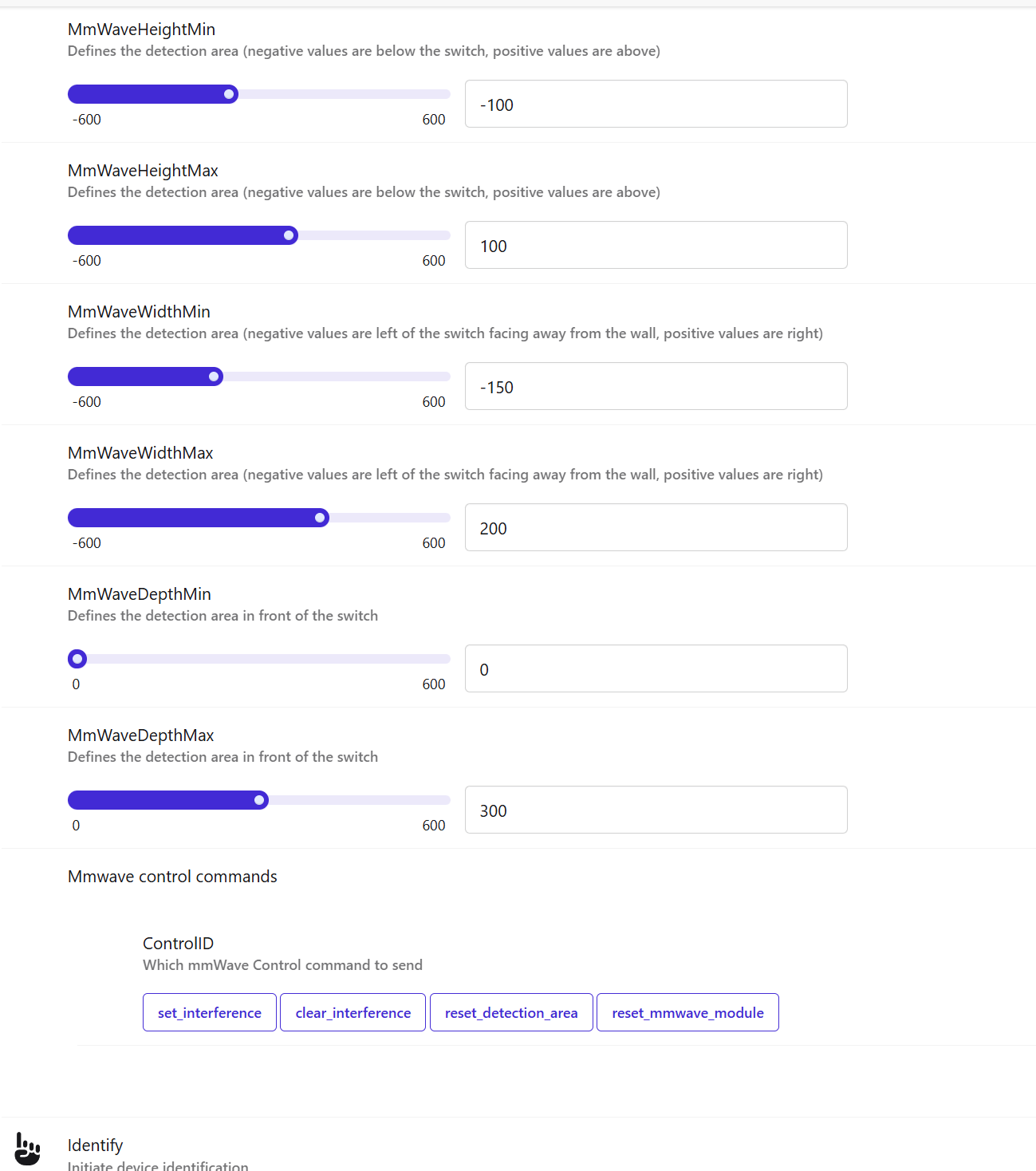
@ccutrer Thanks for the feedback and support. @Bry referred you to a post about multiple switches in the same area. I haven’t noticed any interference.
The “Target Info Report” is as you are thinking. Here is some more info on it if you would like to investigate. It would be cool to see someone build some kind of interface to interact with this cluster:
Blue Series mmWave Presence Dimmer Switch • Advanced mmWave Configuration | Inovelli Help Center
As you suspect, there is a limitation with this and the Zigbee protocol. In tracking a target, the switch will send a report every second (when target info is enabled). This probably isn’t an issue with one switch, but if you turned it on for all of them . . . that could get crazy.
Hello,
I believe I understand what is going on with the unexpected brightness settings. If you have ramp enabled and Persence control of the light (P110 not disabled) the lights will get stuck at a seemingly random brightness if they are in the process of ramping down due to no occupancy and somebody triggers occupancy which then triggers the lights to turn back on.
They do not ramp from the brightness they were at when triggered, rather the LED bar and lights get stuck at that seemingly random brightness.
@EricM_Inovelli Is this expected behavior that requires disabling the on/off ramp to stop? I’ve been using the default, 2.5s and my family quite likes the effect. We have hue recessed lights so nearly all of the lights are suspectable to this. I’ve seen it happen with non-smart lights as well.
Thanks!
OMG THIS IS AMAZING!!!
I’ve got a WIP for zigbee-herdsmen-converters that allows me to control all of these advanced details via MQTT (not exposed to the UI directly, since I didn’t want to further clutter things up).
A few notes where the documentation does not match reality (or at least is unclear):
- The ID field for Report Target Info is an (unsigned?) int8, not an int16
- For Report Interference/Detection/Stay Area, there is a (unsigned?) int8 field at the beginning that always seems to be 4. I presume it’s the number of available areas. Also, given the ellipsis in the docs, it’s not clear if the message is variable length or fixed length (it seems to be fixed length, always containing all four areas).
- Anyone In The Reporting Area seems to always be sent as long as the controller is bound to the mmWave cluster, even if Target Info Reports are disabled. This is fantastic news, because it means multi-zone already works on the current firmware, without overwhelming my network!!! It sends this report when any of the detection area occupancy statuses change.
- If you have multiple detection areas configured, the “top level” regular Occupancy attribute will be “occupied” if any of the individual areas are occupied. So don’t be using that one if you have multiple areas configured!
- When I fetch the Stay Areas from the switch, they’re all 0x0 for both X and Y (the same as the detection areas that aren’t configured). How do Stay Areas interact with Stay Life? It’s hard to “keep still”, so I couldn’t tell if Stay Life only does something within Stay Areas.
I had started working on the Z2M converter changes for the advanced parameters a few months ago (and then life got in the way). Glad to see you’ve had some momentum on it.
I’ll start a chat with you to discuss how best to display and expose the parameters so we can avoid cluttering this thread.
After living with motion lighting via Jasco switches I came up with a couple strategies to make motion lighting in residential work ‘well’ or at least well enough to keep the WAF at acceptable levels.
I think it would make these switches more beginner friendly if some of these ideas were built in.
- The motion lighting behavior should be controllable from the switch.
- Provide some form of visual indication as to what the current mode is.
Today what this means is binding button patterns to motion behavior. A carry over from the Jasco days I’ve always had an inovelli switch next to the motion switch which used the following button pattern.
Double tap up: Auto On, Auto Off (Green for this mode)
Double tap down: Manual On, Auto Off ( Red for this mode, as this is the 'let me sleep mode)
Triple tap up: Full Manual (Blue for this mode)
The particulars of the button patterns and colors don’t really matter, but for a “Simple” setup where one has just one of these switches in a room some built in “beginner mode” would be neat.
Just wanted to call out that I have installed several of these switches and a few of them have had weak black screws that I have stripped out such that they do not tighten anymore. This is with 14G wire and normal hand snugging of the screws. Luckily the switches are easy to disassemble so I was able to steal gold or black screws from the switches I am removing to take their places, but wanted to make others aware to be very careful.
There have been a number of reports re this. Anyone that has a screw stripping issue should email [email protected] for replacements.
Luckily the screws are a standard size and I have the tools required to swap them out so it wasn’t a big deal. I got them installed fine by supplying my own replacement screws. But good to keep in mind!
@manofoz Ah, I see what you are describing. As the dimmer turns off, it goes from the current level down to off using the “ramp rate on to off local” parameter. If you turn the light back on (with a physical press or with presence) during this process then previous level = the level at which the event occurs. So, if I leave the room for a bit and come back into the room while the light is in the process of turning off, its new level will be that level it was at during its “ramp off” process.
This scenario doesn’t happen to me very often so I think I have only seen it a couple times. A workaround could be:
Set “ramp rate on to off local” to 1 or 0 to reduce the chance of this happening
Increase the presence time out to also reduce the chance of this happening
Set the “default level local” to a static level that it will always return to
From a firmware perspective I will talk to the programmer and see what he thinks. If anyone else thinks of some workarounds let me know.
@ccutrer Glad you have been able to tinker with some of the advanced features. I’ll update the site with what you found. You should share if you come up with a cool way to use the extra features. 
For that last question I will run it by the engineer to see how he would describe it.
What I have been doing is moving the traveler screw when this happens as most of the time I don’t need a traveler.
@EricM_Inovelli is there any info on a fix for this? I’m not sure if it’s just Smartthings that is affected, but I do have a specific use case for this where I want the notification on all the time.
Recap - when switch is in dimmer mode and any other mode besides “Do not display load level” is selected for “parameter 17” the light becomes unresponsive.
My p17 is set to “display load level with timeout” and my switch functions perfectly. I would factory reset the switch to see if the behavior returns. That should be the default so test it before you start tweaking other settings.
I’ve done this multiple times until I figured out what setting was doing it, it also functions the same way on other switches, I really only have the need for this option on 1 switch. Are you using Smartthings?
Yes, I am on ST.
If your factory reset the switch and do not change settings with the exception of maybe the switch type, is the switch responsive?
The default setting is not the “other than” setting you described, so I think you need to start with a freshly reset dimmer that is working and then document the change you make that causes the switch to become unresponsive. That will make it a little bit better for Eric M diagnose.
Is there a way to bind multiple Zigbee mmwave sensors to the switch? I have a largish room with a switch at the entrance, but my desk is on the same wall as the switch. Due to the angle, this places me at nearly 90 degrees to the switch, and makes it difficult for the switch to detect me, so the lights constantly turn off. I have a mmwave sensor on the opposite wall that has no problem seeing me. Currently, I have some logic in HA to combine the state of the two sensors into one history stat sensor so it is a bit more accurate. But for these kind of features, I would like that to persist, even if my hub is down. In order to do this, is it possible to bind zwave state of an external sensor to the mmwave sense logic of the switch? Eg, can we treat external sensors as an extension of the switch without a hub? (similar to how bindings work for light bulbs or mult-way configs)
I think @brassardv described it well in his initial post, I confirmed I was seeing the same issue, which is just related to changing parameter 17 even from a factory reset. To clarify unresponsive, the light (Load) just stays off.
No, this is not currently possible. Advanced functionality like this can only be done via a hub.
I noticed that switching between leading/trailing edge will not reflect in z2m unless you reinterview the device. Is this a known issue?